
Most advice about content ideas starts in the wrong place. It tells you to brainstorm more, save more prompts, and keep filling the top of the funnel. That sounds productive until your phone contains hundreds of notes, your spreadsheet has half-finished hooks, and you still can't decide what to publish on LinkedIn tomorrow.
The harder problem isn't idea generation. It's idea management. A useful system captures raw sparks quickly, adds enough context to make them usable later, filters weak concepts before they consume writing time, and turns strong ideas into a realistic publishing queue. When your backlog works like a product backlog instead of a creative junk drawer, consistency becomes far easier.
Why Idea Overload Is Your Real Bottleneck
The obsession with endless brainstorming ignores a basic production constraint. A widely cited B2B ideation study found that marketers need an average of 67 content ideas per quarter, while 99% agreed that a steady stream of ideas is essential to marketing success. Yet 39% find idea generation difficult or somewhat difficult, and only 48% say they have enough ideas to fuel their marketing, according to Kapost's content ideas research.
Those figures describe a real tension. Teams need a steady supply of ideas, but they also lose time deciding which ideas deserve attention. A note titled “post about onboarding” might contain a sharp customer insight, a vague opinion, or nothing more than a topic you saw someone else discuss. Treating every note as equally valuable creates decision fatigue.
The same source puts the average blog post at 4–5 hours once ideation, design, and approvals are included. That makes poor organization expensive. If you select the wrong concept, discover halfway through drafting that it doesn't fit your audience, and then repeat the process next week, the calendar becomes a series of avoidable bottlenecks.
Practical rule: Capture freely, but promote ideas selectively.
Replace the creative junk drawer
A raw inbox should be messy by design. It gives you somewhere to put a customer question, an overheard phrase, a strong LinkedIn hook, or a personal observation without interrupting the work you're doing. But the inbox can't also be your editorial calendar, draft folder, performance archive, and idea library.
Use clear states:
- Captured: The thought exists, but it hasn't been evaluated.
- Qualified: You know who it helps and why it matters.
- Drafting: The angle has passed your decision rules.
- Ready: The post needs editing, formatting, or approval.
- Published: The final version and performance notes are stored together.
- Recycle: The idea or post has a proven angle worth developing again.
This simple separation changes the question from “What should I write?” to “Which qualified idea is the best fit for this publishing slot?” You won't eliminate uncertainty, but you will stop reopening the entire backlog every time you need a post.
Building a Frictionless Capture Workflow
A capture system fails when it asks you to organize an idea before you've recorded it. Inspiration arrives while you're reading a newsletter, listening to a sales call, scrolling LinkedIn, or walking between meetings. If saving it requires opening a project, choosing a folder, and writing a complete brief, you'll lose the useful part before the form loads.

Use one inbox and a short capture format
Pick one central inbox. It could be a Notion database, Microsoft Loop page, Airtable table, Google Sheet, or a task manager that you already check. The tool matters less than having one reliable destination. Phone notes can work for speed, but move them into the central inbox during a regular review so they don't become a second hidden backlog.
Record four things:
- The raw idea: Write the thought in plain language, such as “Why senior marketers should show failed experiments.”
- The source: Note whether it came from a client call, customer objection, newsletter, post, book, or personal experience.
- The trigger: Explain what caught your attention. Maybe the post was confidently wrong, or a client kept asking the same question.
- The possible audience: Add a quick label such as founders, sales leaders, recruiters, or freelance writers.
Don't draft the post at capture time. A raw idea and a polished draft need different environments. The inbox protects speed and curiosity, while the writing workspace protects focus. For a broader view of how different tools handle tasks and workflows, you can compare project management with Tintd before choosing your setup.
A useful content system also needs a clear handoff from capture to drafting. Keep the process lightweight, but document the stages, ownership, and review points in a content creation workflow so an idea doesn't disappear between a note and the calendar.
Add context before the idea goes cold
A week later, “post about pricing objections” won't tell you why the idea felt important. Add one sentence that preserves the tension: “Prospects aren't rejecting price, they're rejecting uncertainty about implementation.” That sentence gives your future self an angle, not just a subject.
Review the inbox on a fixed rhythm. During review, delete duplicates, merge related sparks, add missing context, and move promising concepts into the backlog. Don't polish everything. The purpose of review is to make decisions, not turn every note into a miniature brief.
Tagging and Clustering Your Content Backlog
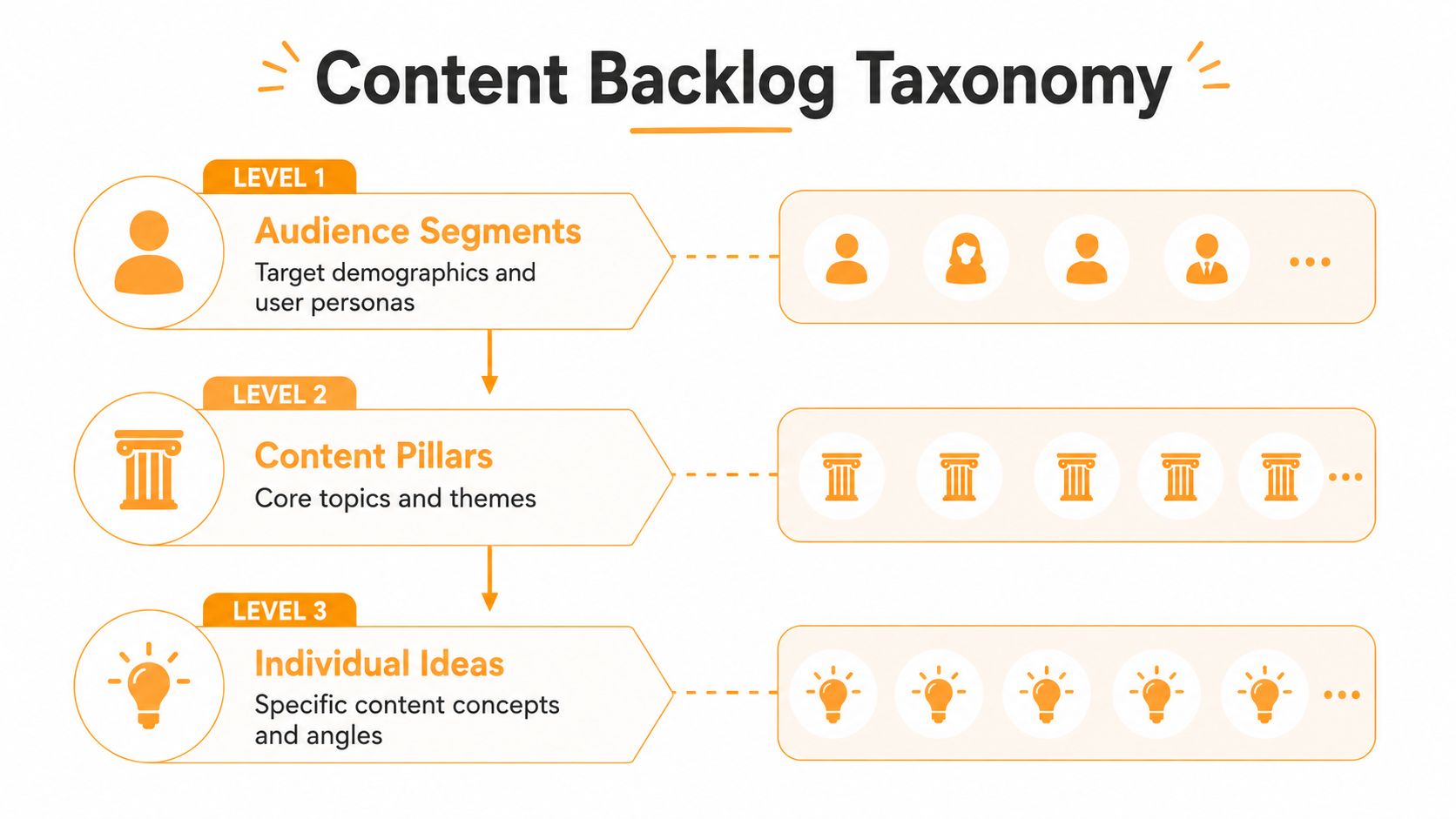
A flat list makes every idea look unrelated. A lightweight taxonomy reveals patterns and helps you build a balanced LinkedIn presence. The most useful structure has three levels: audience, pillar, and individual idea.
Start with the person, not the format
Audience tags should describe the person whose problem you're addressing. “LinkedIn post” isn't an audience, and “carousel” isn't a business purpose. Use labels such as:
- Startup founders: Need practical decisions under uncertainty.
- Marketing leaders: Need systems, measurement, and team alignment.
- Sales professionals: Need better conversations and credible expertise.
- Independent consultants: Need authority without sounding like a constant pitch.
Then add a buyer-journey tag. A post might be designed to create awareness, teach a method, answer an objection, support evaluation, or deepen trust after someone knows your work. This prevents a common imbalance, where a personal brand publishes thought leadership repeatedly but rarely explains how its expertise helps people make decisions.
Build pillars that can support series
Content pillars should be broad enough to generate multiple angles but narrow enough to signal what you know. A consultant might use strategy, client delivery, career lessons, and behind-the-scenes systems. A founder might use product decisions, customer research, leadership, and market education.
Each idea should have one primary pillar and, if useful, a secondary tag. Avoid adding every possible label. Too many tags create the appearance of order without helping you retrieve anything.
Clusters are where the backlog becomes productive. Group ideas that answer different questions about the same theme. For example, a cluster called “content measurement” could contain a beginner explanation, a mistake to avoid, a personal lesson, a practical framework, and a response to a common objection. One strong cluster can become a series, a carousel, a newsletter, and a sales enablement asset without repeating the same post.
A practical workflow recommended by content guidance is to explore first, then cluster by theme, audience, buyer stage, business goal, and expected impact. Before committing to a cluster, check keyword demand, competing content, social conversations, industry publications, real SERP results, and input from sales or product teams through this content organization guidance.
Scoring Ideas to Prioritize What Actually Matters
Prioritization is where most content systems become either too vague or too complicated. A long scoring model with obscure weights looks rigorous, but it slows down decisions. A simple three-point scale is usually enough to compare ideas consistently.
Score each concept against relevance, timeliness, voice alignment, audience signal, business value, and effort. High relevance and strong voice alignment can move an idea forward even when it isn't timely. High effort should slow an idea down unless the expected value justifies the investment.
Use a decision matrix
| Criteria | High Score (3) | Low Score (1) |
|---|---|---|
| Relevance | Solves a current problem for a defined audience | Connects loosely to your general topic |
| Timeliness | Responds to a live conversation, change, or customer question | Could be published at any time without losing value |
| Voice alignment | Uses your experience, point of view, or distinctive method | Sounds interchangeable with another creator |
| Audience signal | Comes from repeated questions, objections, or meaningful discussion | Exists mainly because it seems like a popular topic |
| Business value | Builds trust around an offer, capability, or strategic priority | Has no clear relationship to your professional direction |
| Effort | Can be produced with evidence and examples already available | Requires extensive research, interviews, or approvals |
Don't mistake a high total for an automatic green light. An idea that scores well but requires a full research project may not belong in tomorrow's slot. Add a separate effort check, then choose based on the trade-off between impact and production capacity.
Pressure-test before drafting
Ask three questions:
- Can I make this specific? Replace “how to improve marketing” with a defined situation, decision, or mistake.
- Can I prove the point? Look for a personal observation, customer pattern, documented process, or credible source.
- Would my audience recognize the problem? If not, the idea may need a sharper hook or a narrower segment.
A strong backlog also records the reason an idea was selected. That note helps you review performance later without relying on memory. For measurement principles and useful ways to connect content activity to outcomes, use this guide on how to measure content performance.
The scoring model shouldn't replace judgment. It should make judgment visible, repeatable, and faster.
Integrating AI Tools Into Your Drafting Process
AI works best after the editorial decision has already been made. If you ask a tool to generate ideas from an unfiltered topic, you'll usually receive more generic possibilities and add them to the same backlog you're struggling to manage. If you provide a qualified idea, audience, angle, evidence, and voice notes, AI can reduce the distance between a useful concept and a workable first draft.
That distinction matters because 65% of content teams identified research and ideation as their most time-consuming stage, while 40% named outlining and first drafts as a major bottleneck in a 2025 survey of content teams from AirOps. The efficient response isn't to remove human judgment. It's to reserve human judgment for selecting the idea, defining the point, and approving the final message.

Give the tool a structured brief
A useful AI brief can be short:
- Audience: Who should care?
- Situation: What problem or decision are they facing?
- Point of view: What do you believe that generic advice misses?
- Evidence: Which experience, example, or source supports the point?
- Format: Text post, carousel outline, comment, newsletter section, or video script.
- Voice constraint: Direct, conversational, technical, skeptical, or reflective.
- Do-not-use list: Claims, phrases, jokes, or promises that don't fit your brand.
Ask for several angles rather than one “perfect” draft. One version may lead with a mistake, another with a customer question, and another with a contrarian observation. You choose the direction because you understand the audience and the consequences of getting the message wrong.
Adobe's 2025 research surveyed 3,400 respondents about AI and digital trends in content creation and management, showing why AI-assisted production now belongs in the workflow conversation, not in a separate experimental corner. The tool should still work from your own notes, examples, and posting history. Without those inputs, it can produce fluent copy that lacks earned perspective.
Watch this short demonstration to see how an AI-assisted drafting workflow can fit between an organized idea and a publishable post:
Keep the human review gate
Review the draft for factual accuracy, personal specificity, tone, and intent. Delete polished sentences that don't sound like you. Add the detail only you could know, such as the awkward customer conversation, the failed experiment, or the decision you nearly made.
AI can also create variations from one approved idea, but don't publish every variation. Keep the strongest version, save alternative hooks in the idea record, and mark which angle you used. That prevents accidental duplication when the same theme returns to your calendar.
For a practical explanation of how AI fits into content production rather than replacing the editorial process, read about what AI content creation involves.
Scheduling and Recycling Your Top Performers
A backlog becomes valuable when it makes the calendar easier to fill. Don't schedule ideas just because they scored well. Match them to your available energy, current business priorities, audience expectations, and the amount of time you can give the draft. A thoughtful post that arrives consistently is more useful than an ambitious calendar you abandon after the first busy week.
Consider a consultant with a backlog cluster about failed client onboarding. The first post explains the hidden cost of unclear ownership. After publishing, the consultant reviews the responses and notices that readers ask how to diagnose the problem before a project starts. The next post addresses that question with a checklist. A later version shares the conversation that exposed the issue, and another turns the checklist into a short carousel.
That isn't copying. It's developing one validated theme through different entry points. Each version serves a different reader need while preserving the central expertise. Store the original post, audience response, hook, format, and lesson in the same content record so future recycling starts with evidence rather than memory.
Create refresh rules
Use clear rules for deciding when a published idea deserves another life:
- New evidence: Update the point with a recent customer observation, market change, or internal lesson.
- New audience: Adapt the explanation for founders, managers, recruiters, or another relevant segment.
- New format: Turn a text post into a framework, question, short video outline, or carousel.
- New objection: Respond to a concern that appeared in comments or sales conversations.
- New personal context: Add what happened after you tested the original advice.
Don't recycle a post by swapping a few words and changing the first line. That creates repetition without adding value. Preserve the core insight only when the new version gives the reader a different reason to care.
Your calendar should also include space for timely ideas. Keep some capacity open for a customer question, an industry development, or a conversation that matters now. A rigid schedule protects consistency but can make a personal brand feel disconnected from real work.
If you need a more detailed way to turn one approved idea into multiple assets, this Rooy Development repurposing workflow offers a useful reference for thinking about reuse without treating every output as a duplicate.
Review the backlog regularly. Archive ideas that no longer fit, merge duplicates, promote themes that keep producing useful questions, and lower the priority of concepts that sounded good but never became specific. A content system stays healthy because someone curates it, not because it grows forever.
RedactAI helps professionals turn organized notes and niche-specific ideas into LinkedIn drafts, variations, scheduling plans, and recycled posts while using profile and posting-history signals to support a consistent voice. Visit RedactAI to start building a cleaner idea-to-publishing workflow instead of adding another pile of unused prompts.































































































































































































