
Start with Tuesday through Thursday, roughly 10 a.m. to 1 p.m. and 3 to 4 p.m., in your audience's local time. The exact hour varies by study, so treat these as testing windows, not guaranteed appointment times.
The most useful surprise is how strong early mornings can be: SocialBee's 2026 analysis of 494,774 LinkedIn posts found that more than 46% received their most interaction when published between 7 and 9 a.m. That's a good reason not to build your entire strategy around somebody else's lunchtime chart.
Your job isn't to discover a magic minute. It's to find a repeatable window that reaches the right professionals and produces the response you want.
Best LinkedIn Post Times at a Glance
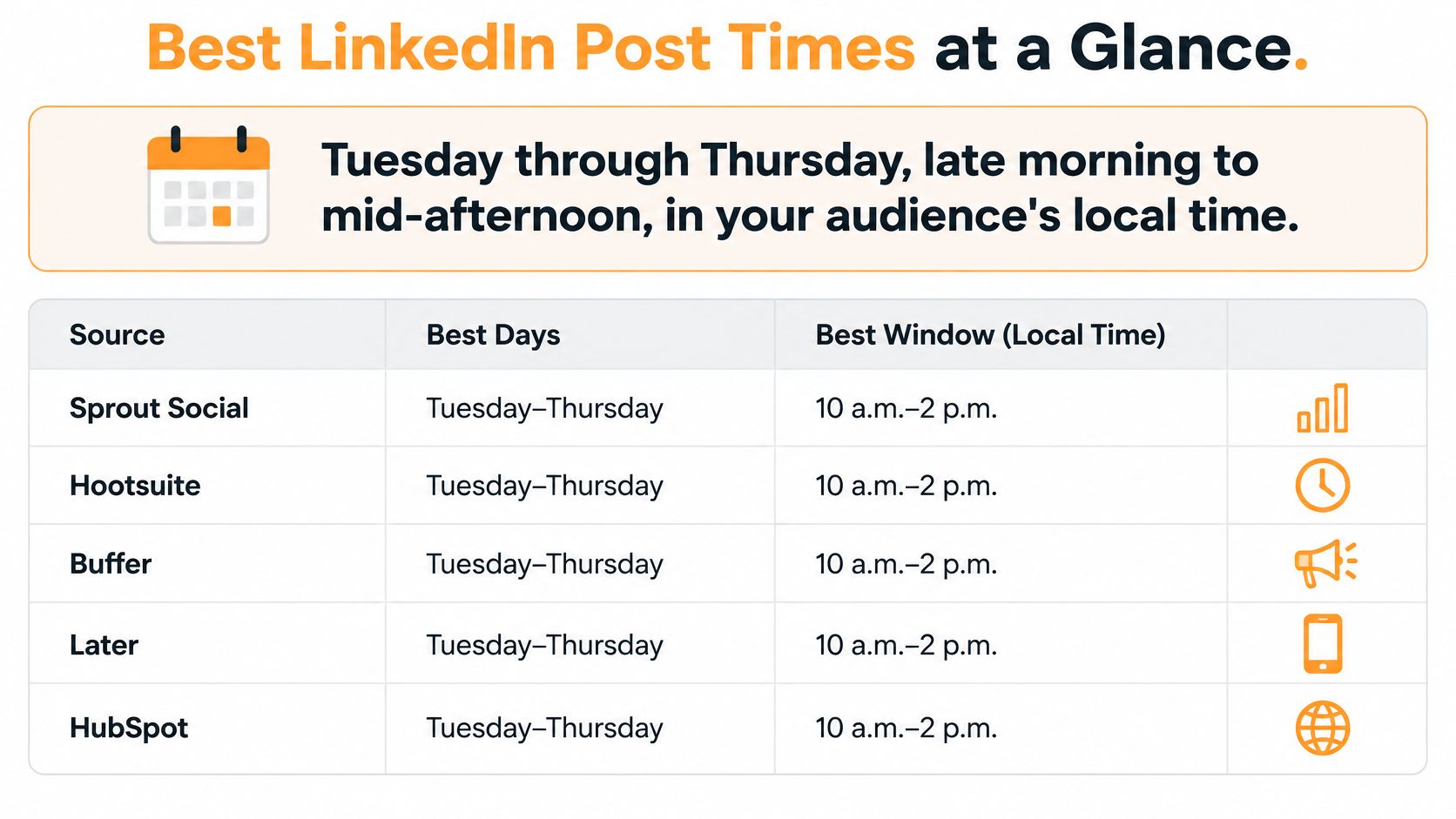
Tuesday through Thursday, late morning to mid-afternoon, is the sensible starting range. Schedule against the audience's working day, not wherever your laptop happens to be.
The strongest broad evidence comes from Sprout Social's 2026 analysis, which examined approximately 2 billion engagements across 307,000 social profiles and identified Tuesday from 11 a.m. to 5 p.m. as LinkedIn's strongest overall window. Its other high-engagement periods included Wednesday from 11 a.m. to 4 p.m. and Thursday from 1 p.m. to 5 p.m.
Strongest LinkedIn posting windows by study
These benchmarks answer slightly different questions. Read the notable detail before choosing a slot.
| Source and sample | Strongest day | Top window | Notable detail |
|---|---|---|---|
| Sprout Social 2026, approximately 2 billion engagements across 307,000 social profiles | Tuesday | 11 a.m. to 5 p.m. | Broad afternoon opportunity, not just a lunchtime peak |
| Buffer, nearly 5 million LinkedIn posts | Wednesday | Wednesday at 4 p.m.; Friday at 3 and 4 p.m. | Thursday and Friday followed closely behind Wednesday |
| LinkedIn marketing guidance | Tuesday through Thursday | Mid-morning and lunchtime | A practical working-day baseline rather than an account-specific prediction |
| SocialBee's post analysis | Day-level winner not specified in the cited finding | Early morning | Useful as a challenger to midday scheduling |
| Adobe's 2025 survey and performance analysis | Friday for average likes, comments, and shares | 6 to 9 a.m. for the most likes on average | Monday, 9 a.m. to noon, was the most popular self-reported publishing window, not the performance winner |
The visual below offers a simplified scheduling overview. Use the source-specific table above when choosing an experiment, because the studies don't support identical recommendations.
Don't write off Monday or Friday. Make them secondary experiments unless your account already gives you a reason to prioritize them.
For an account without a dependable pattern, I'd start inside Tuesday's late-morning-to-lunch window. Use Scheduler.social's guide to test your LinkedIn posting schedule as a practical companion, then let account-level results replace the generic recommendation.
Why Studies Disagree on the Best Time
One analysis favors late afternoon, while familiar advice points to early morning. Both can be useful benchmarks, but neither sets a universal LinkedIn rule. Treat the “best time” as a moving target shaped by who posts, who reads, and what counts as success.
Buffer's analysis of nearly 5 million LinkedIn posts identified Wednesday as the strongest day and highlighted Wednesday at 4 p.m., Friday at 4 p.m., and Friday at 3 p.m. among its leading slots. That recommendation differs from the common advice to publish before the working day gets busy. The gap is a reason to test a window, not copy a chart without checking your own audience.
Timing studies can measure different accounts, countries, industries, publishing tools, and engagement outcomes. Those choices change which days and hours appear strongest.
Popularity isn't performance
A busy publishing period shows when creators choose to post. It does not prove that readers respond best then.
Adobe separates a popular publishing window from its performance winners. Keep that distinction clear: a crowded calendar slot does not automatically deserve your strongest post.
The same applies to your account. A post may earn plenty of likes without starting useful conversations. Another may draw fewer visible reactions but bring the right people to your profile. Compare results against the outcome you want, not a single engagement total.
Choose the outcome before choosing the hour. Otherwise, it's easy to change the definition of success to fit whichever post performed well.
Different goals deserve different winners
A consultant seeking comments from operations directors should favor the window that brings thoughtful questions from those buyers. A slot that earns applause from fellow consultants may look successful while missing the intended audience.
A creator focused on reposts has a different goal. Track when peers encounter content they want to pass along, even if that period does not lead on likes.
For lead generation, record relevant conversations and inquiries alongside engagement. Reactions alone do not establish a commercial winner, and a later inquiry may not come from the most recent post. Build your own posting window by comparing audience response against your goal, then adjust as the pattern changes.
The best time is the one that wins your objective with your audience, not the one that wins someone else's chart.
Matching Post Times to Your Audience's Time Zone
A London creator's morning post can reach a New York follower before their workday begins. The same post arrives at different points in each reader's day.
Schedule by your readers' clocks. Start with follower geography, then prioritize the locations where your target audience is concentrated. More publishing activity cannot fix a mismatch between posting time and audience location.
Local working-hour windows converted to UTC
Use this table as a standard-time conversion guide. For locations that observe daylight saving time, check the offset for the publication date instead of relying on a winter conversion year-round.
| Audience hub | UTC offset in standard time | 10 a.m. local in UTC | 3 p.m. local in UTC |
|---|---|---|---|
| London | UTC+0 | 10:00 | 15:00 |
| New York | UTC-5 | 15:00 | 20:00 |
| Dubai | UTC+4 | 06:00 | 11:00 |
| Singapore | UTC+8 | 02:00 | 07:00 |
| Sydney | UTC+10 | 00:00 | 05:00 |
Set your scheduler to a named location-based time zone when possible. It avoids the upkeep of a fixed UTC offset, particularly when countries change their clocks on different dates.
Choose coverage deliberately
Use these rules to build a practical regional schedule:
- If one region dominates your relevant audience: Post during that region's working day, even if the hour is inconvenient for you.
- If your main markets share working hours: Test a window that overlaps those markets.
- If your markets are far apart: Rotate regional windows or publish localized versions with distinct examples and calls to action.
- If your target buyers are concentrated elsewhere: Prioritize their region over the largest follower group.
The best time is a moving benchmark, not a universal timestamp. A compromise can be easier to maintain, but it will favor some markets over others. Localized versions take more editorial work and give each audience a more relevant chance to respond.
Judge the schedule by more than total impressions. Check which regions generated useful comments and profile actions, then adjust the window to match the audience and outcome you want. A post that reaches many people in the wrong time zone may underperform for your actual goal.
Industry and Seniority Differences That Shift the Window
Say a sales development representative publishes advice for procurement managers in manufacturing. Their morning posts generate practical questions, while lunchtime posts mostly attract colleagues.
Their marketing teammate gets the opposite result: creator peers repost lunchtime observations. Neither person has discovered the universal best time. They've identified different audience routines.
Professional context matters more than a broad industry label. A manufacturing executive, shift supervisor, and recruitment manager can work in the same sector without sharing the same browsing habits.
Questions worth asking by segment
- Executives and founders: Do relevant readers engage before their meeting schedule fills up or after it clears?
- Recruiters: Are you trying to reach candidates during breaks, outside work, or while they're actively job searching?
- Sales and business development: When do buyers contribute useful comments rather than only acknowledge the post?
- Agency owners and consultants: Do your clients share an industry routine, or are you mixing incompatible audiences?
- Creators and ghostwriters: When do peers repost your work rather than merely react?
- HR professionals: Are employees, candidates, or other HR practitioners supplying the engagement?
These questions turn audience segmentation strategies into a scheduling decision instead of an abstract marketing exercise.
Inspect who responded
Open the post's analytics and examine the available viewer demographics, including job title, industry, and location. Availability differs by account and post, so use the fields LinkedIn exposes rather than assuming every viewer can be identified.
Then read the comments. A strong response from the wrong professional group doesn't prove that your buyer-focused window worked.
Keep separate notes for the segments you're targeting. A post aimed at recruiters can underperform among founders without being a bad post, and a founder-heavy audience shouldn't dictate the schedule for candidate-facing content.
Give each important segment its own timing hypothesis. Combine segments only when their results justify it.
How to Test Your Own Posting Window
Use a controlled rotation, not a collection of unrelated posts published whenever you remember. LinkedIn's marketing guidance highlights Tuesday through Thursday, with recurring windows around 10 to 11 a.m. and noon to 1 p.m.
That gives you a defensible starting point. Your experiment should establish whether those recommendations fit your audience and whether an afternoon alternative performs better.
Build a repeatable comparison
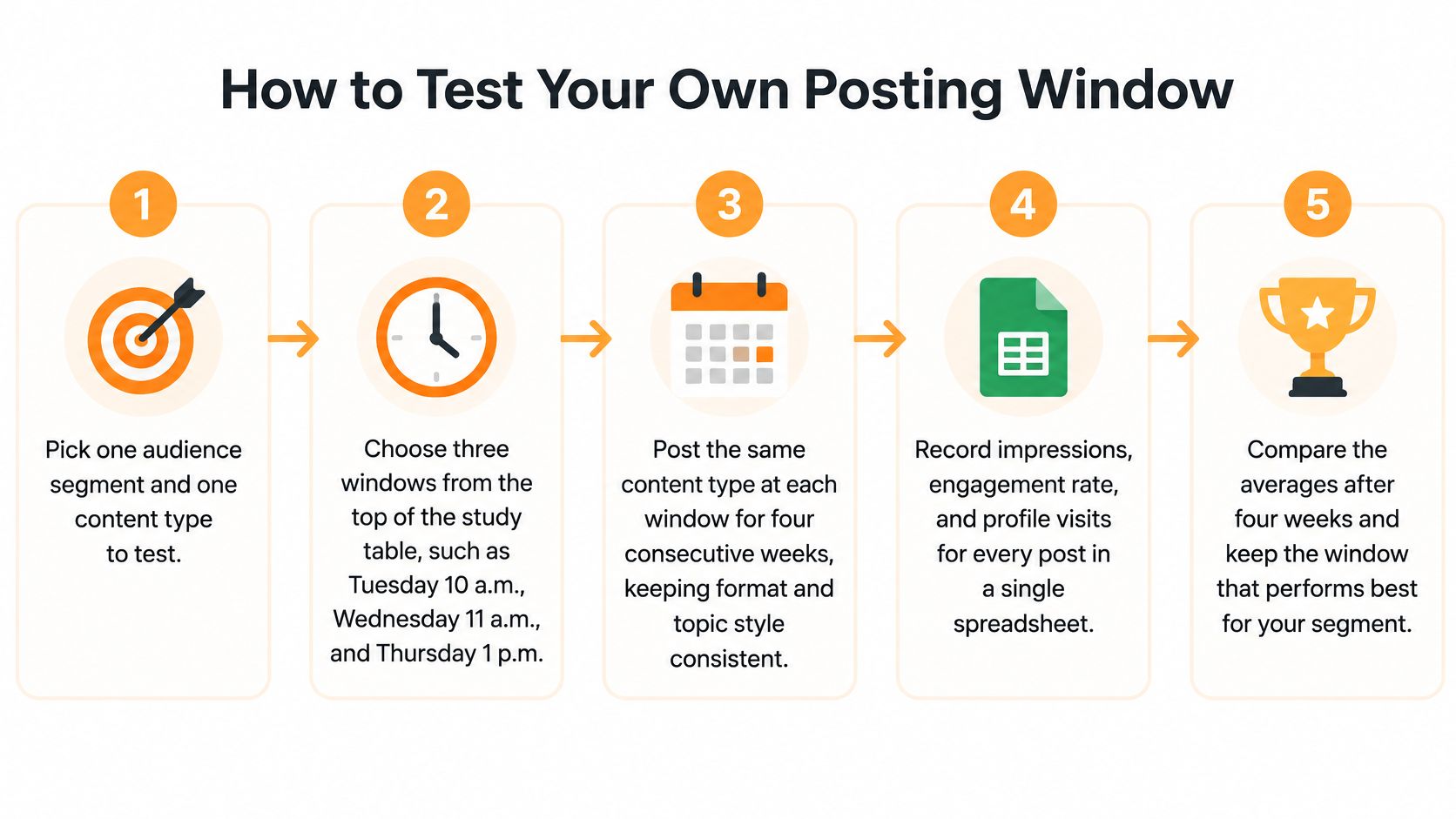
Choose a segment and content type. Test buyer-focused text posts separately from recruitment updates or creator-facing carousels. You need a comparison that means something.
Select distinct windows. Include a mid-morning slot, a lunchtime slot, and an afternoon challenger from the benchmark ranges. If you have no history, start with the mid-morning option in your audience's local time.
Standardize the editorial inputs. Keep topic family, format, hook style, author, and call to action as consistent as practical. Record publication time, target geography, follower count, and anything unusual about the post.
Rotate fairly. Randomize slot assignment where possible instead of always giving your strongest idea to your preferred time. As a practical minimum, collect at least four posts per window before making a provisional decision. That's an operating rule, not a statistical guarantee.
Record comparable outcomes. Capture impressions, unique viewers where available, reactions, comments, reposts, and profile actions. Use the same measurement interval for every post so older publications don't receive an unfair advantage.
Compare rates and consistency. Calculate engagement rate as interactions divided by impressions, using the same interaction definition throughout. Inspect qualified comments separately, and check whether removing the strongest post changes the winner.
Keep, shift, or continue testing. Adopt a clearly stronger window provisionally. If the gap is small or inconsistent, call it a tie and continue collecting comparable posts.
This visual summarizes the workflow. Let the number of comparable posts, rather than the calendar alone, determine when you judge a slot.
Make uncertainty visible
A lucky post can make a weak window look excellent. Don't confuse a topical breakthrough, an influential repost, or an unusually strong story with evidence about publication time.
For larger datasets, use confidence intervals or a bootstrap comparison of post-level outcomes. For small accounts, label conclusions provisional and look for a pattern across posts rather than inventing precision.
Use a LinkedIn analytics guide to keep your metric definitions consistent. Your final log should show the slot, segment, content type, engagement rate, qualified responses, and decision.
For geographically split audiences, run separate regional comparisons. Otherwise, stronger performance in a large market can hide weak coverage elsewhere.
Scheduling Tactics and a Weekly Cadence That Holds Up
Batch the writing and scheduling before the week gets busy. Pick a regular planning session, finish the drafts, and assign publication windows while you can still check the audience and purpose of each post.
The habit is simple: prepare deliberately instead of publishing between meetings.

Choose the simplest workable scheduler
LinkedIn's native scheduling is a sensible option when you manage your own account and need straightforward advance publishing. Check the scheduled queue after saving, particularly when a post includes media.
A third-party tool makes more sense when you need a shared calendar, draft management, or performance review alongside publishing. Evaluate the workflow you'll use day to day, not the size of the feature list.
One automation option is RedactAI: it can generate multiple drafts from keywords, schedule upcoming posts, recycle proven content, and use integrated analytics to inform scheduling decisions. Those functions support the same routine: prepare useful posts, publish consistently, and review outcomes without rebuilding the process every day.
Keep a cadence you can sustain
My default recommendation for a busy professional is a small weekly schedule: an anchor post in the strongest window and a supporting post in a secondary slot. Add more only when you can maintain the editorial standard and respond to readers.
- Anchor post: Publish the idea most relevant to your main audience and business objective.
- Supporting post: Use a practical example, a focused question, or a lighter observation.
- Experiment: When capacity allows, use a challenger window without disrupting the anchor.
A LinkedIn content calendar should record the target segment and purpose beside the publication time. A calendar filled with timestamps but no audience intent won't help you interpret results.
The walkthrough below can support the practical publishing routine.
Don't publish at an identical minute every day merely out of habit. During testing, deliberate variation helps you separate day effects from hour effects; afterward, consistency within a winning window is useful.
Revisit successful material once the context warrants it. Refresh the hook, examples, and takeaway instead of reposting stale wording just to fill the queue.
Lock In Your Posting Window This Week
Choose a starting window that fits your main audience hub and put it in the scheduler. Don't keep researching tiny differences between charts while your drafts remain unpublished.
Set a review date a month out. Keep the rest of the publishing routine steady enough that you can interpret what happened, and extend the test if you haven't accumulated enough comparable posts.
Make the review a decision
Pull post performance and available viewer demographics into the same log. Ask whether the window reached the intended professionals, produced the response you wanted, and repeated that result across comparable posts.
Then choose a clear next move:
- Keep: The window consistently reaches the right audience and supports your objective.
- Shift: A challenger produces more useful responses.
- Split: Different professional groups or regions need separate schedules.
- Continue: The results are too close or too thin to justify a change.
Your scheduling rule: Weekdays first. The audience's clock, not yours. Test before you trust, and judge engagement rate and relevant responses rather than raw likes.
You don't need a permanent answer this week. You need a sensible starting decision and a date when you'll challenge it.
Schedule the first post for your chosen window today, and put the review in your calendar.
Turn that decision into a repeatable workflow with RedactAI, which offers personalized drafts, post scheduling, content recycling, and integrated analytics. Start for free, queue your first test post, and track whether the chosen window reaches the professionals you want to engage.
































































































































































































