You promised yourself three posts a week. Now it's Thursday night, Friday's video still needs captions, and the person who can approve it hasn't replied. The edit wasn't the whole job, but it was the only part you gave a proper slot in the calendar.
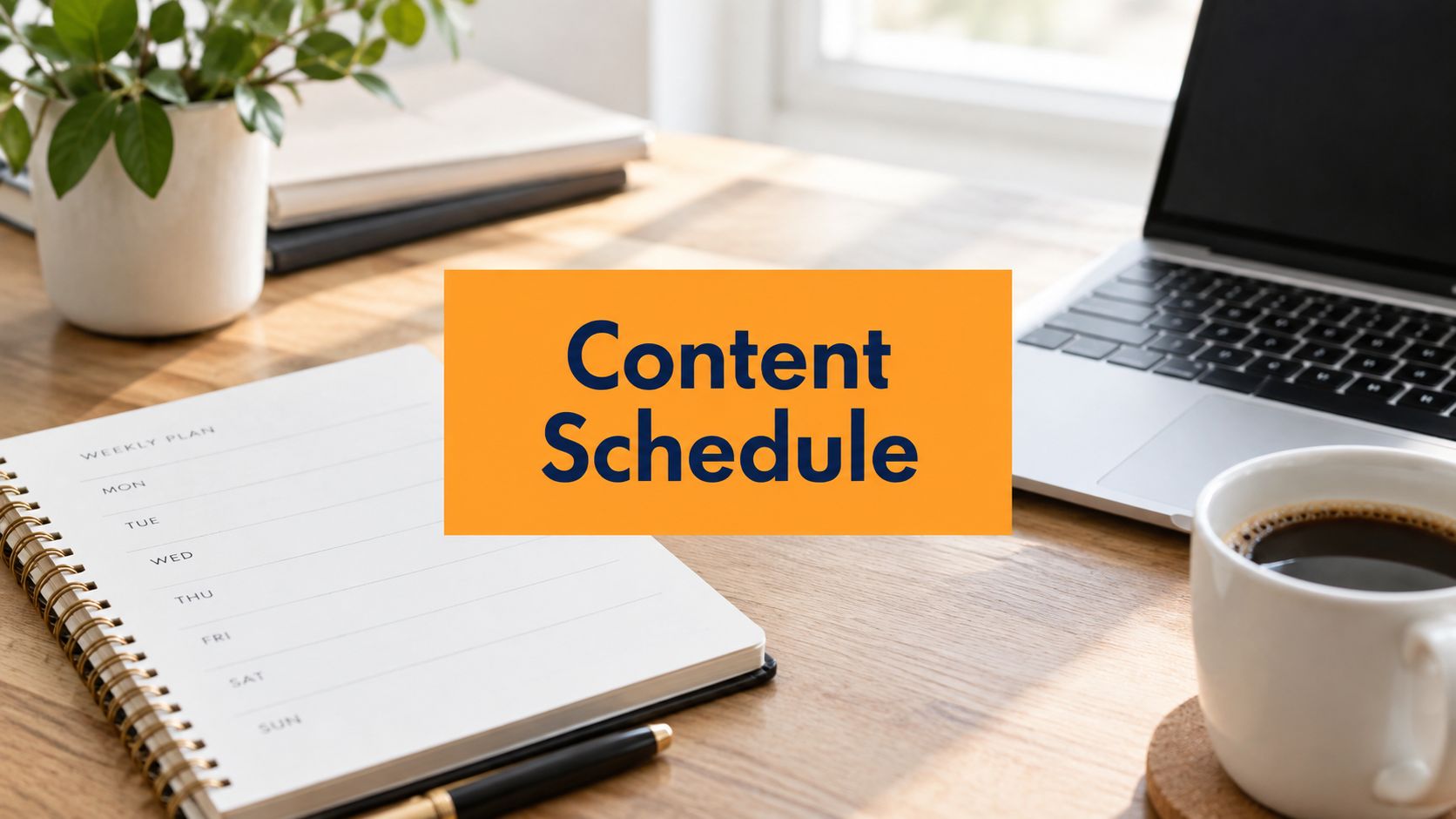
A useful post production schedule template makes the waiting visible, too. It gives feedback, exports, playback checks, and publishing their own deadlines, so you can spot a threatened post before you're exporting it over breakfast.
A Ready-to-Copy Post Production Schedule Template
Start with a spreadsheet, not a complicated production dashboard. Give each post a summary row with its publish date, current status, and next blocker. Underneath, use task rows so the editor and approver can see exactly what they owe.
The example below is a proposed seven-day cycle for a short social video, not an industry turnaround standard. Its time allowances are starting estimates to replace with your own actuals.
Seven-day post production schedule for one social video
| Stage | Task | Owner | Planned Time | Due Day |
|---|---|---|---|---|
| Ingest | Copy footage and back up to a second drive | Editor | 0.5 day | Day 1 |
| Edit | Rough cut and first draft | Editor | 1 day | Day 2 |
| Review 1 | Internal creative feedback | Creative lead | 1 day | Day 3 |
| Finish | Captions, graphics and color fix | Editor | 1 day | Day 4 |
| Approval | Client or stakeholder sign-off | Client contact | 1–2 days | Day 5 |
| Export | Platform versions and playback QC | Editor | 0.5 day | Day 6 |
| Buffer | Absorbs overruns from approval and export | Social manager | Protected remainder of Day 6 | Day 6 |
| Publish | Schedule in tool and confirm live post | Social manager | 0.5 day | Day 7 |
Planned time isn't always hands-on time. The approval allowance is elapsed waiting time; the editor shouldn't be booked as busy throughout it. If the client needs the longer window, send the review copy during finishing, then confirm that any subsequent fixes match the approved request.
Make the buffer honest
Day 6 is the protected pre-publish day, but it also contains export work. That means this compact example has a partial-day contingency reserve, not a full spare working day. If you need a full buffer day, move export earlier or extend the cycle.
Post-production itself isn't a fixed-length block: the California Legislative Analyst's Office industry review describes a period ranging from approximately one week to many months, driven primarily by project length and visual-effects complexity.
Copy the table into Google Sheets or Excel, enter your actual publish date, and replace role names with people's names. Don't leave “client” responsible when several people could assume somebody else is handling it.
How to Build the Schedule Backward From Publish Day
Begin with the delivery requirement, then work toward the edit. Assemble's film post-production workflow template supports backward scheduling, explicit dependencies, approval gates, and parallel work rather than a static calendar.
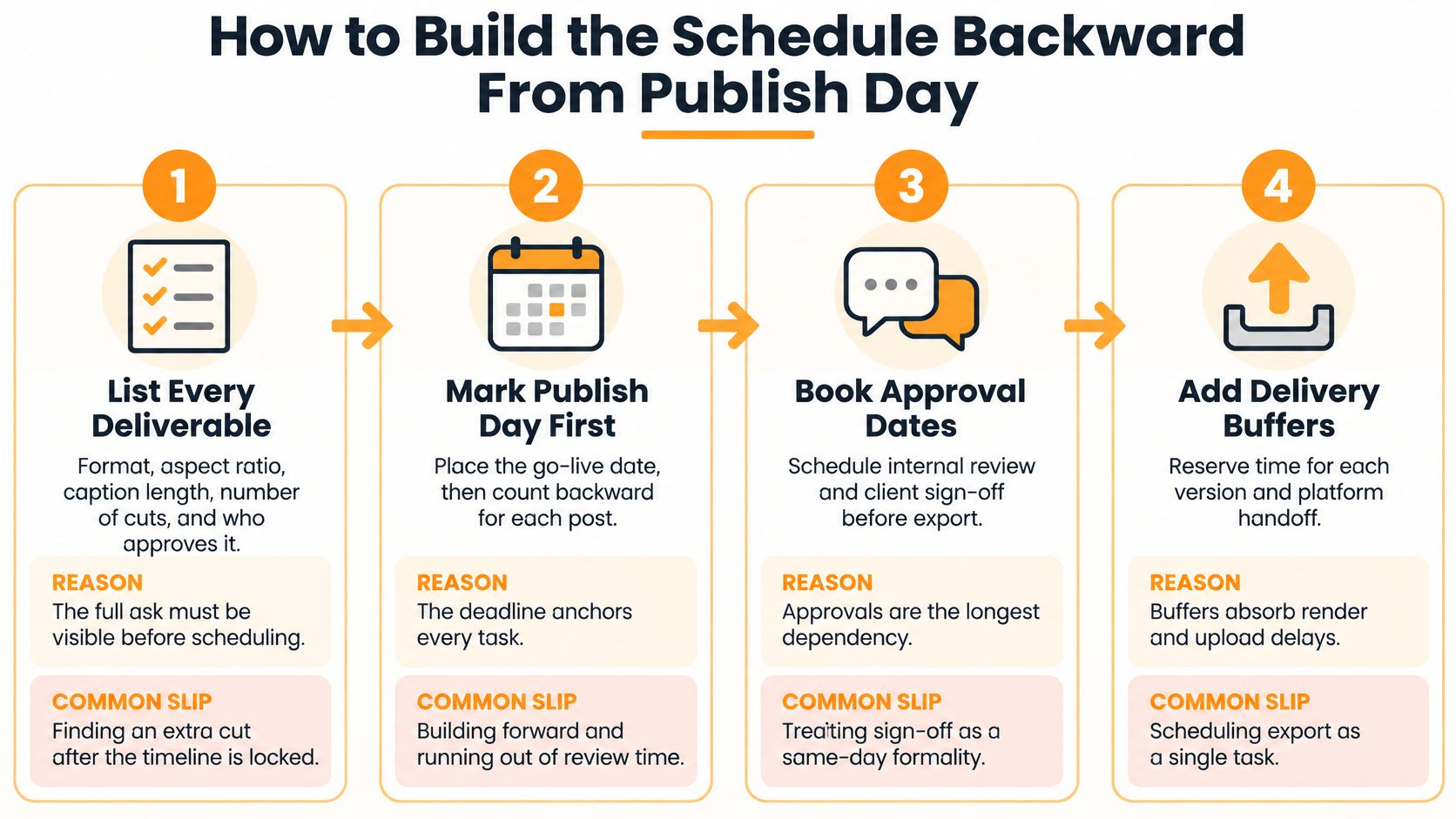
Use this sequence to turn the starter table into a usable week.
List every deliverable. Record format, aspect ratio, caption length, required cuts, and approver before allocating editing time. Forgetting a vertical version until export day changes the work, not just the filename.
Verify the publish date. Check your posting calendar, campaign commitments, and the intended account before typing the deadline. A correctly executed schedule still fails if everybody planned around the wrong launch.
Place delivery before creative work. Reserve export and playback QC before publication, then place sign-off and finishing ahead of those. Building forward from an available editing slot can leave review squeezed against go-live.
Estimate tasks separately. Use hands-on estimates for editing and elapsed windows for reviews, with an explicit contingency reserve. Giving every row the same duration hides the difference between a quick correction and a slow decision.
Assign an owner and a predecessor. Name the person responsible and the task that releases their work. If feedback blocks finishing, the dependency cell should say that rather than leaving the editor to explain it in chat.
Mark the approval gates and picture lock. Confirm the rough-cut direction before polishing, then freeze editorial decisions before final delivery work. A late structural change should reopen affected tasks, not disappear into an unchanged due date.
Check whether the start is possible. If the calculated ingest date has already passed, move publication, reduce scope, or batch fewer posts. Don't solve an impossible calendar by pretending reviews take no time.
The visual below condenses that sequence into the main handoffs.
Keep the handoffs readable
Connect the sheet to your broader content creation workflow, including where briefs, assets, and feedback live. Otherwise, a green status cell can conceal a missing review link.
If assigning work is the sticking point, Jan Kutschera's resource on how to delegate better with ADHD is a useful companion for thinking through clearer delegation.
Practical rule: Someone opening the sheet should be able to identify the next action, its owner, and its deadline without asking you.
Test that by reading the week at a glance. If you need to explain every row out loud, simplify the labels before adding automation.
Approval Windows and Slip Fixes That Protect the Date
Approval waits can break the week even when the editor finishes on time. An available editor can't resolve a disputed claim, choose a client's preferred opening, or authorize publication on someone else's behalf.
Freispace's production scheduling guidance highlights coordination work such as blocked approvals, rework, overdue milestones, and unplanned priority changes. Track those alongside booked editing hours, because an apparently available team can still be stuck waiting for decisions.
For every review, log feedback requested, feedback received, revision rounds, and approval owner. Add blocked time and a reopened-stage flag so you can distinguish slow production from slow authorization.
The windows below are proposed operating rules for this example, not universal service standards. Agree on them with reviewers before relying on them.
Approval windows and what to do when they run long
| Review Type | Planned Window | Escalate When | Schedule Impact |
|---|---|---|---|
| Internal creative review | 24 hours | No feedback after 24 hours | Move publish date by one day |
| Client or stakeholder sign-off | 48 hours | No decision by the agreed deadline | Ping approver and set a fallback slot |
| Caption and accessibility check | 24 hours | Captions still missing on Day 5 | Hold export until fixed |
| Final approval before publish | 12 hours | Any change after the cut is frozen | Reopen dependent rows and log rework |
Make the request easy to answer
Send the review link, the exact version, the decision needed, and the deadline together. Ask the approver to consolidate comments before returning them, rather than feeding conflicting requests to the editor through separate messages.
Name the person authorized to say yes. Other stakeholders can contribute, but somebody needs to resolve disagreement and close the review.
Book a fallback slot while everyone still has calendar space. A clear content approval workflow helps distinguish a reminder, an escalation, and permission to publish. Silence isn't approval unless your agreed process explicitly says otherwise.
A late decision is a schedule event. Record it with the same care as a late edit.
Fix the slips that keep returning
- Late client feedback: Send a fixed deadline with the review request and reserve a fallback slot. If the decision misses both, get agreement on a new publish date instead of promising an invisible recovery.
- Missing backup: Make the second-drive copy during ingest and verify it before clearing or returning source media. Opening a folder isn't proof that every file copied correctly.
- Ambiguous filenames: Use the asset name, version, date, and destination consistently. Keep approved and superseded exports in separate folders so nobody schedules an obsolete cut.
- A moved launch with unchanged tasks: Shift the dependency chain and notify affected owners. Moving only the publish cell leaves everyone following conflicting deadlines.
- Failed exports near publication: Run a representative test export during finishing, before the delivery slot. Record the failure, troubleshooting time, and re-export time separately from creative revisions.
- Over-batching: Stop adding posts when unfinished approvals and exports would consume the contingency reserve. More rough cuts don't help if nobody can finish and release them.
Calculate approval lead time as receipt time minus request time. Compare that actual window with the allowance, then note whether the delay consumed buffer or forced rework.
Backup and naming rules are setup tasks. Approval and export rules need testing on real posts before you can judge whether the allowances fit your team.
Aspect Ratios and Versions for Every Platform
A finished master isn't the same as a delivery-ready campaign. Give each destination its own row, because a crop, caption file, or language variant can remain unfinished after the main edit is approved.
Pretzel Logic Productions' timeline guidance addresses delivery risks including render time, export errors, and technical failures. Treat those as work to schedule, not reasons to hope the upload goes smoothly.
A multi-version workspace makes those differences easier to see.

Use a delivery matrix with platform, intended aspect ratio, codec, caption file, language or cut, owner, and acceptance check. The ratios below are proposed creative choices for this example, not a statement of every platform's supported formats or current limits.
Aspect ratios and export notes by platform
| Platform | Export Note |
|---|---|
| Instagram Reels | Plan a 9:16 version; keep captions clear of the bottom interface area |
| Instagram Feed | Plan a 4:5 crop; a 1:1 cut is another option, but check what the reframing removes |
| TikTok | Plan a 9:16 version; keep key text away from the bottom and right edges |
| LinkedIn video | Plan 1:1 or 16:9; include a captions file where supported and check the square crop |
| YouTube Shorts | Plan a 9:16 version; consider reusing the Reels export only after checking title and length requirements |
| X (Twitter) | Plan 16:9 or 1:1; confirm current upload limits before final export |
For LinkedIn-specific preparation, check the LinkedIn post specifications guide. If the brief includes mobile advertising, Busylike vertical video campaigns offers context for planning a dedicated vertical deliverable rather than treating it as an accidental crop.
Finish the versions together
Edit the master, duplicate approved sequences, and batch the platform versions. Reposition graphics deliberately rather than trusting automatic reframing.
Reserve separate slots for caption correction, re-exports, and a test upload. Check each result on a phone, then mark its matrix row accepted only when the intended destination can use it.
Quality Checks Before Anything Goes Live
Quality control is a production phase, not a quick glance at the export thumbnail. FilmUp's post-production workflow guidance calls for checks covering picture, sync, dialogue intelligibility, loudness, captions, frame rate, resolution, file integrity, and delivery packaging.
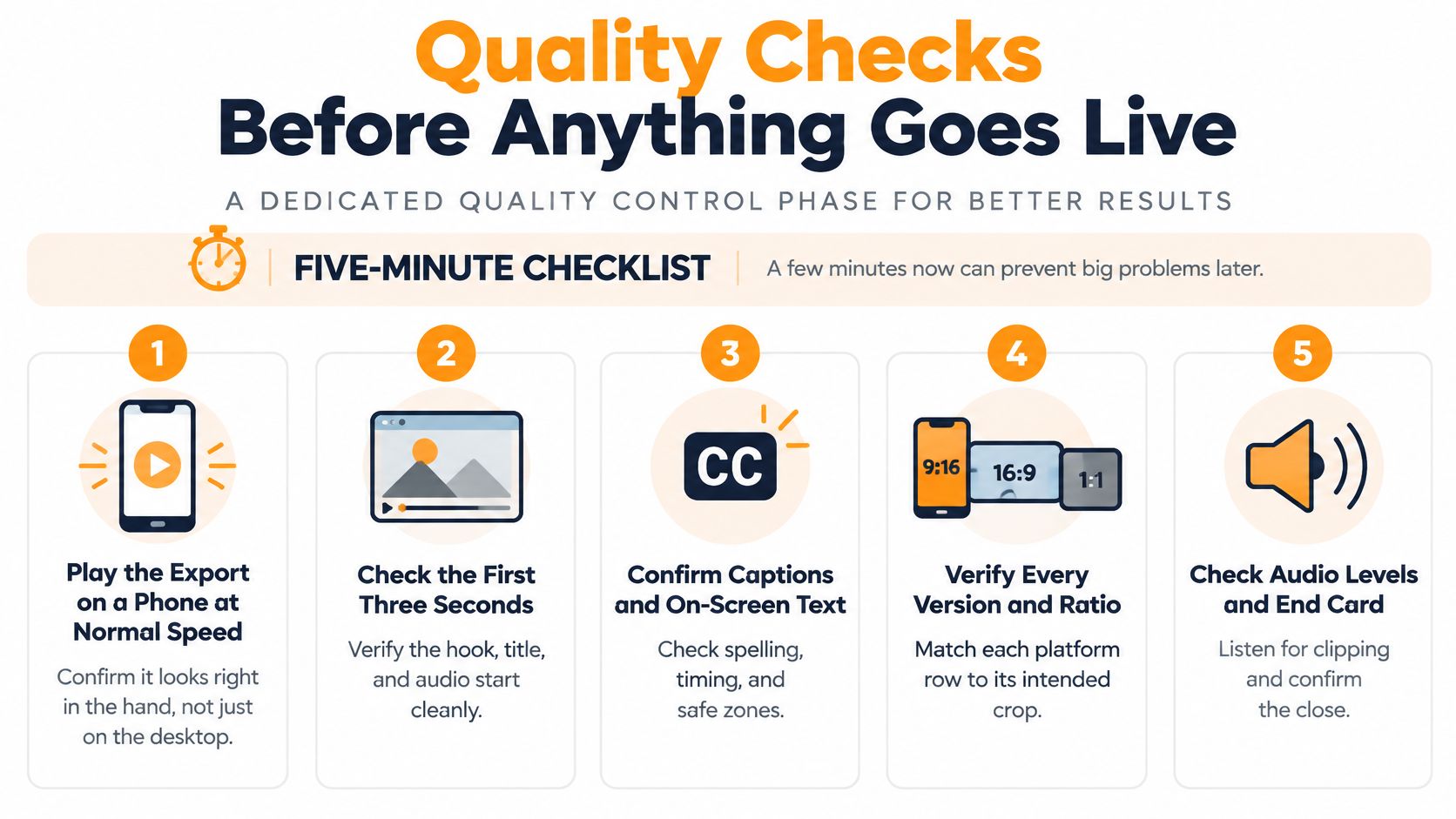
For a short social post, use the following as a quick release checklist. Longer assets and technical problems need more time, so don't mistake a short checklist for permission to rush playback.
Check the file and the actual post
- Play the exported file: Watch on a phone at normal speed, not just inside Premiere Pro or DaVinci Resolve.
- Inspect the opening: Confirm the hook, title, and audio start cleanly, without a stray black frame.
- Read with sound off: Check caption spelling, timing, contrast, and whether the message still makes sense.
- Listen on the phone speaker: Catch clipped speech, distracting music, and an abrupt ending.
- Match the approved version: Verify that the filename and delivery row identify the same cut.
- Inspect the platform crop: Keep faces, product details, and essential text visible in the preview.
- Check publishing details: Confirm the account, caption, links, tags, thumbnail, and intended publication time.
- Verify the handoff: Confirm the scheduled entry exists, then check the live post after publication.
Release check: A successful export proves you created a file. It doesn't prove you published the right post.
Record a pass or fail beside each delivery row, with the checker's name. If you replace a failed file, rerun the relevant checks on the replacement rather than carrying forward the old approval.
Make Friday's schedule review a short working appointment. Move unfinished rows, classify what slipped, and adjust the next cycle's estimates from actual completion times. Keep approval delays separate from technical failures so you fix the right problem.
Set Up Your Schedule This Week
Choose an upcoming post with a real deadline and a manageable brief. Don't begin by migrating your entire content operation into a new spreadsheet. A single live asset will expose missing fields more clearly than a beautifully formatted empty dashboard.
Create tabs for the post overview, task schedule, and delivery matrix. Keep the overview suitable for a quick status check, while the task schedule holds review links, dependencies, actual times, and change notes.
Run a practical setup check
- Confirm the release commitment. Match the intended publish date to your posting calendar and check that the people involved are available. A holiday or absent approver changes the plan before editing starts.
- Fill the working rows. Enter named owners, planned durations, due dates, and the condition that counts as finished. For approval, that condition is a recorded decision, not merely a sent email.
- Check the earliest task. If the start is already impossible, change the deadline or scope before sharing the sheet. Remove an optional version before sacrificing backup or release checks.
- Ask someone else to read it. They should be able to find the next blocker without opening your messages. If they can't, clarify the status and dependency fields.
Use actuals without turning them into surveillance
Log when work starts, when it finishes, and why it stops. You're trying to improve estimates and handoffs, not make an editor account for every pause.
Keep notes concrete: waiting for claim approval, replacement audio required, or export failed playback. “Delayed” doesn't tell you what to change next time.
For the publishing side, RedactAI's Optimize, Schedule and Recycle tools include post scheduling, real-time statistics, viewing best posts based on statistics, and recycling and repurposing best content. Those tools can support the LinkedIn publishing and performance-review part of your plan; keep video production dependencies in the schedule where your team can track them.
The useful test comes after release: did the sheet reveal the problem early enough for someone to act? Keep fields that helped you make a decision, remove duplicated admin, and update unrealistic allowances before copying the next cycle.
Build the first schedule around work you've committed to. Once that post is live, use its completed rows as the starting point for the next one, not its original optimistic estimates.
RedactAI offers LinkedIn post scheduling, real-time statistics, and tools for repurposing your best content. Visit RedactAI to organize upcoming LinkedIn posts and review their performance alongside your production schedule.