
Sunday night always looks manageable until it doesn't. The client win is half-written, your LinkedIn tab is open, notifications won't stop, and tomorrow morning's calendar is already packed before the week even starts. That's exactly when como agendar publicações stops being um diferencial e se torna a diferença entre publicar no prazo e perder completamente a janela.

The fix isn't just “post earlier.” It's building a setup where drafting, timing, and review happen on purpose instead of under pressure. If you need a practical route, there are two. One is the native LinkedIn path. The other uses a scheduling workflow that turns draft creation and timing into one repeatable system, including AI-assisted drafting and queued publishing. I'll also show you how to choose a posting window when the studies disagree, what cadence fits different creator types, and what to do when a scheduled post misbehaves.
The Sunday Night LinkedIn Panic
At 10:47 PM on Sunday, the post is still sitting there in fragments. The opening line is decent, the proof point is solid, but the call to action feels blunt and the week ahead is already shouting for attention. That's the point where a lot of people either rush it live or save it “for later” and then forget the post entirely.
Scheduling exists so this moment stops owning your calendar. LinkedIn's own scheduling flow lets you line up the post before the workday starts, while a tool like RedactAI lets you move from topic to draft to queued publish without rebuilding the same process every week. If you want a broader look at how AI can support the content side of that workflow, this overview of estratégias de crescimento com IA para redes sociais is a useful companion read.
Practical rule: if a post matters enough to write, it matters enough to schedule with intent.
For teams and solo operators, the win is control. You're not just saving a few minutes. You're protecting the slot, the cadence, and the first impression that happens when the post lands.
Your Two Paths to Scheduling Posts on LinkedIn
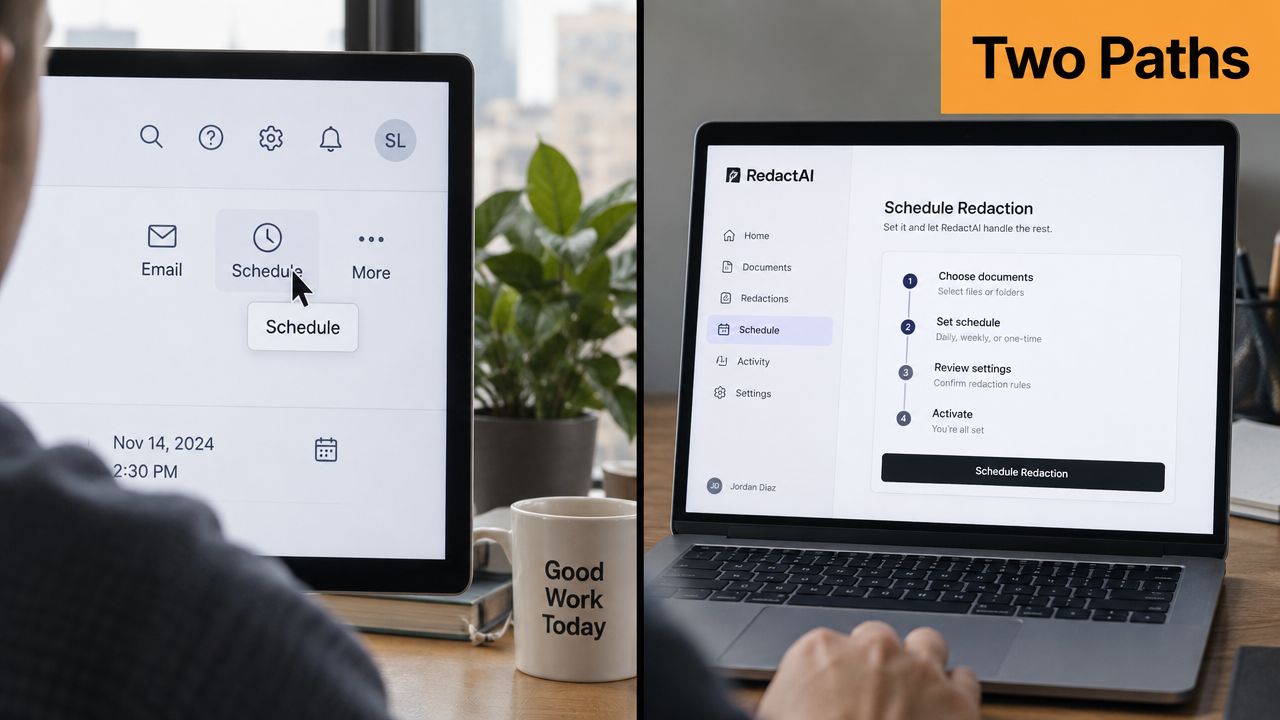
LinkedIn native scheduling is the simplest path when you already know what you want to post. You draft the post, click the clock icon, choose the date and time, set the viewer setting, and confirm it in the Scheduled posts list under Me, View profile, Activity. The upside is obvious. It keeps everything inside LinkedIn and removes another tool from the stack.
The limits show up fast. Native scheduling is restricted to company pages in some regions, and it doesn't cover every format the same way. If you work with carousels or document-style drafts, you'll feel those edges quickly. That's why many operators keep a second option in reserve, especially when they need more than a basic queue.
A RedactAI workflow is different because it starts with the draft, not just the clock. You generate a post from a topic prompt, tune the tone slider, attach a CTA template, then open the schedule modal and pick a slot from suggested windows before confirming the item in the calendar dashboard. That makes it easier to move from idea to publish without bouncing between separate tools.
The best fit depends on volume. Solo creators usually do fine with native scheduling when they're posting a small number of strong updates. Agencies juggling multiple author accounts tend to need the extra control, the queue view, and the draft pipeline. If you want a deeper tool comparison, this guide to ferramentas de agendamento para LinkedIn is the right place to start.
The practical difference isn't just convenience. It's whether your workflow helps you preserve voice, timing, and review before the post ever reaches the feed.
Choosing Your Best Posting Window When the Studies Disagree
The best-time studies don't line up neatly, and pretending they do only creates bad habits. Hootsuite's LinkedIn guidance points to 8 to 9 AM on Tuesdays and Wednesdays, Sprout Social's general engagement data leans toward Tuesday through Thursday from 11 AM to 6 PM local time, and Buffer's Instagram analysis points to Thursday mornings and other midweek daytime windows in its sample. The contradiction isn't a problem to hide. It's the signal that timing depends on audience, format, and what the study measured.
Why the benchmarks conflict
One study may look at engagement, another at impressions, and another at clicks. The audience mix changes too, along with follower geography and the type of account being measured. A B2B audience spread across North America won't behave like a creator audience concentrated in one time zone, so a “best time” benchmark is really just a starting hypothesis.
The cleaner way to choose is to use your own data first, then compare it against the external pattern. Open LinkedIn analytics, review your top 50 posts, and plot engagement by hour and weekday. Then weight your active windows by where most of your followers sit, because a perfect local posting time is useless if half your audience is asleep.
| Source | Top Day | Top Time Window | Metric Measured | Sample Bias |
|---|---|---|---|---|
| Hootsuite | Tuesday and Wednesday | 8 AM to 9 AM | LinkedIn engagement guidance | Platform-specific benchmark, likely audience and region mix |
| Sprout Social | Tuesday through Thursday | 11 AM to 6 PM local time | General engagement window | Broader social benchmark, not LinkedIn-only |
| Buffer | Thursday | Morning and midweek daytime slots | Instagram post performance | Instagram-heavy sample, format and user behavior differ |
A simple posting matrix helps here. Use one row for each content type, one column for weekday, one for local time, and one for result. Revisit it quarterly, because the right window in January isn't always the right window in July.
The goal isn't to find one universal best time. It's to find the first window worth testing, then let your own audience prove or disprove it.
For a deeper benchmarking reference, this breakdown of the melhores horários para publicar no LinkedIn pairs well with a spreadsheet-based test plan.
Cadence, Time Zones, and Formats That Actually Fit
Cadence and time zones stack on top of format. A three-post week doesn't behave the same way if one version lands at 9 AM EST on Tuesday and another goes out at 7 AM GMT on Thursday, because the audience's scroll window shifts with the clock. Add content type into the mix and the timing effect changes again, since a text post, a carousel, and a poll do not ask for the same attention.
A rhythm that doesn't fight your calendar
For solo creators, a practical default is two text posts and one carousel, spaced across Tuesday, Thursday, and Saturday. Keep document-style posts for days when you have something high-signal to teach, because those formats deserve more than a filler slot. Agencies need a steadier rotation, often across four days, so the feed doesn't feel like the same format repeating on a loop.
| Day | Solo Creator | Agency Creator | Rationale |
|---|---|---|---|
| Tuesday | Text post | Text post | Strong weekday attention and room for a clear hook |
| Thursday | Carousel | Video | Midweek visibility with a richer format |
| Saturday | Text post | Poll | Lower-pressure day for lighter interaction |
| Friday | Reserved or test slot | Text post | Useful for agency rotation and final-week pacing |
If your audience is spread across regions, the time zone problem matters as much as the format problem. Check the top five countries in LinkedIn analytics and rotate publish times in 30-minute increments until at least 60% of followers sit inside the active window. That doesn't mean everyone will see the post at once. It means you're aiming your schedule at the largest practical overlap.
For distributed teams, privacy-preserving scheduling matters too, especially when multiple people touch the calendar. This guide on agendamento com preservação de privacidade para equipes is useful if you're coordinating across regions without exposing unnecessary personal schedule details.
Avoid stacking a carousel and a text post back-to-back in the same short window. They can crowd each other out, and the text post often loses the cleaner test slot. Keep some breathing room so each format gets its own chance to earn early engagement.
Does Scheduling Hurt Reach? The Myth Worth Killing
The old fear is that LinkedIn punishes anything that doesn't go live manually. That idea doesn't hold up. In Hootsuite's experiment, 10,000 scheduled posts were compared with 10,000 manually published posts, and the scheduled set showed a 1.4% higher average impression rate in the test. That's not a dramatic difference, but it's enough to kill the myth that scheduling itself is the problem.
What matters is what happens right after the post lands. The first 30 minutes are the prime attention window, because early comments and reactions tell the feed the post is worth surfacing. If you schedule a post, show up when it goes live, answer comments, send a couple of relevant DMs, and put the post in front of the right people while it's still fresh.
There are still ways scheduling can go wrong. Off-time dead zones are obvious. So are broken link cards and queued posts that go out while the account is in a rate-limit cooldown. Those aren't scheduling failures, they're timing and account-health failures.
The question isn't whether you should schedule. It's whether you'll be present when the post arrives. If you can be there for the first burst of engagement, scheduling becomes a workflow advantage instead of a reach risk.
Quick Fixes When Scheduled Posts Misbehave
When a scheduled post breaks, the fastest fix is usually tied to the symptom, not the tool. Start there and you'll save yourself a lot of dashboard wandering. The most common failures fall into a few predictable buckets.
The fastest checks
- Posts not publishing at all. This usually means a revoked third-party OAuth token or a queue hitting the daily limit. Reconnect the LinkedIn account in the scheduler, then clear the pending queue.
- Wrong timezone in the published post. Check whether the scheduler is reading UTC from the browser instead of the profile timezone. Force the scheduler to use the profile timezone and re-queue the post.
- Drafts stuck in limbo. This is often a media upload that failed without notice. Re-upload the asset in the scheduler, not in the native composer.
- Grey thumbnail with zero preview. The image aspect ratio is off and the card can't render properly. Fix the file before it goes back into queue.
- Post flips back to draft after a profile edit. The OAuth handshake usually needs a refresh.
For a quick reference on where to find queued items once they're live in the system, this walkthrough on como encontrar publicações agendadas no LinkedIn is handy to keep open in another tab.
Useful habit: do a 60-second verification pass before every weekly batch, check account connection, timezone, media format, and the final queue order.
That tiny check prevents most “why didn't it post?” moments before they turn into lost reach.
Your First Week With Scheduled Posts on Autopilot
The strongest scheduling system isn't just a queue, it's a loop. Monday starts with topic capture, Tuesday turns that into a draft and a hook test, Wednesday becomes the publish slot, Thursday repurposes the idea into a comment-led post or document upload, and Friday is for analytics review. The point is to make each week feed the next one.
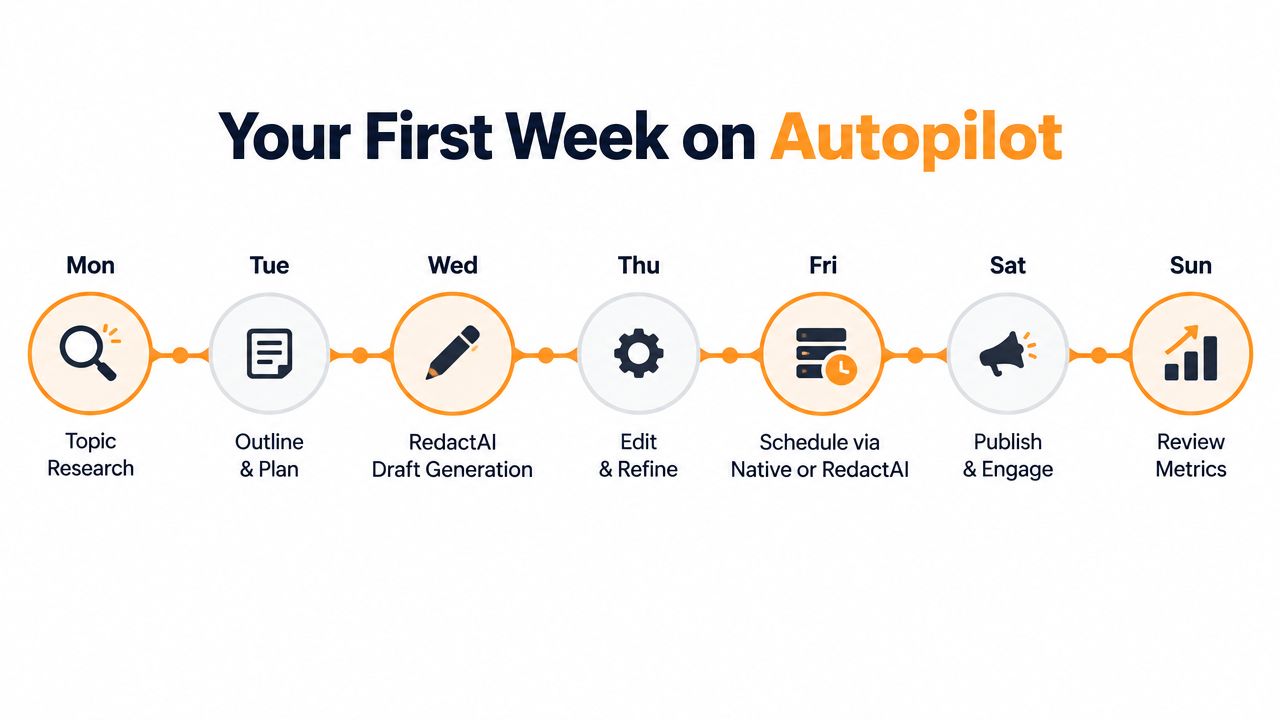
A simple seven-day loop
- Monday, idea capture. Write down one flagship topic and two support angles.
- Tuesday, draft and hook test. Shape the opening, tighten the CTA, and choose the format.
- Wednesday, publish. Queue the post in RedactAI with a suggested slot or move it into LinkedIn native scheduling if that fits the account.
- Thursday, repurpose. Turn the core idea into a comment prompt, a short text post, or a document upload.
- Friday, review analytics. Export performance, tag the themes that earned saves, and move winners back into next week's queue.
- Saturday, light buffer. Leave space for real-time commentary if something in your market deserves a fast response.
- Sunday, reset. Clear the queue, check the next week's themes, and make sure the timing matches your current audience data.
A RedactAI workflow works best when it produces one flagship post and two supporting posts each week, because that leaves room for reactive content without blowing up the schedule. The value here isn't just saved time. It's the feedback loop, the one that tells you which topics, hooks, and time slots deserve more of your attention.
After four weeks, the queue should start tuning itself. The slots come from your own data, the topics come from your own audience, and the generic “best time” chart becomes a reference point instead of a rulebook.
If you want a cleaner LinkedIn workflow, RedactAI can help you generate posts, queue them for later, and review what's working without rebuilding your process every week. Visit RedactAI and set up a publishing routine that gives you drafts, timing, and review in one place.




















































































































