
Let's get right down to it. For a LinkedIn post, you get a pretty generous 3,000 characters to play with. That's more than enough room for a good story or a detailed update. Your profile headline, on the other hand, is a much tighter squeeze at just 220 characters, so you have to make every word count.
The Quick Guide to Every LinkedIn Character Limit
You came here for the numbers, so let's get you those numbers. This section is your go-to cheat sheet for every important character limit you'll run into on LinkedIn.
It's one thing to know the rules of the game, but it's another to know how to win. Understanding these limits is the first step, but really mastering the entire LinkedIn platform is what sets the pros apart.
To make things super simple, I've laid everything out in a quick reference table. No need to dig through long paragraphs—just find what you're looking for and get back to creating great content.
This little visual is a great reminder of the big three: posts, headlines, and comments.
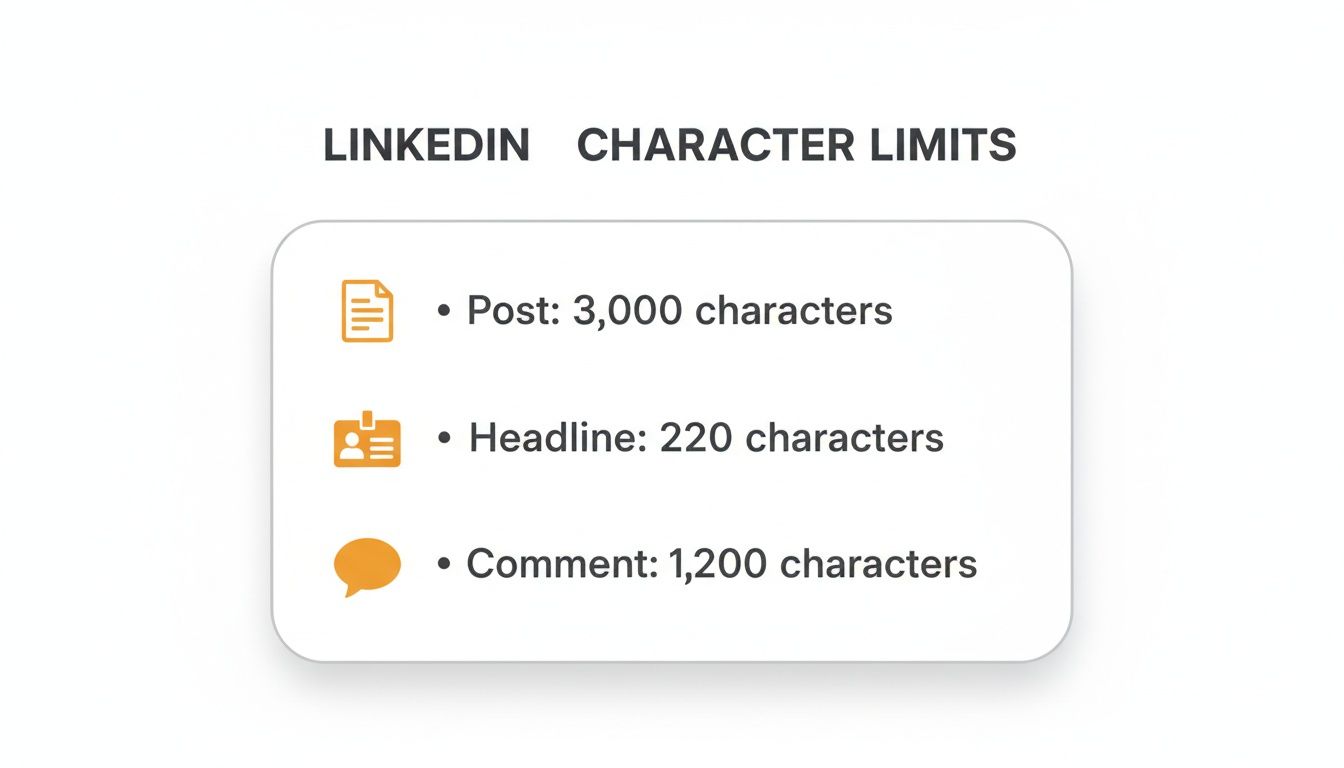
It’s a perfect illustration of why your writing style has to change depending on where you're posting. A sprawling, 3,000-character post requires a completely different approach than a punchy headline.
LinkedIn Character Limits at a Glance
Here’s the full breakdown of all the numbers you need to know. Think of this as your personal, bookmark-worthy reference for making sure every piece of content you create is perfectly optimized.
| LinkedIn Feature | Character Limit | Optimal Length for Engagement |
|---|---|---|
| LinkedIn Post | 3,000 characters | 1,200–1,600 characters |
| Profile Headline | 220 characters | 150–200 characters |
| 'About' Section | 2,600 characters | 1,500–2,000 characters |
| Comments | 1,250 characters | 50–150 characters |
| Connection Request | 300 characters | 200–250 characters |
| Article Headline | 100 characters | 40–60 characters |
Remember, the "limit" is the absolute maximum, but the "optimal length" is where the magic really happens for engagement. And if you want to pair this knowledge with the right visuals, be sure to check out our complete guide on https://redactai.io/blog/linkedin-post-specs.
Why LinkedIn Expanded Its Post Character Limit
Ever wonder why LinkedIn suddenly gave us more room to write? The jump from a 1,300 to a 3,000 character limit for LinkedIn posts wasn't just a random tweak. It was a smart move based on watching how people were already getting creative to tell longer stories.
Before the update, you saw it all the time. Someone would hook you with a great post and then... "see the first comment for the rest of the story." This was a classic workaround. Others got crafty with document carousels, essentially turning a PDF into a multi-page post.
LinkedIn’s team was paying attention. They saw that users wanted to do more than just drop a quick update. People were hungry to share detailed case studies, unpack complex ideas, and tell complete stories without chopping them up. While the workarounds were clever, they created a clunky experience, splitting conversations between the main post and the comments section.
Responding to Creator Needs
So, why 3,000 characters? It wasn't just a number pulled out of a hat. LinkedIn saw that top creators were using things like thread carousels to get around the old limit, but this often fragmented engagement by up to 30%, according to their own data. If you're curious, you can learn more about how creators influenced this change and what it meant for post engagement.
By officially bumping up the character count, LinkedIn simply gave the people what they wanted. They handed creators the tools to publish richer, more complete content right in the feed where it belongs.
This wasn't just about adding more text. It was about empowering professionals to build real authority by sharing their full expertise and stories in one seamless post.
Now, everyone from freelancers to CEOs can share a full narrative without sending their audience on a scavenger hunt. The result? Deeper engagement and better conversations, all happening in one place.
Mastering the "See More" Hook
While you technically have 3,000 characters to play with in a LinkedIn post, the real magic happens in the first 210. This is your entire window of opportunity.
Think about how you scroll through your own feed. You’re flying past dozens of updates. The first two or three lines of any post are like a billboard on the side of that digital highway. Is it compelling enough to make someone slam on the brakes, or will they just keep scrolling?
That's the entire job of the "See More" hook. It's your one chance to stop the scroll and earn that click. If your opening is weak, all the great stuff you wrote below it—your insights, your story, your data—might as well not exist. It's all hidden behind that little blue link.
Crafting an Irresistible Opening
So, how do you make people click? You have to create an "information gap." It’s a fancy way of saying you need to spark some serious curiosity, making the reader feel like they have to know what comes next. Clicking "See More" should feel like an impulse, not a chore.
Here are a few tried-and-true formulas for your opening lines:
- Make a bold or surprising statement: "I just deleted half of my LinkedIn connections. Here's why..."
- Ask a provocative question: "What's the one piece of bad career advice you're tired of hearing?"
- Create a sense of mystery: "My biggest professional failure taught me a lesson that has nothing to do with business."
The best hooks don't just summarize your post. They create a feeling of missing out if you don't keep reading. That's how you turn passive scrollers into an active, engaged audience.
Even though you have more space to work with, a punchy opening almost always wins. We’ve seen engagement data showing that posts getting straight to the point before the cutoff can see 25% higher read-through rates. Getting more granular, you can learn more about how brevity impacts engagement rates on professional networks.
Nailing this skill is what makes all your content creation efforts worthwhile. For more hands-on advice, check out our guide on essential LinkedIn post writing tips. When you focus on a killer opening, the character limit stops being a rule and starts becoming a strategic tool for grabbing attention.
Finding the Perfect Length for Your Post
Just because LinkedIn gives you a 3,000-character runway doesn't mean every post should be a novel. The most seasoned creators know the real secret isn't just staying under the limit—it's about making your post length a strategic choice that serves your goal.
Think about it this way: are you aiming for a quick nod of agreement or sparking a deep, meaningful conversation? Your answer will tell you exactly how many words you need.
Sometimes, all you need is a short, punchy update. A quick post of around 200-400 characters is fantastic for asking a sharp question, celebrating a small win, or dropping a great image with a bit of context. These are designed for the scrollers—they're easy to digest and get quick reactions.
When to Go Short vs. When to Go Long
On the flip side, longer posts are your best friend when you want to build real authority and earn trust. A well-crafted post between 1,200 and 1,600 characters gives you the space to tell a compelling story, break down a complicated idea, or share a mini-guide that’s genuinely helpful.
Here’s a simple way to think about it:
- Go Short For: Quick announcements, engaging questions, sharing visuals, or getting clicks on a link. The aim here is immediate impact.
- Go Long For: Personal stories, detailed case studies, thought leadership pieces, or explaining a nuanced opinion. The goal is to educate, build trust, and kickstart a real discussion.
The length of your post should be a strategic choice, not an accident. Ask yourself: "What do I want my audience to do or feel after reading this?" Let that answer guide your word count.
Ultimately, the best approach is to mix it up. Varying your post lengths keeps your feed from getting stale and appeals to different people in your audience. When done right, even a simple text post can get great results—we're talking 1-3% reaction rates and 2-4% click-through rates.
You can discover more insights on LinkedIn engagement metrics to really dial in your strategy. By matching your post length to your intent, you give every single post the best possible chance to succeed.
Writing Compelling Posts Within the Limits
Knowing the character limit for LinkedIn posts is one thing. Actually writing something that grabs attention within that space? That's a whole different ball game. It’s not just about following the rules; it’s about making every word count.
Think of it like being a storyteller who's been handed a specific-sized canvas. The first step isn't to start painting wildly, but to brainstorm what your audience actually wants to see. Forget what you want to shout from the rooftops for a second and ask, "What would genuinely help or interest the people I want to connect with?" This is the secret sauce to every post that doesn't just get scrolled past.
Once you’ve got a solid idea, just write. Seriously, get a first draft down without obsessing over the character count. Let your thoughts flow and focus on getting your authentic voice and core message onto the page.
Refining Your Message for Impact
Got that first draft done? Great. Now, it’s time to be ruthless. This is where you put on your editor hat, sharpening your opening hook, clarifying your key takeaways, and cutting every single word that doesn't earn its keep. Structure is your best friend here.
Here are a few tricks to make your posts easy on the eyes and super scannable:
- Short Paragraphs: Keep them to one or two sentences. This creates crucial white space that makes your post feel less intimidating.
- Bullet Points: Got a list or a few key points? Break them out. It’s way easier to digest than a chunky paragraph.
- Strategic Emojis: A well-placed emoji can add a pop of personality and break up the text visually.
The real goal isn't just to stay under the 3,000-character limit. It's to make every character pull its weight. Smart editing is what transforms a decent idea into a post people can't ignore.
This whole process—from a brain dump to a polished piece—is how you consistently create content that respects your audience's time. And if you’re looking to really level up, check out these tips on how to write LinkedIn posts that get real engagement.
Frequently Asked Questions
Let's dig into some of the most common questions people have about LinkedIn's character limits. I'll give you the straight answers to help you get the most out of the platform without hitting any roadblocks.
What Happens If I Go Over the Character Limit?
Don't worry, you can't accidentally break LinkedIn. The platform has a built-in safety net.
As you type, you'll see a small counter keeping track of your characters. If you go over the 3,000 character limit for a post, the counter will turn red, and the "Post" button will become inactive. It's a simple, foolproof system that forces you to trim your text back down before you can publish. This applies everywhere, from posts to your profile headline.
Do Hashtags, Emojis, and Links Count as Characters?
Yes, they sure do. Think of it this way: if you can type it, it counts.
Every single letter, number, space, and punctuation mark chips away at your total. That includes every character in your hashtags (the # symbol too!) and any emojis you use. Even the URLs you paste in are counted, although LinkedIn will often display a shortened version. So, when you're pushing the character limit for LinkedIn posts, keep an eye on those extras.
The simple rule is: if you can type it, it counts. This includes every single space and line break you add for readability.
When Should I Write a Long Post vs. a LinkedIn Article?
Ah, the classic strategy question. It really boils down to your goal.
A long post (up to 3,000 characters) is perfect for sparking conversation in the feed. Use it for timely thoughts, personal stories, or quick takes that invite immediate replies. It's all about in-the-moment engagement.
A LinkedIn Article (up to a massive 125,000 characters) is your go-to for evergreen, in-depth content. These are more like blog posts that live permanently on your profile, get indexed by Google, and are fantastic for building authority with detailed guides or big-picture thought leadership.
How Can I Make My Long Posts Easier to Read?
Readability is king, especially when you're asking someone to read a longer post in a fast-scrolling feed. You have to make it inviting. The trick is to break up the wall of text.
Try these simple formatting tips to keep your readers hooked:
- Use bullet points or numbered lists to organize ideas.
- Sprinkle in a few relevant emojis to add personality and create visual pauses.
- Embrace plenty of white space. Use extra line breaks to create short, skimmable paragraphs—one or two sentences is often perfect.
This approach makes your content look way less intimidating and much easier to digest on a phone or desktop. If you want to see exactly how your post will look before it goes live, you can learn how to effectively preview a LinkedIn post.
Struggling to write compelling posts that fit the limits and get results? RedactAI helps you generate high-impact LinkedIn posts in minutes, perfectly optimized for engagement while staying true to your authentic voice. Start for free and see the difference.

























































































































































































