
So, what exactly are LinkedIn impressions?
In the simplest terms, an impression is counted each time your post is displayed on someone's screen.
Think of it like a billboard on a busy highway. Every car that passes by and sees the billboard counts as one impression. It doesn't matter if they slowed down to read it or just glanced at it as they drove past—it was seen. That's what an impression is: a measure of pure visibility.
Impressions, Reach, and Engagement: What’s the Difference?
This is where things can get a little fuzzy for people, so let's clear it up. These three metrics are often grouped together, but they tell very different stories about your content's performance.
Imagine you share a post. Your follower, Sarah, scrolls through her feed and sees it. That’s one impression. A few hours later, her colleague shares your post, and Sarah sees it again. That’s a second impression.
Even though only one person (Sarah) saw your content, you racked up two impressions. This is the key distinction.
This diagram shows how impressions are the starting point for everything else.
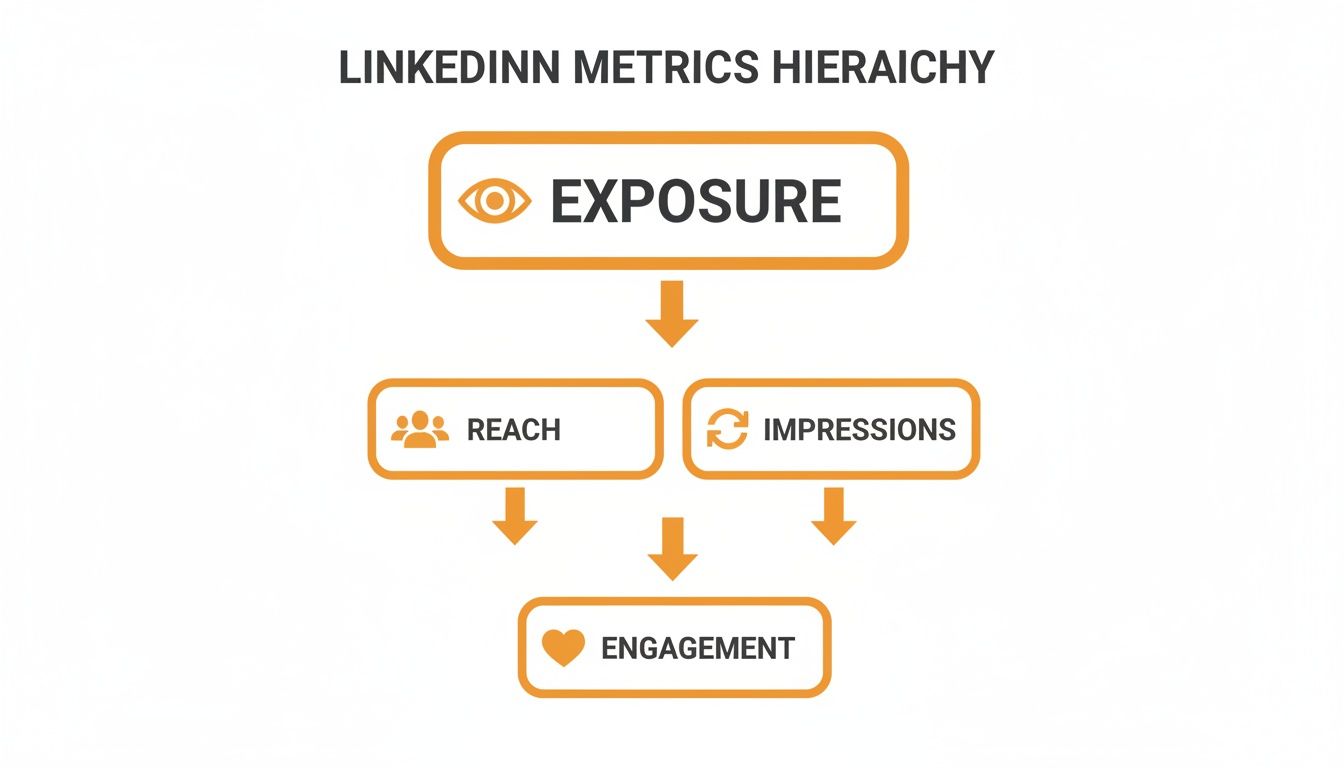
Without getting seen (impressions), you can't get engagement. It’s the first domino to fall.
To make this even clearer, it helps to see how these key metrics stack up against each other. They each provide a unique piece of the puzzle.
Key LinkedIn Metrics at a Glance
| Metric | What It Measures | Simple Analogy |
|---|---|---|
| Impressions | The total number of times your content was displayed on a screen. | How many times a flyer was seen, even if by the same people multiple times. |
| Reach | The number of unique people who saw your content. | How many individual people received the flyer. |
| Engagement | The number of interactions (likes, comments, shares, clicks). | How many people called the number on the flyer. |
As you can see, each metric builds on the last. You need impressions to get reach, and you need reach to get engagement. They all work together.
Here’s one more way to think about it:
Impressions measure visibility, Reach measures audience size, and Engagement measures audience reaction.
You can't have one without the others. Impressions are your invitations to the party. Reach is how many people actually got the invitation. And engagement? That’s the number of people who showed up, hit the dance floor, and started a conga line.
It all starts with getting those invitations out the door. Without impressions, there's no party.
Why Impressions Matter More Than You Think
It's tempting to brush off impressions as just another "vanity metric." You know, a number that looks impressive on a report but doesn't actually put money in the bank. And sure, an impression isn't a qualified lead. But dismissing them entirely means you're missing the whole point of using LinkedIn in the first place.
Think about it: before anyone can like your post, click your link, or slide into your DMs to become a client, they have to see your content. That’s it. That’s the first step.
Impressions are the very top of your funnel, the bedrock of your entire LinkedIn game. Picture it like a storefront on a bustling main street. The more people who walk by and even glance at your window display (impressions), the more chances you have to entice someone to come inside. Without that initial foot traffic, the best products in the world just gather dust.
When you consistently rack up high impressions, it’s a clear sign you're playing well with the LinkedIn algorithm. It means you're reaching a broad, and hopefully relevant, audience. This is the critical first step to building brand awareness and making a name for yourself.
Building Trust Through Visibility
We all know the old saying: people do business with those they know, like, and trust. Impressions are the "know" part of that classic formula. When your name, face, and ideas keep popping up in someone’s feed, you start to build brand recall. They might just scroll past most of the time, but their brain is subconsciously filing you away as "that person who knows about [your industry]."
Over time, this consistent presence has a powerful snowball effect:
- It builds familiarity: You become a regular, recognizable face in their professional bubble.
- It establishes credibility: Sharing smart takes and helpful advice time and again paints you as an authority.
- It creates serendipity: The more eyeballs on your content, the greater the odds that the right person sees it at the perfect time.
Impressions measure the size of the audience you have the opportunity to influence. Ignoring them is like trying to build a house without pouring the foundation first. Every other meaningful metric, from engagement to leads, rests on that initial exposure.
So, while you shouldn't get obsessed with the impressions count alone, you have to respect what it represents. It’s the fuel for your entire LinkedIn engine, turning your static profile into a dynamic tool for growth.
Where to Find Your Impressions (And What to Do With Them)
Alright, so you know what impressions are, but where do you actually find them? And more importantly, how do you make sense of the numbers? Staring at a graph won't magically boost your reach, but knowing what to look for will.
Luckily, LinkedIn doesn't hide this information.
For your personal profile, just head to your main profile page and look for the Analytics section right under your headline. You'll get a quick look at your post impressions. Click on it, and you can dig into the performance of each individual post. Simple as that.
If you're managing a Company Page, it's just as straightforward. Go to your page, find the Analytics tab, and you'll open up a much more detailed dashboard where you can see trends over different timeframes.
Turning Numbers Into a Real Strategy
Okay, you've found your analytics. Now the real work begins. This is where you stop just looking at numbers and start figuring out what they’re trying to tell you.
Here’s how you can start connecting the dots:
- Look for Patterns: Are your impressions heading up, taking a nosedive, or just coasting? Check out the trends over the last 7, 28, and 90 days. This gives you the big picture of your visibility.
- Find Your Greatest Hits: Which posts got the most eyeballs? Sort them by impressions and see what pops. Were they videos? Carousels? Simple text posts with a killer hook? This is your audience telling you exactly what they want to see.
- Check Who's Watching: Your analytics will show you the job titles, companies, and locations of the people seeing your content. This is gold. It confirms whether you're actually reaching the people you want to reach.
Take a look at the analytics view below. This is the kind of breakdown you'll get for your posts.
See how it lays out not just the impression count but also who those people are? That's how you connect the dots between your content and your audience.
By making a habit of checking this data, you can move from guessing what works to knowing what works. If you want to get even more sophisticated, exploring some of the best social media analytics tools can give you an even deeper level of insight.
Decoding High Impressions and Low Engagement
Ever post something on LinkedIn, watch the impression count climb into the thousands, but then see only a couple of likes and maybe one lonely comment? It's a classic head-scratcher, and you're not alone.
Think of it like having a storefront on a bustling main street. Thousands of people walk by and peek in the window—those are your impressions. But only a handful actually open the door to look around. Those are your engaged viewers.
Getting eyeballs on your content is the first, crucial step. High impressions mean the algorithm is showing your post to people. But if no one is stopping to react, comment, or share, it's a sign that your message didn't quite land. Maybe the opening line wasn't compelling, the visual was forgettable, or you didn't ask a question to get the conversation started.
Why Engagement Rates Matter
This is where the numbers really tell a story. Your LinkedIn engagement rate is the metric that reveals how many people who saw your post actually interacted with it.
Generally speaking, a platform-wide organic engagement rate of 2% is considered pretty decent on LinkedIn. If you're hitting above 5%, you're doing great. Of course, this can shift depending on your industry—B2B tech, for example, sees an average of around 3.6%.
High impressions get your foot in the door. High engagement invites you to stay for dinner. Your goal is to find the sweet spot where your content achieves both widespread visibility and meaningful connection.
It's a balancing act. Sometimes a super-niche post might not get a ton of impressions, but it could ignite a fantastic, high-value conversation with the exact right people. To dig deeper into what makes people tick, check out this guide to master social media engagement.
Ultimately, looking at your impressions and engagement together helps you stop guessing and start diagnosing. You can pinpoint what's working and what's just getting scrolled past. To get started, take a look at our guide on how to calculate your LinkedIn engagement rate and begin turning those views into real conversations.
Proven Strategies to Boost Your LinkedIn Impressions
Knowing what LinkedIn impressions are is the first step. Actually getting more of them? That's the real challenge. The good news is you don’t need to crack some secret code to boost your visibility. It just takes a consistent, smart approach.
Let's start with the most critical part of your post: the first couple of lines. Think of it like a movie trailer—it has to be a scroll-stopper. This opening hook is your only shot to grab someone's attention as they're flying through their feed. Ask a compelling question, state a bold opinion, or share something that piques curiosity.
Nail Your Content and Timing
Beyond a killer hook, the format you choose for your content really matters. The LinkedIn algorithm has its favorites, and mixing things up keeps your feed from feeling stale.
- Go Visual: It's no secret that posts with images, videos, or documents crush text-only updates. Carousels (those multi-page PDFs) are especially great for breaking down complex ideas or telling a story.
- Use Hashtags Wisely: Hashtags are basically keywords for your content. Stick to a mix of 3-5 broad and niche hashtags to help LinkedIn understand what your post is about and show it to the right people.
- Post When People Are Watching: Every audience is a little different, but generally, LinkedIn is busiest from Tuesday to Thursday, mid-morning to early afternoon. Test out different times to see when your network is most plugged in.
Don't underestimate the power of format. In B2B tech, for example, a well-made carousel can easily pull in 3,000–4,200 impressions. And if you really want to make a splash, live events can be a game-changer. With attendance rates often hitting 37%, the engagement spike gives your impressions a massive lift.
Start a Conversation to Feed the Algorithm
At the end of the day, LinkedIn just wants to keep people on the platform. The algorithm absolutely loves posts that spark a conversation because it's a clear signal that you're sharing high-quality stuff.
The most powerful way to get more impressions is to create content that makes people stop, think, and talk. When a post gets likes and comments early on, LinkedIn pushes it out to a wider audience, and the visibility just snowballs from there.
The easiest way to do this is to get a dialogue going. End your posts with an open-ended question that actually invites people to chime in. And when they do comment, don't just "like" it—reply thoughtfully and keep the conversation alive. If you really want to dig in and master B2B marketing on LinkedIn, you'll find that understanding impressions is a cornerstone of success.
When all these strategies work together, you send a powerful signal to the algorithm that your content is valuable. For more tips on crafting posts that get people talking, check out our guide on how to write engaging LinkedIn posts.
Got Questions About LinkedIn Impressions? Let's Clear Things Up.
Diving into LinkedIn analytics can feel a bit like learning a new language. Let's break down some of the most common questions people have about impressions so you can get back to what matters—growing your presence.
So, Are Impressions the Same as Views?
Yep, you can think of them as the same thing. On LinkedIn, when you see “views” on your post, it’s just another word for impressions.
It simply means the number of times your content popped up on someone's screen. If your post has 1,000 views, it has 1,000 impressions. Easy as that.
Does Scrolling Past My Own Post Add an Impression?
Nope! You can breathe a sigh of relief. You’re not skewing your own data every time you check on your post.
LinkedIn is smart enough to know it's you, so your own views aren't counted. This means your impression count is a genuine reflection of how many times other people saw your content.
What’s a “Good” Number of Impressions, Anyway?
This is the golden question, and the honest answer is: it depends. There’s no magic number that works for everyone. What’s great for a marketing guru with 50,000 followers will be different for a software developer with 500 connections.
Instead of getting hung up on a specific number, think about it like this:
- Beat Your Own Best: Your real competition is your last post. Focus on steady, month-over-month growth in your average impressions. That’s a true sign you’re heading in the right direction.
- A Good Rule of Thumb: As a starting point, aim for an impression count that is 2 to 5 times your number of connections. Got 1,000 connections? Shooting for 2,000-5,000 impressions per post is a fantastic goal.
How Do I Make High Impressions Actually Mean Something for My Business?
Getting lots of eyes on your content is great, but it’s only half the battle. Impressions open the door; you still have to invite people in. That’s where a clear call-to-action (CTA) comes in.
Don’t just post and ghost. Ask a thought-provoking question, point people to a helpful article on your blog, or invite them to connect. Give them a reason to do something.
Visibility gets you noticed, but conversion gets you results. To make impressions count, you need to guide your audience from simply seeing your content to taking a meaningful next step.
Let’s look at the math. A typical organic engagement rate on LinkedIn hovers around 2%–6%. If you can bump a post's impressions from 5,000 to 15,000 while keeping a 4% engagement rate, you've just taken your top-of-funnel activity from 200 to 600 engagements. That’s triple the opportunity for leads. You can learn more about how these benchmarks impact ROI to see the bigger picture.
By paying attention to which high-impression posts also get clicks and comments, you'll uncover the secret to creating content that doesn't just get seen—it gets results.
Ready to turn your insights into high-impact content without the guesswork? RedactAI helps you create personalized, engaging LinkedIn posts in minutes. Join over 21,000 professionals who use our AI-powered platform to boost their visibility and build their brand. Start for free at RedactAI.









































































































































































