All topics

How to Customize Your LinkedIn URL: how to customize linkedin url in 3 steps

Nicolas Pamart
Nicolas PamartLast updated: 1/9/2026

Customizing your LinkedIn URL is one of the fastest and most impactful things you can do for your professional brand. Seriously. Instead of a clunky, auto-generated link full of random numbers, you get a clean, memorable URL that immediately makes you look more polished and credible. It’s a simple fix that takes less than two minutes.

A laptop displaying a webpage with 'Stand Out Online' banner and a person in a conference setting.

Why Your Custom LinkedIn URL Is a Game Changer

Think about that default LinkedIn URL you were assigned—the one with a long jumble of numbers tacked on the end. It's like being handed a generic name tag at a massive conference. Sure, it works, but it does absolutely nothing to help you stand out.

A custom URL, on the other hand, is your professionally printed business card. It instantly signals that you pay attention to the details, you're comfortable with the platform, and you’re serious about how you present yourself professionally.

This tiny tweak has a surprisingly big impact on your digital presence. For starters, it makes you much easier to find. Search engines like Google tend to favor clean, keyword-rich URLs, which helps recruiters and potential clients find your profile when they search for your name.

But it goes beyond just searchability. A custom URL turns your LinkedIn profile into a shareable asset you can use everywhere.

Just think about these common scenarios:

  • On Your Resume: linkedin.com/in/jane-doe-marketing looks worlds better and is much easier to type than linkedin.com/in/jane-doe-a1b2c3d4.
  • In Your Email Signature: A clean link looks sharp and actually encourages people to click, driving more traffic to your profile.
  • On Business Cards: A short, memorable URL is just plain practical and helps reinforce your personal brand in the real world.

A personalized URL is a foundational element of your online brand architecture. It demonstrates a level of professional polish that sets you apart from those who stick with the default settings.

Ultimately, this isn't just about looks; it's a strategic move that boosts your credibility and makes your profile far more accessible. Customizing your URL is a crucial first step, but it's just one piece of the puzzle. For a deeper dive into making your profile work for you, check out our complete guide on how to optimize your LinkedIn profile for maximum visibility.

Taking control of these small details is what turns a passive profile into a powerful career tool.

Customize Your LinkedIn URL on Desktop in Minutes

Ready for one of the easiest, highest-impact profile updates you can make? Customizing your LinkedIn URL from a desktop or laptop is a breeze. It literally takes a couple of minutes but pays off big time for your professional brand down the road.

First things first, log in to your LinkedIn account. Once you’re on the homepage, head over to your own profile. You can get there by clicking the Me icon in the top navigation bar and then selecting View Profile. This is your personal dashboard for all things profile-related.

A laptop on a wooden desk displays a social media profile, next to a notebook with 'Edit Your URL'.

Finding the Right Setting

Once you're looking at your profile, glance over to the right-hand side. You'll spot a box with the heading "Public profile & URL." Go ahead and click on Edit public profile & URL.

This click will pop open a new tab, taking you to your public profile settings page. Think of this as the control panel for how you appear to the outside world—anyone who isn't logged into LinkedIn.

Right there, in the top right corner, you'll see the option you're looking for under "Edit your custom URL." See that little pencil icon next to your current, probably clunky, URL? That's where the magic happens. Click it.

Crafting Your New URL

Now for the fun part. In the text box, you can type in your desired custom URL. The best move is to aim for something clean and professional, like your first and last name.

If jane-doe is already taken, don't sweat it. Get a little creative. Try adding a middle initial (jane-m-doe) or a simple keyword that speaks to what you do (jane-doe-marketing).

Pro Tip: Whatever you do, steer clear of random numbers or old nicknames. The whole point is to create a link that’s easy to remember and screams "professional." You'll need to stick to 3-100 characters using only letters and numbers—no spaces or special symbols allowed.

Tucking a relevant keyword into your custom URL—whether it's your industry or specialty—can actually help people find you. Based on LinkedIn marketing research, your URL is a key piece of the puzzle that helps you show up in search results.

Once you’ve perfected your profile, getting a second opinion is always a good idea. For an automated analysis, our free LinkedIn Profile Review tool can give you some quick, data-driven suggestions.

After you've typed in your new URL, just hit Save, and you're good to go

Change Your LinkedIn URL from Your Phone

Let's be real, a lot of business happens away from the desk these days. If you're commuting or waiting for a meeting to start and realize your LinkedIn URL needs a refresh, you don't have to wait to get back to your computer.

You can knock it out right from your phone, though the steps are a little different than the desktop version.

First, pop open the LinkedIn app and tap your profile picture in the top-left corner. This slides out a menu where you’ll want to hit View Profile.

Navigating the Mobile App

Once you're on your profile, look for the little pencil icon (✏️) next to your name and headline. Go ahead and tap that to go into edit mode.

This is where it gets a bit tricky on mobile. You won't see the URL option right away. You actually need to scroll all the way to the bottom of the page until you find the Contact info section. Tap the pencil icon next to that.

Finally, you're there! On this screen, you’ll see the option to Edit your custom URL. Tapping that takes you to the familiar page where you can type in your new, polished web address.

Pro Tip: The mobile app buries this setting a bit, making it less intuitive than on desktop. If you get lost, just remember the click path: Profile > Edit Pencil > Scroll to Contact Info > Edit Pencil > Edit your custom URL.

After you save it, your new URL is live instantly. It's a small, two-minute task that keeps your personal brand looking sharp, even when you're on the move. Plus, it shows a great attention to detail that people definitely notice.

Choosing A URL That Strengthens Your Brand

Think of your custom LinkedIn URL as more than just a link. It's your digital name tag, a small but mighty piece of your professional brand. Getting it right makes you instantly recognizable and reinforces your identity every time you share your profile.

The cleanest, most professional route is usually just your full name. Something like linkedin.com/in/jane-doe is perfect—it's simple, memorable, and makes you easy for people to find. But what if you have a common name and that URL is already snatched up? Don't worry, you just need to get a little creative.

Finding Your Perfect URL Format

If your name is taken, try adding a middle initial (jane-m-doe) or a keyword that speaks to your profession. For instance, a real estate agent could try john-smith-realtor, or a software developer might go with sarah-jones-dev. This does two things: it helps you snag a unique URL and it immediately tells people what you do. It’s a subtle but effective branding move.

Choosing the right format is a key part of your branding strategy. A clean, memorable URL is like a firm digital handshake—it makes a strong first impression and builds credibility before anyone even clicks on your profile.

This small tweak is a foundational step in building your personal brand. It’s one of those easy wins that contributes to a more cohesive and powerful online presence.

Choosing Your Custom LinkedIn URL Style

Not sure which style is the best fit? This table breaks down the most common formats to help you decide which one aligns with your professional goals.

URL Style Example Best For Pros Cons
Full Name jane-doe Most professionals, especially those in traditional fields. Clean, professional, and easy to remember. Great for personal branding. Often already taken, especially for common names.
Name + Initial jane-m-doe Individuals with common names looking for a simple alternative. Still looks very professional and is often available. Can be slightly less memorable than a simple full name.
Name + Keyword jane-doe-cpa Niche experts, freelancers, and sales professionals. Highlights your expertise instantly. Can help with searchability. Might feel less personal; could need updating if you change careers.
Creative/Branded thecopywriterjane Creatives, consultants, or entrepreneurs with a strong brand name. Highly memorable and reinforces a specific brand identity. Can seem unprofessional if not done well. Risks becoming dated.

Ultimately, the goal is to pick a URL that is both professional and easy for others to recall and type. Keep it simple and focused on your long-term career identity.

If you’re trying to do this on the go, this little decision tree shows you exactly how to find the URL editor on your phone.
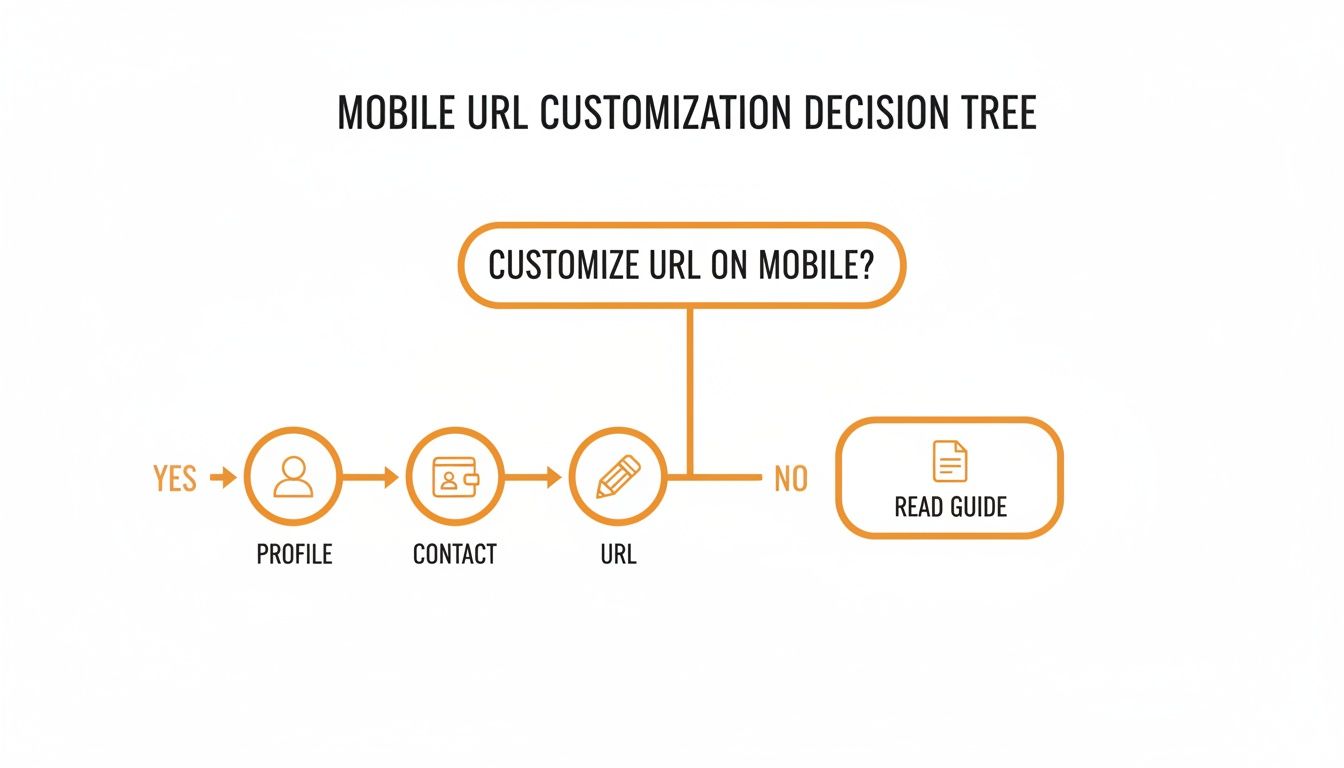
A decision tree flowchart showing steps to customize a mobile URL or access a guide.

The numbers don't lie: these small optimizations can lead to huge results. Profiles that are fully filled out are 40 times more likely to get hit up with professional opportunities. When you consider that a strong headline alone can boost your views by 30 percent, pairing it with a custom URL is a no-brainer for getting noticed.

Updating Your LinkedIn Company Page URL

It’s not just personal profiles that get a branding boost from a clean URL—your Company Page needs one, too. A custom URL does more than just look good; it makes it way easier for potential clients, partners, and future hires to find you directly. Honestly, this is a non-negotiable for any business serious about its online presence.

First things first, you'll need the right keys to the kingdom. Only a Super or Content admin for the page has the power to make this change.

If that’s you, head over to your Company Page and make sure you’re in Admin view. From there, just click the Edit Page button.

Nailing Down Your Company URL

Once you're in the editing suite, navigate to the "Page info" tab. The very first field you’ll spot is "LinkedIn public URL." Go ahead and click that little pencil icon to start fresh.

The best practice here is pretty straightforward: use your official company name. Keep it clean and simple.

For example, if your company is "Apex Innovations Inc.," your ideal URL would be something like linkedin.com/company/apexinnovations. That kind of consistency across all your social channels is what builds a strong, recognizable brand.

A clean, branded URL isn’t just a cosmetic touch-up; it’s a strategic asset. It boosts your page’s discoverability and adds a layer of professionalism that starts building trust before someone even clicks "Follow."

This small tweak can have a real impact on your lead generation. Think about it: LinkedIn’s visitor-to-lead conversion rate is a solid 2.74%, which is way higher than other social platforms. Optimizing every little detail, including your URL, is a high-value move. Driving the right kind of traffic is so much easier with a memorable URL, especially when you consider LinkedIn is already sending nearly half of all social traffic to B2B sites. You can dive deeper into some of these insights on LinkedIn B2B marketing to see the full picture.

And if your Company Page is fresh out of the box, our guide on how to create LinkedIn Pages will walk you through the entire setup process.

Got Questions About Your LinkedIn URL? Let’s Clear Things Up

Alright, so you’ve customized your LinkedIn URL. Awesome. But now you might be wondering about a few things. Let's walk through some of the common questions that pop up so you can handle your new link like a pro.

The first thing people usually ask is, "What happened to my old, clunky URL?" The second you hit 'save' on your new custom URL, the old one ceases to exist. Poof. Gone. Anyone who tries to use it will land on a "profile not found" page.

This is a big deal. It means you need to go on a mission to update that link everywhere it lives—your resume, email signature, personal website, and any other social media profiles.

What to Do If Your Perfect URL Is Already Taken

It’s the classic scenario: you try to snag linkedin.com/in/yourname only to find out someone beat you to it. Since every single custom URL has to be unique, this happens all the time.

Don't panic. You can still create something professional and memorable. Here are a few simple tweaks I've seen work well:

  • Toss in a middle initial: jane-m-doe
  • Add a key credential: john-smith-cfa
  • Include your industry or specialty: sarah-jones-marketing

The key is to keep it clean and relevant. Whatever you do, try to avoid adding a random string of numbers. That just defeats the purpose of creating a polished, professional link.

A quick heads-up: LinkedIn lets you change your URL up to five times within a 180-day period. While it's nice to have that flexibility, changing it constantly is a bad idea. It just creates a trail of broken links across the web, making it a nightmare for people to find you.

After those six months are up, your previous URL is fair game again for anyone else to claim. This is exactly why you should put a little thought into it upfront and pick a URL that you can stick with for the long haul.


Ready to create compelling LinkedIn content without the guesswork? RedactAI helps you generate high-impact posts that reflect your unique voice and expertise. Join over 21,000 professionals who use our platform to build their brand and engage their audience. Try it for free today.


Related articles

RedactAINicolas Pamart

How to Customize Your LinkedIn URL: how to customize linkedin url in 3 steps

All topics
Post icon
All topics

How to Customize Your LinkedIn URL: how to customize linkedin url in 3 steps

Customizing your LinkedIn URL is one of the fastest and most impactful things you can do for your pr

Last updated: 1/9/2026
RedactAINicolas Pamart

How to Get Connections on LinkedIn Your Guide to Real Network Growth

All topics
Post icon
All topics

How to Get Connections on LinkedIn Your Guide to Real Network Growth

Figuring out how to get more connections on LinkedIn really boils down to two things: actively reach

Last updated: 1/8/2026
RedactAINicolas Pamart

Social Selling Index Score: How to Elevate Your Rating

All topics
Post icon
All topics

Social Selling Index Score: How to Elevate Your Rating

So, what's the deal with this Social Selling Index (SSI) score everyone's talking about? Think of it

Last updated: 1/7/2026
RedactAINicolas Pamart

Measuring Social Media ROI Like a Pro

All topics
Post icon
All topics

Measuring Social Media ROI Like a Pro

So, you're putting time, money, and a whole lot of effort into social media. But is it actually payi

Last updated: 1/6/2026
RedactAINicolas Pamart

Impression vs View What Actually Matters for Your Strategy

All topics
Post icon
All topics

Impression vs View What Actually Matters for Your Strategy

Alright, let's clear up the confusion between impressions and views for good. Think of it this way:

Last updated: 1/5/2026
RedactAINicolas Pamart

What are post impressions on linkedin: A concise guide

All topics
Post icon
All topics

What are post impressions on linkedin: A concise guide

Ever wonder what "impressions" on your LinkedIn posts actually mean? It’s a term that gets thrown ar

Last updated: 1/4/2026
RedactAINicolas Pamart

The Ultimate Guide to Image Size for LinkedIn Post Success

All topics
Post icon
All topics

The Ultimate Guide to Image Size for LinkedIn Post Success

Let's get this right from the start: the best image size for a LinkedIn post is 1200 x 627 pixels .

Last updated: 1/3/2026
RedactAINicolas Pamart

How to Find Scheduled Posts on LinkedIn The Easy Way

All topics
Post icon
All topics

How to Find Scheduled Posts on LinkedIn The Easy Way

Ever scheduled a LinkedIn post, only to have it seemingly vanish into thin air a few minutes later?

Last updated: 1/2/2026
RedactAINicolas Pamart

How to Find Your Writing Voice and Build a Powerful Brand

All topics
Post icon
All topics

How to Find Your Writing Voice and Build a Powerful Brand

Let's get one thing straight: your writing voice isn't some mystical thing you stumble upon. It's th

Last updated: 1/1/2026
RedactAINicolas Pamart

How to Overcome Writer's Block for Good

All topics
Post icon
All topics

How to Overcome Writer's Block for Good

Let's be honest, we've all been there. Staring down that mocking, blinking cursor on a blank page. I

Last updated: 12/31/2025
RedactAINicolas Pamart

12 LinkedIn-Focused Social Media Posting Ideas to Try in 2025

All topics
Post icon
All topics

12 LinkedIn-Focused Social Media Posting Ideas to Try in 2025

Ever stare at that blinking cursor on LinkedIn, wondering what on earth to post today? You’re not al

Last updated: 12/30/2025
RedactAINicolas Pamart

Executive Communication Skills Training: Elevate Leadership & Drive Results

All topics
Post icon
All topics

Executive Communication Skills Training: Elevate Leadership & Drive Results

Let's be honest: calling executive communication a "soft skill" is a thing of the past. It's now a c

Last updated: 12/29/2025
RedactAINicolas Pamart

How to Create LinkedIn Pages That Drive Real Growth

All topics
Post icon
All topics

How to Create LinkedIn Pages That Drive Real Growth

First things first, to get your LinkedIn Page off the ground, you'll start from your personal profil

Last updated: 12/28/2025
RedactAINicolas Pamart

How to Create a Business Profile on LinkedIn That Attracts Clients

All topics
Post icon
All topics

How to Create a Business Profile on LinkedIn That Attracts Clients

First things first, you can't have a business page without a personal LinkedIn account. Once you're

Last updated: 12/27/2025
RedactAINicolas Pamart

8 Data-Backed Insights on the Best Time to Post on LinkedIn (2025)

All topics
Post icon
All topics

8 Data-Backed Insights on the Best Time to Post on LinkedIn (2025)

You've crafted the perfect LinkedIn post. It's insightful, engaging, and packed with value. You hit

Last updated: 12/26/2025
RedactAINicolas Pamart

Boost Your Reach with what are impressions on linkedin

All topics
Post icon
All topics

Boost Your Reach with what are impressions on linkedin

So, what exactly are LinkedIn impressions? In the simplest terms, an impression is counted each time

Last updated: 12/25/2025
RedactAINicolas Pamart

How to Write Engaging LinkedIn Posts People Actually Read

All topics
Post icon
All topics

How to Write Engaging LinkedIn Posts People Actually Read

If you want people to actually engage with your LinkedIn posts, you have to stop thinking like a bro

Last updated: 12/24/2025
RedactAINicolas Pamart

How to Build Your Network: how to get linkedin connections

All topics
Post icon
All topics

How to Build Your Network: how to get linkedin connections

Before you even dream of hitting that "Connect" button, let's talk about your home base: your Linked

Last updated: 12/23/2025
RedactAINicolas Pamart

How to Tag on LinkedIn to Boost Your Visibility

All topics
Post icon
All topics

How to Tag on LinkedIn to Boost Your Visibility

So, you want to learn how to tag someone on LinkedIn? It’s refreshingly simple. Just type the @ symb

Last updated: 12/22/2025
RedactAINicolas Pamart

Preview LinkedIn Post Perfectly Every Time

All topics
Post icon
All topics

Preview LinkedIn Post Perfectly Every Time

We’ve all been there. That sinking feeling right after you hit ‘Post’ on LinkedIn and immediately sp

Last updated: 12/20/2025
RedactAINicolas Pamart

Your Essential Guide to LinkedIn Post Specs for 2024

All topics
Post icon
All topics

Your Essential Guide to LinkedIn Post Specs for 2024

Tired of guessing which image size to use for your next LinkedIn post? Let's get it right, every tim

Last updated: 12/19/2025
RedactAINicolas Pamart

12 Must-Have LinkedIn Post Templates to Elevate Your Content in 2025

All topics
Post icon
All topics

12 Must-Have LinkedIn Post Templates to Elevate Your Content in 2025

Crafting a standout LinkedIn post every time can feel like a guessing game. That’s why we’ve curated

Last updated: 12/18/2025
RedactAINicolas Pamart

Your Ultimate Business Writing Style Guide for Clear Content

All topics
Post icon
All topics

Your Ultimate Business Writing Style Guide for Clear Content

A business writing style guide is basically your company's rulebook for all things written. It lays

Last updated: 12/17/2025
RedactAINicolas Pamart

10 Creative LinkedIn Post Ideas to Spark Engagement in 2025

All topics
Post icon
All topics

10 Creative LinkedIn Post Ideas to Spark Engagement in 2025

That blank cursor on your LinkedIn 'Create a post' screen can feel daunting. You know you need to be

Last updated: 12/16/2025
RedactAINicolas Pamart

10 LinkedIn Content Ideas to Banish Writer's Block in 2025

All topics
Post icon
All topics

10 LinkedIn Content Ideas to Banish Writer's Block in 2025

That blinking cursor can feel like a professional nemesis. You know you should be posting on LinkedI

Last updated: 12/15/2025
RedactAINicolas Pamart

8 Unbeatable LinkedIn Post Writing Tips to Explode Your Reach in 2025

All topics
Post icon
All topics

8 Unbeatable LinkedIn Post Writing Tips to Explode Your Reach in 2025

You've got great ideas and valuable insights, but when you post on LinkedIn, it feels like shouting

Last updated: 12/13/2025
RedactAINicolas Pamart

12 Powerful Social Media Post Ideas for LinkedIn in 2025

All topics
Post icon
All topics

12 Powerful Social Media Post Ideas for LinkedIn in 2025

That blinking cursor on an empty LinkedIn draft is a familiar nightmare. You know you need to post c

Last updated: 12/12/2025
RedactAINicolas Pamart

7 Smart Strategies for Reposting on LinkedIn in 2025

All topics
Post icon
All topics

7 Smart Strategies for Reposting on LinkedIn in 2025

Ever feel like your best LinkedIn posts just... disappear? You spend hours crafting the perfect insi

Last updated: 12/11/2025
RedactAINicolas Pamart

A Guide to Personal Branding on LinkedIn That Actually Works

All topics
Post icon
All topics

A Guide to Personal Branding on LinkedIn That Actually Works

When we talk about personal branding on LinkedIn, what we're really talking about is taking control

Last updated: 12/10/2025
RedactAINicolas Pamart

10 LinkedIn Newsletter Best Practices to Explode Your Growth in 2025

All topics
Post icon
All topics

10 LinkedIn Newsletter Best Practices to Explode Your Growth in 2025

LinkedIn newsletters have become a powerhouse for professionals looking to build authority, connect

Last updated: 12/9/2025
RedactAINicolas Pamart

How to Get More LinkedIn Followers with Proven Strategies

All topics
Post icon
All topics

How to Get More LinkedIn Followers with Proven Strategies

Let's be honest, before anyone hits that "Follow" button, they're going to check out your profile. I

Last updated: 12/8/2025
RedactAINicolas Pamart

Impressions vs Views What Marketers Need to Know

All topics
Post icon
All topics

Impressions vs Views What Marketers Need to Know

Let's get one thing straight right from the start: the difference between an impression and a view i

Last updated: 12/7/2025
RedactAINicolas Pamart

Mastering Your LinkedIn Engagement Rate a Practical Guide

All topics
Post icon
All topics

Mastering Your LinkedIn Engagement Rate a Practical Guide

Your LinkedIn engagement rate is simply the percentage of people who saw your post and actually did

Last updated: 12/6/2025
RedactAINicolas Pamart

10 Proven Ideas for What to Post on LinkedIn in 2025

All topics
Post icon
All topics

10 Proven Ideas for What to Post on LinkedIn in 2025

Ever stare at that blinking cursor on LinkedIn, completely stumped on what to share? You're not alon

Last updated: 12/4/2025
RedactAINicolas Pamart

10 Powerful LinkedIn Post Examples That Get Results in 2025

All topics
Post icon
All topics

10 Powerful LinkedIn Post Examples That Get Results in 2025

Ever hit 'post' on LinkedIn, full of hope, only to be met with… silence? It's a common frustration.

Last updated: 12/3/2025
RedactAINicolas Pamart

7 Best LinkedIn Post Template Generators for 2025

All topics
Post icon
All topics

7 Best LinkedIn Post Template Generators for 2025

Ever stare at a blank LinkedIn post box, knowing you should post but having zero idea what to say? Y

Last updated: 12/2/2025
RedactAINicolas Pamart

10 Powerful Content Repurposing Strategies to Try in 2025

All topics
Post icon
All topics

10 Powerful Content Repurposing Strategies to Try in 2025

Ever feel like you're stuck on a content treadmill, constantly churning out new ideas just to keep u

Last updated: 12/1/2025
RedactAINicolas Pamart

content creation workflow: A Lean, High-Impact Process

All topics
Post icon
All topics

content creation workflow: A Lean, High-Impact Process

Let's be real—a messy content creation workflow is more than just a headache. It's the silent killer

Last updated: 11/30/2025
RedactAINicolas Pamart

A LinkedIn Content Strategy That Actually Works

All topics
Post icon
All topics

A LinkedIn Content Strategy That Actually Works

So, what exactly is a LinkedIn content strategy? Think of it as your game plan for everything you cr

Last updated: 11/29/2025
RedactAINicolas Pamart

How to Post on LinkedIn to Get Noticed

All topics
Post icon
All topics

How to Post on LinkedIn to Get Noticed

It's one thing to post on LinkedIn. It's another thing entirely to actually get noticed. This isn't

Last updated: 11/28/2025
RedactAINicolas Pamart

How to Write LinkedIn Posts That Get Noticed

All topics
Post icon
All topics

How to Write LinkedIn Posts That Get Noticed

Want to write LinkedIn posts that actually get noticed? It all starts with a clear plan. You need to

Last updated: 11/27/2025
RedactAINicolas Pamart

Mastering Project Scope Creep Management

All topics
Post icon
All topics

Mastering Project Scope Creep Management

Scope creep. It’s that sneaky thing that happens when a project starts to grow beyond what everyone

Last updated: 11/26/2025
RedactAINicolas Pamart

10 Key Business Process Automation Benefits for 2025

All topics
Post icon
All topics

10 Key Business Process Automation Benefits for 2025

In today's fast-paced world, standing still means falling behind. Businesses are constantly hunting

Last updated: 11/25/2025
RedactAINicolas Pamart

Your Guide to Risk Mitigation Planning

All topics
Post icon
All topics

Your Guide to Risk Mitigation Planning

So, what exactly is risk mitigation planning? At its core, it's the process of putting together a ga

Last updated: 11/24/2025
RedactAINicolas Pamart

12 Best Leadership Development Programs for 2025

All topics
Post icon
All topics

12 Best Leadership Development Programs for 2025

Stepping into a leadership role, or leveling up the one you already have, is a huge milestone. But l

Last updated: 11/23/2025
RedactAINicolas Pamart

10 Proven Conflict Resolution Strategies for the Workplace

All topics
Post icon
All topics

10 Proven Conflict Resolution Strategies for the Workplace

Workplace disagreements are inevitable, but they don't have to be destructive. When handled correctl

Last updated: 11/22/2025
RedactAINicolas Pamart

How to Recruit Top Talent a Modern Playbook

All topics
Post icon
All topics

How to Recruit Top Talent a Modern Playbook

Finding and hiring top talent isn't about luck; it's about running a smart, proactive playbook. Thin

Last updated: 11/21/2025
RedactAINicolas Pamart

10 Business Communication Best Practices for 2025

All topics
Post icon
All topics

10 Business Communication Best Practices for 2025

Ever felt like you nailed a presentation, only to be met with blank stares? Or sent a crystal-clear

Last updated: 11/20/2025
RedactAINicolas Pamart

How to Build Executive Presence With Confidence

All topics
Post icon
All topics

How to Build Executive Presence With Confidence

Unlocking executive presence really comes down to three basics: gravitas, communication, and appeara

Last updated: 11/19/2025
RedactAINicolas Pamart

How to Grow on LinkedIn Proven Strategies That Work

All topics
Post icon
All topics

How to Grow on LinkedIn Proven Strategies That Work

If you want to grow on LinkedIn, you have to stop thinking of your profile as a digital resume. It’s

Last updated: 11/18/2025
RedactAINicolas Pamart

Protect Your Brand with crisis communication planning

All topics
Post icon
All topics

Protect Your Brand with crisis communication planning

When a crisis hits, you're not just managing a problem; you're managing perception. Crisis communica

Last updated: 11/17/2025
RedactAINicolas Pamart

how to create editorial calendar: Build a content plan

All topics
Post icon
All topics

how to create editorial calendar: Build a content plan

So, how do you actually build an editorial calendar? It's less about a complicated formula and more

Last updated: 11/16/2025
RedactAINicolas Pamart

How to Network Effectively and Build Connections

All topics
Post icon
All topics

How to Network Effectively and Build Connections

Let's be real—the word "networking" can make you want to cringe. It often brings up images of stuffy

Last updated: 11/15/2025
RedactAINicolas Pamart

how to add resume on linkedin: Quick LinkedIn guide

All topics
Post icon
All topics

how to add resume on linkedin: Quick LinkedIn guide

So, you've got your LinkedIn profile looking sharp. Is uploading a traditional resume even necessary

Last updated: 11/14/2025
RedactAINicolas Pamart

how to change your linkedin url - Quick Profile Boost Tips

All topics
Post icon
All topics

how to change your linkedin url - Quick Profile Boost Tips

Your LinkedIn URL is surprisingly easy to change. Just head to your profile, find the "Edit public p

Last updated: 11/13/2025
RedactAINicolas Pamart

Your Guide to the LinkedIn Connection Request Limit

All topics
Post icon
All topics

Your Guide to the LinkedIn Connection Request Limit

So, you're trying to figure out the official LinkedIn connection request limit ? Good luck finding a

Last updated: 11/11/2025
RedactAINicolas Pamart

How to Optimize Your LinkedIn Profile for Success

All topics
Post icon
All topics

How to Optimize Your LinkedIn Profile for Success

Think of your LinkedIn profile less like a static resume and more like your personal, 24/7 marketing

Last updated: 11/10/2025
RedactAINicolas Pamart

10 Powerful Examples of LinkedIn Posts for 2025

All topics
Post icon
All topics

10 Powerful Examples of LinkedIn Posts for 2025

Staring at a blank LinkedIn composer, wondering what to post? We’ve all been there. You hit publish,

Last updated: 11/9/2025
RedactAINicolas Pamart

A Guide to Writing LinkedIn Articles That Get Noticed

All topics
Post icon
All topics

A Guide to Writing LinkedIn Articles That Get Noticed

Writing articles on LinkedIn isn't just about sharing a few thoughts—it's a serious strategic play t

Last updated: 11/8/2025
RedactAINicolas Pamart

A Modern Guide to LinkedIn for Educators

All topics
Post icon
All topics

A Modern Guide to LinkedIn for Educators

For a long time, LinkedIn felt like a tool built for everyone except educators. It was the digital e

Last updated: 11/7/2025
RedactAINicolas Pamart

10 Best LinkedIn Summaries That Win Recruiters in 2025

All topics
Post icon
All topics

10 Best LinkedIn Summaries That Win Recruiters in 2025

Your LinkedIn profile picture gets them to pause, your headline gets them to click, but your "About"

Last updated: 11/6/2025
RedactAINicolas Pamart

how to bold text in linkedin post: a quick formatting guide

All topics
Post icon
All topics

how to bold text in linkedin post: a quick formatting guide

Ever wonder how some LinkedIn posts seem to leap off the screen and grab your attention? The secret

Last updated: 11/5/2025
RedactAINicolas Pamart

headline for linkedin - Create a Magnetic LinkedIn Headline

All topics
Post icon
All topics

headline for linkedin - Create a Magnetic LinkedIn Headline

Think of your LinkedIn headline as your digital handshake. It’s that first, crucial impression—your

Last updated: 11/2/2025
RedactAINicolas Pamart

How Do You Connect on LinkedIn the Right Way

All topics
Post icon
All topics

How Do You Connect on LinkedIn the Right Way

Ever wondered how to actually connect on LinkedIn in a way that gets real results? It’s pretty simpl

Last updated: 11/1/2025
RedactAINicolas Pamart

how to edit linkedin profile: Tips to attract recruiters

All topics
Post icon
All topics

how to edit linkedin profile: Tips to attract recruiters

Ready to give your LinkedIn profile a facelift? It's easier than you think. Just head to your profil

Last updated: 10/31/2025
RedactAINicolas Pamart

linkedin impressions meaning: What It Signals on LinkedIn

All topics
Post icon
All topics

linkedin impressions meaning: What It Signals on LinkedIn

Here's the simple truth: LinkedIn impressions are the total number of times your content gets displa

Last updated: 10/30/2025
RedactAINicolas Pamart

How to Generate Business Leads and Grow Your Sales

All topics
Post icon
All topics

How to Generate Business Leads and Grow Your Sales

Generating business leads is all about identifying and nurturing potential customers. But before you

Last updated: 10/29/2025
RedactAINicolas Pamart

customer relationship management basics: Quick guide

All topics
Post icon
All topics

customer relationship management basics: Quick guide

Let's be honest, "Customer Relationship Management" sounds a little... corporate and stuffy. But don

Last updated: 10/28/2025
RedactAINicolas Pamart

8 Powerful Employer Value Proposition Examples for 2025

All topics
Post icon
All topics

8 Powerful Employer Value Proposition Examples for 2025

In today's hyper-competitive job market, simply offering a good salary isn't enough to attract and k

Last updated: 10/27/2025
RedactAINicolas Pamart

10 Online Reputation Management Tips for 2025

All topics
Post icon
All topics

10 Online Reputation Management Tips for 2025

In 2025, what people find when they Google your name isn't just a search result—it's your resume, yo

Last updated: 10/26/2025
RedactAINicolas Pamart

How to Become a Subject Matter Expert in Your Field

All topics
Post icon
All topics

How to Become a Subject Matter Expert in Your Field

So, you want to become a subject matter expert? It’s a journey that takes you from being pretty good

Last updated: 10/25/2025
RedactAINicolas Pamart

10 Sales Prospecting Best Practices for 2025

All topics
Post icon
All topics

10 Sales Prospecting Best Practices for 2025

If your pipeline feels inconsistent and your reps are struggling to book meetings, you're not alone.

Last updated: 10/24/2025
RedactAINicolas Pamart

Top linkedin lead generation strategies for 2025

All topics
Post icon
All topics

Top linkedin lead generation strategies for 2025

LinkedIn is more than just a digital resume or a place to reconnect with old colleagues. It's a powe

Last updated: 10/23/2025
RedactAINicolas Pamart

What is professional networking: A practical guide

All topics
Post icon
All topics

What is professional networking: A practical guide

Let's be real for a second. When you hear the term "professional networking," what comes to mind? Fo

Last updated: 10/22/2025
RedactAINicolas Pamart

7 Essential Relationship Building Skills for 2025

All topics
Post icon
All topics

7 Essential Relationship Building Skills for 2025

Ever feel like your connections are a mile wide but only an inch deep? You're not alone. In a world

Last updated: 10/21/2025
RedactAINicolas Pamart

How to Create Buyer Personas That Drive Real Growth

All topics
Post icon
All topics

How to Create Buyer Personas That Drive Real Growth

So, what exactly is a buyer persona? It's essentially a fictional character you create to represent

Last updated: 10/20/2025
RedactAINicolas Pamart

How to Identify Target Audience: Boost Your Growth

All topics
Post icon
All topics

How to Identify Target Audience: Boost Your Growth

So, how do you figure out who your target audience actually is? It all starts with digging into your

Last updated: 10/19/2025
RedactAINicolas Pamart

How to Measure Content Marketing ROI the Right Way

All topics
Post icon
All topics

How to Measure Content Marketing ROI the Right Way

Figuring out your content marketing ROI is all about connecting what you spend on content to the mon

Last updated: 10/18/2025
RedactAINicolas Pamart

Thought Leadership Content Examples to Boost Authority

All topics
Post icon
All topics

Thought Leadership Content Examples to Boost Authority

"Thought leadership." The phrase gets thrown around so often it’s practically lost all meaning. It’s

Last updated: 10/17/2025
RedactAINicolas Pamart

Your Essential Content Marketing Strategy Guide

All topics
Post icon
All topics

Your Essential Content Marketing Strategy Guide

A solid content marketing strategy is the master plan that makes sure every blog post, video, or twe

Last updated: 10/16/2025
RedactAINicolas Pamart

10 Content Distribution Strategies to Go Viral in 2025

All topics
Post icon
All topics

10 Content Distribution Strategies to Go Viral in 2025

You've spent hours, maybe even days, crafting the perfect blog post, video, or whitepaper. It’s insi

Last updated: 10/15/2025
RedactAINicolas Pamart

How to Get More Connections on LinkedIn

All topics
Post icon
All topics

How to Get More Connections on LinkedIn

Before you even think about sending a single connection request, you need to turn your LinkedIn prof

Last updated: 10/14/2025
RedactAINicolas Pamart

How to Post a Carousel on LinkedIn & Boost Engagement

All topics
Post icon
All topics

How to Post a Carousel on LinkedIn & Boost Engagement

Alright, let's get one thing straight: LinkedIn's old "carousel" feature is a thing of the past. But

Last updated: 10/13/2025
RedactAINicolas Pamart

Write LinkedIn Article That Gets You Noticed

All topics
Post icon
All topics

Write LinkedIn Article That Gets You Noticed

Think of writing a LinkedIn article as your secret weapon. It’s a way to show off your real expertis

Last updated: 10/12/2025
RedactAINicolas Pamart

How to Personalize LinkedIn URL: Boost Your Profile Today

All topics
Post icon
All topics

How to Personalize LinkedIn URL: Boost Your Profile Today

Ever looked at your LinkedIn URL? You know, the one with the long string of random numbers and lette

Last updated: 10/11/2025
RedactAINicolas Pamart

7 LinkedIn About Section Examples That Work in 2025

All topics
Post icon
All topics

7 LinkedIn About Section Examples That Work in 2025

Your LinkedIn 'About' section is prime real estate. It's often the first place a recruiter, potentia

Last updated: 10/10/2025
RedactAINicolas Pamart

The Ultimate LinkedIn Post Character Limit Guide

All topics
Post icon
All topics

The Ultimate LinkedIn Post Character Limit Guide

When you're writing a standard LinkedIn post, you technically have a lot of room to play with—a full

Last updated: 10/9/2025
RedactAINicolas Pamart

How to Make a Post on LinkedIn that Gets Read

All topics
Post icon
All topics

How to Make a Post on LinkedIn that Gets Read

Right, let's talk about posting on LinkedIn. The mechanics are simple enough: find the "Start a post

Last updated: 10/8/2025
RedactAINicolas Pamart

How to Create a Company Profile on LinkedIn: Step-by-Step Guide

All topics
Post icon
All topics

How to Create a Company Profile on LinkedIn: Step-by-Step Guide

Setting up a company profile on LinkedIn is surprisingly quick. You just log into your personal acco

Last updated: 10/7/2025
RedactAINicolas Pamart

What Are Impressions on LinkedIn and Why Do They Matter?

All topics
Post icon
All topics

What Are Impressions on LinkedIn and Why Do They Matter?

Let's be honest, when you post on LinkedIn, you want people to see it. That's where impressions come

Last updated: 10/6/2025
RedactAINicolas Pamart

Craft a Winning LinkedIn Profile Headline

All topics
Post icon
All topics

Craft a Winning LinkedIn Profile Headline

Think of your LinkedIn headline as your professional billboard. You've only got 220 characters to ma

Last updated: 10/5/2025
RedactAINicolas Pamart

How to Connect on LinkedIn and Actually Grow Your Network

All topics
Post icon
All topics

How to Connect on LinkedIn and Actually Grow Your Network

Building a powerful LinkedIn network isn't about mindlessly clicking "Connect." It's a strategic gam

Last updated: 10/4/2025
RedactAINicolas Pamart

How to Ask for Recommendation on LinkedIn: Get a Yes!

All topics
Post icon
All topics

How to Ask for Recommendation on LinkedIn: Get a Yes!

It's easy enough to figure out how to ask for a recommendation on LinkedIn. A few clicks and you're

Last updated: 10/3/2025
RedactAINicolas Pamart

How to Post a Video on LinkedIn The Right Way

All topics
Post icon
All topics

How to Post a Video on LinkedIn The Right Way

So, you know how to post a video on LinkedIn—click the button, upload the file, write a caption, don

Last updated: 10/2/2025
RedactAINicolas Pamart

How to Get Followers on LinkedIn: Top Strategies to Grow Fast

All topics
Post icon
All topics

How to Get Followers on LinkedIn: Top Strategies to Grow Fast

Your LinkedIn profile is the absolute first thing you need to nail. Seriously, before you even think

Last updated: 10/1/2025
RedactAINicolas Pamart

12 Best Social Media Analytics Tools for 2025

All topics
Post icon
All topics

12 Best Social Media Analytics Tools for 2025

Ready to move past vanity metrics and understand what really drives growth? Choosing from the best s

Last updated: 9/30/2025
RedactAINicolas Pamart

Top 12 Social Media Automation Tools for 2025

All topics
Post icon
All topics

Top 12 Social Media Automation Tools for 2025

Juggling content creation, scheduling, and engagement across multiple social channels feels like a n

Last updated: 9/29/2025
RedactAINicolas Pamart

12 Best Social Media Scheduling Apps for 2025 (Reviewed)

All topics
Post icon
All topics

12 Best Social Media Scheduling Apps for 2025 (Reviewed)

Let's be honest: manually posting to every social media platform is a massive time sink. You're cons

Last updated: 9/28/2025
RedactAINicolas Pamart

What is Impressions on LinkedIn? Complete Guide & Insights

All topics
Post icon
All topics

What is Impressions on LinkedIn? Complete Guide & Insights

Let's break down what LinkedIn impressions really are, without any of the jargon. Simply put, an imp

Last updated: 9/27/2025
RedactAINicolas Pamart

How to Measure Content Performance Effectively

All topics
Post icon
All topics

How to Measure Content Performance Effectively

Ever feel like you're just creating content and tossing it into the void? You hit "publish," watch t

Last updated: 9/26/2025
RedactAINicolas Pamart

Automate LinkedIn Posts and Save Hours of Work

All topics
Post icon
All topics

Automate LinkedIn Posts and Save Hours of Work

Let's be real: automating your LinkedIn posts isn't about being lazy. It’s about being smart. You're

Last updated: 9/25/2025
RedactAINicolas Pamart

How to Post a Video on LinkedIn: Easy Step-by-Step Guide

All topics
Post icon
All topics

How to Post a Video on LinkedIn: Easy Step-by-Step Guide

Sure, uploading a video to LinkedIn is easy. You click 'Start a post,' hit the little media icon, pi

Last updated: 9/24/2025
RedactAINicolas Pamart

How to Write LinkedIn Posts That Actually Get Noticed

All topics
Post icon
All topics

How to Write LinkedIn Posts That Actually Get Noticed

So, you want to write a LinkedIn post that actually gets noticed? The secret isn't some complicated

Last updated: 9/23/2025
RedactAIRima Tagougui

LinkedIn Post Generator with AI: Create Better Content in 30 Seconds (Without Burning Out)

Content creation
Post icon
Content creation

LinkedIn Post Generator with AI: Create Better Content in 30 Seconds (Without Burning Out)

You want to be visible on LinkedIn, share value, and attract leads. But instead, you often find yourself staring at a blank page, trying to come up with the “perfect” idea. The more you think about it, the more you overthink… until you either rush a post with no real impact or push it off again. The real issue isn’t a lack of inspiration it’s a lack of clarity. The good news? There’s a simple, human method to fix that. In this article, I’ll show you how to find a LinkedIn post idea in just 30 seconds without the stress, and with content that actually connects.

Last updated: 7/29/2025
RedactAIRima Tagougui

LinkedIn Strategy: 3-2-1 Framework + Proven Method with RedactAI

LinkedIn content strategy
Post icon
LinkedIn content strategy

LinkedIn Strategy: 3-2-1 Framework + Proven Method with RedactAI

LinkedIn is full of potential. But if you’re posting without a real strategy? You're leaving that potential on the table. Here’s what typically happens: You log in. You scroll. You see others post. You think: "I should say something too."

Last updated: 7/24/2025
RedactAIRima Tagougui

Recycle and Repurpose Your LinkedIn Content the Smart Way

LinkedIn content strategy
Post icon
LinkedIn content strategy

Recycle and Repurpose Your LinkedIn Content the Smart Way

You spend real time and energy writing your LinkedIn posts. Maybe you block off time early in the morning before meetings, or you squeeze it in between client calls because you know showing up consistently matters. You share your expertise, your perspective, your best advice.

Last updated: 7/16/2025
RedactAIRima Tagougui

Posting on LinkedIn: The Step-by-Step guide to writing posts that actually work

Content creation
Post icon
Content creation

Posting on LinkedIn: The Step-by-Step guide to writing posts that actually work

Want your LinkedIn posts to get more views, engagement, and leads? This guide breaks down exactly how to write high-performing LinkedIn content even if you're starting from scratch. Whether you're a marketer, founder, or thought leader, mastering the art of posting on LinkedIn is a game-changer in 2025.

Last updated: 7/8/2025
RedactAINicolas Pamart

Best Times to Post on LinkedIn in 2025

Content creation
Post icon
Content creation

Best Times to Post on LinkedIn in 2025

Discover the optimal times to post on LinkedIn in 2025 with RedactAI’s expert insights. Boost your engagement and elevate your social media strategy today! 🚀

Last updated: 2/28/2025
RedactAINicolas Pamart

10 Best Practices for LinkedIn Posts in 2025

Content creation
Post icon
Content creation

10 Best Practices for LinkedIn Posts in 2025

In the rapidly evolving digital landscape, utilizing best practices for LinkedIn posts is crucial for professionals aiming to expand their networks and showcase their expertise. As we move through 2025, aligning your content strategy with these essential guidelines can help you stand out and engage effectively with your target audience. Here are the ten best practices for LinkedIn posts that will elevate your presence this year:

Last updated: 2/28/2025
RedactAINicolas Pamart

How to Select LinkedIn Image Sizes and Linkedin Post Sizes in 2025

Profile optimization
Post icon
Profile optimization

How to Select LinkedIn Image Sizes and Linkedin Post Sizes in 2025

Keep your LinkedIn profile engaging with optimal LinkedIn post sizes for 2025. Stay updated with the latest LinkedIn post image size and cover photo size recommendations to make sure your visual content leaves a positive impression on your audience. Properly sized images, such as 1200 x 627 pixels for LinkedIn post images and 1584 x 396 pixels for LinkedIn cover photo size, help maintain a professional appearance while boosting engagement and visibility. Use tools like Canva and Adobe Spark to effortlessly adjust your LinkedIn image size and maintain quality across devices.

Last updated: 2/28/2025
RedactAINicolas Pamart

How the LinkedIn Algorithm 2025 Works

LinkedIn basics
Post icon
LinkedIn basics

How the LinkedIn Algorithm 2025 Works

Unraveling the LinkedIn algorithm for 2025. Gain expert insights and strategies for maximizing visibility and engagement 🚀

Last updated: 2/28/2025
RedactAINicolas Pamart

How to Use Hashtags for Linkedin in 2025

Content creation
Post icon
Content creation

How to Use Hashtags for Linkedin in 2025

Hashtags that work on other sites may not apply on LinkedIn. Here's how to build a LinkedIn hashtag strategy that will help you grow 🚀

Last updated: 2/28/2025
RedactAINicolas Pamart

How Often to Post on LinkedIn: Guide for 2025

Content creation
Post icon
Content creation

How Often to Post on LinkedIn: Guide for 2025

LinkedIn is a crucial platform for social media marketing, providing unmatched chances for professional networking and brand exposure 🚀

Last updated: 2/28/2025
RedactAINicolas Pamart

How to Create a Carousel Post on Linkedin in 2025

Content creation
Post icon
Content creation

How to Create a Carousel Post on Linkedin in 2025

Creating engaging content on LinkedIn is more crucial than ever, and carousel posts are a fantastic way to capture attention and tell your story. Whether you're showcasing products, breaking down complex information, or driving traffic to your site, LinkedIn carousel posts offer a versatile and interactive solution. In this guide, we'll dive into what carousel posts are, their benefits, and how you can create them using tools like RedactAI. Let's get started on enhancing your LinkedIn marketing strategy for 2025 !

Last updated: 2/28/2025
RedactAINicolas Pamart

How to Get More Impressions on LinkedIn

Profile optimization
Post icon
Profile optimization

How to Get More Impressions on LinkedIn

LinkedIn has become an essential platform for professionals seeking to expand their network, showcase expertise, and enhance their brand presence. In this detailed guide, we explore how to increase your LinkedIn impressions, an important metric that measures how often your content is displayed to users. Whether you're looking to boost your social media visibility, increase engagement, or improve your overall LinkedIn strategy, this article provides actionable insights and practical tips to help you achieve your goals.

Last updated: 6/12/2024
RedactAINicolas Pamart

LinkedIn Poll Ideas to Boost Engagement & Leads

Content creation
Post icon
Content creation

LinkedIn Poll Ideas to Boost Engagement & Leads

LinkedIn polls are a powerful feature within LinkedIn's suite of marketing tools, designed to encourage audience engagement and gather insights. These polls allow users to ask questions and provide multiple-choice answers for respondents to select from.

Last updated: 6/5/2024
RedactAINicolas Pamart

How to Grow your Network on LinkedIn : Stratégies

LinkedIn basics
Post icon
LinkedIn basics

How to Grow your Network on LinkedIn : Stratégies

Creating engaging content on LinkedIn is essential for marketers, bloggers, influencers, and anyone looking to leverage the power of this social network. Whether you are into business blogging or digital content creation, crafting a compelling LinkedIn post can drive engagement and expand your professional reach. To effectively grow your LinkedIn network, it's essential to understand the core principles of LinkedIn networking. Understanding these basics will set the foundation for expanding your professional network and leveraging LinkedIn for career advancement 🌟

Last updated: 5/29/2024
RedactAINicolas Pamart

How to Create a post on Linkedin : Tips & Examples

LinkedIn basics
Post icon
LinkedIn basics

How to Create a post on Linkedin : Tips & Examples

Creating engaging content on LinkedIn is essential for marketers, bloggers, influencers, and anyone looking to leverage the power of this social network. Whether you are into business blogging or digital content creation, crafting a compelling LinkedIn post can drive engagement and expand your professional reach. Let’s dive into the step-by-step guide to posting on LinkedIn.

Last updated: 5/25/2024










































































































































































