
For most writers, LinkedIn is a digital resume gathering dust. It's a huge missed opportunity. The truth is, using LinkedIn for writers isn't about landing another job—it's about building a real business, pulling in high-value clients, and cementing yourself as the go-to expert in your niche.
Why LinkedIn Is a Goldmine For Writers
Let's be real for a second. Most writers see LinkedIn as a stuffy, corporate platform. You probably have a profile, but it’s just sitting there—a passive placeholder, not a client-generating machine. This view is the single biggest thing holding you back.
The moment you stop seeing LinkedIn as a job board and start treating it as your personal digital storefront, everything changes.
This mindset shift is the foundation for everything else. You stop being a job seeker hoping to get noticed and become a business owner who actively showcases their expertise. Your profile goes from a boring list of past roles to a compelling sales page. Every post you publish becomes a marketing asset designed to attract, educate, and convert your ideal clients.
The Untapped Opportunity
So, what makes LinkedIn such a powerhouse for writers? It all comes down to the audience and the professional environment. Unlike those crowded freelance marketplaces where you're constantly forced to compete on price, LinkedIn is where the decision-makers hang out looking for solutions. These people have problems, they have budgets, and they are actively looking for experts to hire.
And here’s the kicker: the platform is surprisingly underserved by actual creators. Picture a room with over 1.3 billion members, but only 3% of them are posting content more than once a week. When you consider that 80% of B2B leads come straight from LinkedIn, this content gap creates a massive opening. Consistent writers can easily dominate their niche and grab all the attention.
The real power of LinkedIn for writers isn't just who is on the platform, but what they're looking for: credible solutions from trusted voices. Your content is the bridge that connects their problem to your solution.
Your Strategic Starting Point
Before you even think about writing a post or sending a connection request, you have to nail this mindset adjustment. It’s that important. It shapes every single action you take, from tweaking your headline to building out your entire content strategy.
This simple infographic breaks down the process.
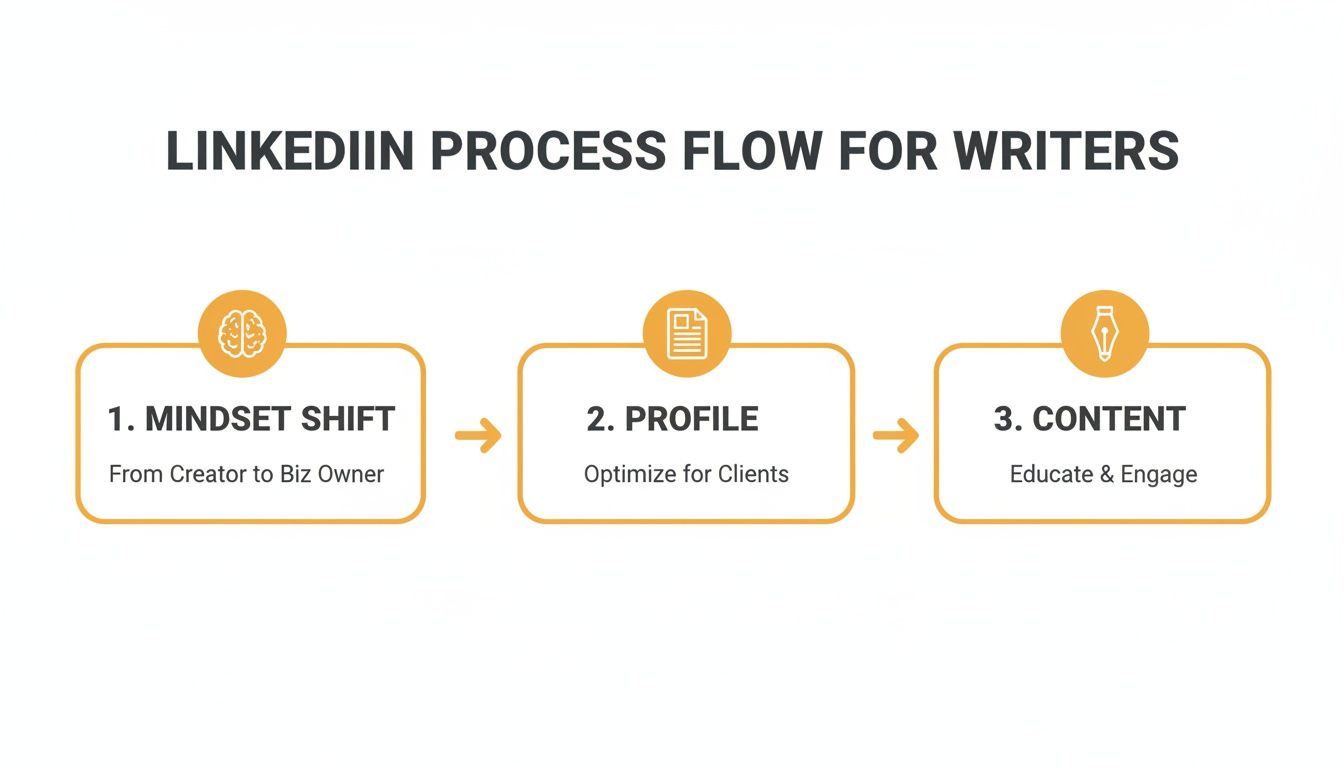
As you can see, success starts with a smart strategy, not just random activity. Getting this right prepares you for what’s next: building a profile that sells and creating content that attracts your dream clients. We dive deep into these topics in our complete guide on lead generation with LinkedIn.
Before we move on, let's quickly review the non-negotiables for your profile. This checklist covers the absolute basics you need to have in place.
Your LinkedIn Foundation Checklist
| Profile Element | Why It Matters | Quick Action Item |
|---|---|---|
| Professional Headshot | It’s your first impression. A clear, friendly photo builds trust instantly. | Upload a high-resolution photo where you look approachable and professional. No party pics! |
| Keyword-Rich Headline | This is prime SEO real estate. It tells people who you are and what you do. | Go beyond "Freelance Writer." Use a formula like: "I help [Your Niche] with [Your Service] to achieve [Their Goal]." |
| Compelling Banner | Your banner is a mini-billboard. It should visually communicate your value. | Create a simple banner with your value proposition, a client logo, or a call to action. |
| "About" Section | This is your sales page. It should tell a story and guide visitors to the next step. | Write it in the first person. Focus on your ideal client's pain points and how you solve them. End with a clear CTA. |
Getting these four elements right sets the stage for everything else. It ensures that when your great content brings people to your profile, they'll know exactly who you are, what you do, and why they should care.
Crafting A Client-Magnet LinkedIn Profile
Let's get one thing straight: your LinkedIn profile isn't just a digital resume anymore. It’s your 24/7 salesperson, working around the clock to grab the attention of your ideal clients. Think of it as your personal storefront. When a potential client lands on your page, every single element needs to work together to tell a story that makes them think, "This is the writer I need to hire."
We're not just talking about filling out all the sections. This is a strategic overhaul. The goal is to stop high-value clients mid-scroll and make your profile an undeniable pitch for your services. This shift is crucial. With 7 hires happening every minute on LinkedIn and 72% of recruiters using it as their go-to talent source, your profile is your main stage.
What’s more, hires made through LinkedIn are considered higher quality by 67% of recruiters. That's a huge nod to the platform's power. If you want to see the full picture, check out these insightful LinkedIn stats from The Social Shepherd.
Your Headline Is Your Hook
Please, stop using "Freelance Writer" as your headline. That tells people what you are, but it says nothing about what you do for them. Your headline is the single most valuable piece of real estate on your profile—it follows you everywhere you go on the platform, from comments to connection requests.
A headline that actually works needs to be:
- Client-Centric: Ditch the job title and focus on the outcome you deliver.
- Keyword-Rich: Use terms your ideal clients are actually searching for, like "B2B SaaS Content Writer" or "Healthcare Copywriter."
- Specific: Clearly state who you serve and the results you help them get.
For example, instead of just "Content Writer," try something punchier: "B2B Tech Writer | Turning Complex Ideas into Lead-Generating Content for SaaS Startups." See the difference? The second one instantly positions you as a niche expert and speaks directly to a specific client’s pain points.
Transforming Your About Section Into A Sales Page
This is where you turn a casual visitor into a warm lead. Your "About" section is your chance to connect, show off your expertise, and guide people to the next step. So many writers make the mistake of just listing skills like it's a resume. Don't do that. Instead, tell a story.
A great "About" section isn't really about you—it's about making your client the hero of the story. It should reflect their challenges and position you as the expert guide who can lead them to a solution.
Kick it off with a strong opener that hits on a major pain point. Something like, "Are your blog posts falling flat, failing to bring in leads? You're not alone." From there, introduce yourself as the solution, give a glimpse into your process, and drop some social proof (like a killer client result).
To really nail this, our guide on writing the perfect LinkedIn About section summary breaks it down with more examples and templates.
And always, always end with a crystal-clear Call to Action (CTA). Tell them exactly what you want them to do next. Book a call? View your portfolio? Send a DM? Make it stupidly simple for them to take that next step.
As you can see, the layout puts your name, headline, and the first few lines of your 'About' section right at the top—it's the first impression you make.
Using The Featured Section As Your Portfolio
The Featured section is your "show, don't tell" moment. You’ve told them you're a great writer; now it’s time to prove it. This is where you can pin your absolute best work, compelling case studies, glowing client testimonials, or links to your highest-performing content.
To make this section work for you:
- Pin Your Best Case Study: Choose a project that shows a clear, measurable ROI for a client.
- Showcase a High-Value Article: Link to a blog post or article that cements you as a thought leader in your space.
- Include a Link to Your Services Page: Give interested prospects a direct path to see what you offer and how to hire you.
This curated gallery gives potential clients tangible proof of your skills and the results you deliver, sealing the deal that the rest of your profile started.
Developing Your Signature Content Strategy
Let's be real: just tossing random thoughts and links onto your LinkedIn profile isn't going to land you high-paying clients. If you want to stop being a passive observer and start being an active authority in your space, you need a repeatable content system. It’s time to ditch the "spray and pray" method and build a content engine that actually brings leads to you.
The secret to this is the Content Pillar framework. Instead of trying to be an expert on everything under the sun, you'll pick 3-5 core topics you can genuinely own. These pillars are the bedrock of everything you post, making sure every single piece of content reinforces your expertise and speaks directly to your dream client.
Think of it like this: if a potential client scrolls through your last 10 posts, they should instantly get who you help, what you solve, and what you’re like to work with. That kind of consistency builds trust and makes you the obvious choice.
Choosing Your Content Pillars
Your content pillars should live at the intersection of what you know inside and out, what your clients are desperate for, and what you actually enjoy talking about. You want topics broad enough for endless ideas but specific enough to attract your perfect niche audience.
Start by jotting down answers to these questions:
- What are the top 5 questions clients always ask you? Ding, ding, ding! Each one is a potential content pillar.
- What common mistakes drive you crazy in your industry? Your expert insights can become a pillar focused on best practices.
- What's a unique process or framework you use? This is a fantastic way to build a pillar that highlights what makes you different.
- What industry trends are you genuinely excited about? A forward-looking pillar positions you as a thought leader, not just a follower.
So, for a B2B SaaS writer, pillars might be something like: "Long-Form SEO Content," "Product-Led Storytelling," and "Converting Bottom-of-Funnel Copy." If you're an author coach, maybe it's: "Building a Writing Habit," "Navigating Traditional Publishing," and "Book Marketing for Beginners."
Proven Post Formats That Work For Writers
Once you've got your pillars, you can plug them into post formats that are proven to grab attention and get people talking. LinkedIn isn't just a wall of text; it's about presenting your ideas in a way that makes people stop scrolling.
With 2 million posts hitting LinkedIn every single day, just showing up isn't enough. The data shows what people are actually engaging with: carousels get a whopping 6.60% engagement rate, and overall engagement is up 44% year-over-year. Comments have also jumped by 37%. For writers, this is a clear signal: valuable, well-structured content—especially in formats like carousels—is how you start the conversations that turn into business.
Here are four formats every writer should have in their back pocket.
The Client Success Story
This is your single most powerful sales tool. It's not about bragging. It’s about making your client the hero and showing off the real-world results you helped them get.
- Structure: Problem -> Your Process -> Solution -> The Awesome Result (with numbers!).
- Example: "My client's blog was a ghost town. We built a topic cluster strategy focused on what their users were actually searching for. The result? Organic traffic shot up 150% in 6 months, and they just closed their biggest deal ever from a blog post."
This format is pure social proof. It answers a potential client's number one question: "Can this person actually get me results?"
The Behind-the-Scenes Process
People are naturally curious. They love seeing how the sausage is made. This format pulls back the curtain on your work and builds a ton of trust by showing your expertise in action. Walk them through your research method, share your editing checklist, or explain how you run a client onboarding call.
When you're this transparent, hiring you feels way less risky because they already have a sense of your methodology.
The Contrarian Take
Don’t be afraid to challenge the common wisdom in your niche. A well-argued contrarian post can be a massive scroll-stopper and spark a lively debate in the comments. It shows you're a critical thinker, not just another writer parroting the same old advice.
- Example for a content writer: "Everyone says to publish more. I say publish less, but make it 10x better. Here's why one monster pillar page will crush 20 mediocre blog posts every single time..."
This is a fantastic way to generate comments and plant your flag as a true thought leader.
The Educational Carousel
Carousels (which are really just PDFs) are absolute gold on LinkedIn. They let you break down complex topics into simple, bite-sized slides that are easy to look at and digest. Use them to create mini-guides, share step-by-step tutorials, or offer up a useful checklist.
As you're thinking about topics, diving into a practical book marketing guide can give you tons of great material that can be repurposed beautifully into an educational carousel to attract clients.
When you combine these signature formats with your content pillars, you create a system. You'll never stare at a blank screen wondering what to post again. Instead, you'll have a reliable, effective engine for creating content that builds your authority and, most importantly, fills your pipeline with great clients.
Building An Engagement-Driven Posting Cadence
So you’ve started posting your brilliant content. That's a great first step, but it's genuinely only half the battle on LinkedIn. The other half—the part that actually gets the algorithm on your side and helps you build real relationships—is all about strategic engagement.
This isn’t about just scrolling through your feed. It’s about creating a solid routine that turns your network from a list of names into an active, buzzing community.
Think of it like this: every post you publish is you starting a conversation. If you drop a great idea and immediately walk away, the room just goes silent. A consistent engagement routine means you’re not just talking at people; you’re an active participant in the bigger discussion happening in your field. This tells LinkedIn you're a valuable member of the community, which in turn gives your own content a much-needed visibility boost.

The real goal here is to find a rhythm you can stick with without burning out. Consistency will always beat intensity. Trust me, it’s far better to post three times a week and genuinely engage than to post daily for a month before vanishing completely.
Finding Your Posting Sweet Spot
There's no single magic number for how often you should post. But for most writers trying to build a presence, a great place to start is 3-5 times per week. That’s frequent enough to stay on people’s radar and keep the algorithm happy, but not so much that it completely takes over your life.
What about the best time to post? You’ll hear a lot of advice about midweek mornings and lunch hours, and that’s often true. But your audience might be different. You have to do a little detective work.
- Test and Measure: For a couple of weeks, experiment with different days and times. Try posting at 8 AM, 12 PM, and 4 PM on a Tuesday, then a Thursday, and so on.
- Check Your Analytics: Dive into your LinkedIn analytics. The data doesn't lie—it will show you exactly when your content is getting the most eyeballs and interaction.
- Spy on Your Network: Pay attention to when the key players and ideal clients in your industry are most active. Their activity patterns are a massive clue.
Don’t get paralyzed by this at the start. Just pick a schedule, stick to it for a month, then look at the results and tweak from there. It’s all about building a sustainable habit.
The Power Hour Your Secret Weapon
Okay, this is one of my favorite tricks: the "Power Hour." It's a hyper-focused block of time you dedicate only to strategic engagement on LinkedIn. The key is that you’re not posting your own stuff during this time; you’re interacting with everyone else.
Doing a Power Hour right before or right after you hit ‘publish’ on a new post can give it an instant kickstart in the algorithm.
Your content is just an invitation to a conversation. The real networking happens in the engagement. I've found that the comments section is often more valuable than the post itself—that's where you build relationships and uncover opportunities.
Here’s a simple breakdown of what a Power Hour can look like:
- First 20 Mins - Reply to Everyone: Go to your latest post and engage with every single comment. Don’t just ‘like’ it; ask a follow-up question to keep the chat alive.
- Next 20 Mins - Comment on Influencers' Posts: Find 5-10 key people in your niche—the thought leaders, the big names. Drop a thoughtful, value-packed comment on their latest content.
- Final 20 Mins - Engage Your Feed: Now, scroll your main feed. Interact with posts from your existing connections and anyone who looks like an ideal client. This nurtures your network and keeps you visible.
Writing Comments That Actually Add Value
The gap between a comment that gets ignored ("great post!") and one that sparks a real conversation is huge. Let’s ditch the empty-calorie comments. We want every comment to count.
Here’s a dead-simple framework I use for writing comments that get noticed:
- Acknowledge & Agree: Start by highlighting a specific point from their post you connected with. "I love your point about..."
- Add Your Insight: Build on their idea with a quick personal story, a relevant fact, or your own professional experience. "In my experience with B2B clients, I've seen this exact thing happen when..."
- Ask a Question: Wrap it up with an open-ended question that invites a reply and pulls other people into the discussion. "How have you seen this play out with smaller startups?"
This little formula transforms your comment from a passive nod into an active contribution. It immediately positions you as a thoughtful expert, makes the original poster feel genuinely heard, and encourages a real dialogue. This is how you use LinkedIn for writers to do more than just broadcast—you use it to connect, build authority, and ultimately, land clients.
Turning Followers Into Paying Clients
Let's be real: likes and comments are nice, but they don't pay your invoices. The real power of LinkedIn for a writer kicks in when you figure out how to consistently turn those engaged followers into high-paying clients. This is the moment all your content creation and networking efforts actually start making you money.
It’s not some complicated, secret formula, but you absolutely need a plan. You have to build clear pathways for people to signal they’re interested, whether that’s a smart call-to-action in a post or a thoughtful DM that lands just right. Without that final piece, you're basically just shouting into the content void.
To do this right, you need to get good at two distinct but related skills: inbound and outbound lead generation. Inbound is all about attracting people to you, while outbound is about thoughtfully reaching out to your dream clients in a way that feels helpful, not annoying.
The Art of the Inbound Funnel
This is where your content does all the initial heavy lifting. When a potential client reads your post and has that "aha!" moment—"Wow, this person really gets it"—you need to tell them what to do next. That's the job of a great Call-to-Action (CTA).
Please, stop ending your posts with a flimsy "what do you think?" You have to guide them. A solid CTA is direct, clear, and makes it dead simple for them to take the next step.
- For someone ready to buy: "Seeing results like this for your own SaaS blog? Shoot me a DM with the word 'Content' and I'll send over my service guide."
- For those still in the learning phase: "If you want the full story, I broke it all down in a case study. The link is in the comments."
- To get a conversation going: "What's the single biggest content challenge you're wrestling with right now? Let me know below."
Every post isn't just for likes. It's for starting conversations. Public comments build your authority, but the DMs are where the real business happens.
When someone responds to your CTA or leaves a great comment, that's your cue. Move the conversation to a private channel. A simple DM like, "Hey [Name], thanks for the thoughtful comment on my post about [Topic]. Curious to hear how you're handling this at [Company Name]," is a perfect, non-pushy way to open the door.
Smart Outbound That People Actually Welcome
Let's face it, outbound on LinkedIn has a terrible reputation, and for good reason. Most people get it completely wrong, blasting out generic, salesy connection requests that everyone ignores. As a writer, your approach needs to be the polar opposite: personalized, value-first, and patient.
Forget about mass-messaging tools. Instead, make a list of 10-15 dream companies you’d kill to write for. Then, for the next week or two, just hang out where they are. Engage with their company posts and, more importantly, with the content from their key decision-makers. This is where you drop those insightful comments we talked about earlier.
Once you’re a familiar face, your connection request feels warm, not like a cold interruption.
Here’s a simple script that works:
"Hi [Name],
I've really been enjoying your posts on [Topic]—especially your take on [Specific Point] the other day.
As a [Your Niche] writer who works with companies in the [Their Industry] space, I'm always looking to connect with leaders like yourself.
Would be great to connect and keep up with your work."
This works because it proves you've actually paid attention. It's genuine. After they accept, don't immediately pounce with a sales pitch. That's the kiss of death. Just continue the conversation, offer an idea, and wait for the natural moment to mention how you can solve a problem for them. This patient, relationship-driven strategy is how you turn a stranger into a fantastic client.
Inbound vs. Outbound Lead Generation On LinkedIn
To make money as a writer on LinkedIn, you really need to understand both inbound and outbound strategies. One brings clients to your doorstep, while the other lets you go out and find them. Here’s a quick breakdown of how they stack up.
| Strategy | Primary Goal | Best For... | Key Challenge |
|---|---|---|---|
| Inbound | Attract and capture interest from your ideal clients through valuable content. | Writers with a consistent content cadence and an established (or growing) niche audience. | Can take time to build momentum; requires patience and consistent content creation to see results. |
| Outbound | Proactively identify and engage with specific, high-value dream clients. | Writers targeting a very specific type of client or those who need to generate leads more quickly. | Can feel "salesy" if not done with a personalized, value-first approach; requires research and tact. |
Ultimately, the most successful writers don't choose one or the other—they blend them. Your inbound content warms up potential leads, making your outbound messages feel less cold and far more effective.
Scaling Your Content With AI And Automation
Let's be real: to win on LinkedIn, you have to be consistent. But who has time to live on the platform 24/7? This is where working smarter, not just harder, comes into play. Think of AI and automation as your personal content assistants, there to do the heavy lifting so you can focus on what you do best—writing.
It's all about building an efficient system that works for you in the background. Imagine taking one solid idea and having an AI tool spin it into five different post drafts in seconds. You could have one that’s a quick tip, another that’s a contrarian take, and a third that tells a personal story. This is how you multiply your output without burning out.
Work Smarter With Automation
The real game-changer here is scheduling. By planning and loading up your content a week or two in advance, you guarantee a steady presence. The algorithm loves it, your audience stays engaged, and you don’t have to scramble for ideas on a busy Tuesday afternoon.
And what about that killer post you wrote last quarter? Don't let your best content collect dust. Your top-performing posts are goldmines waiting to be rediscovered. Automation tools can help you resurface and republish these "greatest hits," squeezing every last drop of value out of them. We actually have a whole guide on how to automate your LinkedIn posts if you want to dive deeper.
Even when you’re using AI for speed, your authentic voice is non-negotiable. The goal is to scale your process, not sound like a robot. Your personal touch is still your biggest advantage.
Of course, using AI effectively means the final output still has to sound like you. It's critical to understand how to avoid AI detection and humanize your content so you maintain that genuine connection with your readers. This blend of smart automation and a human-first approach is the secret to building a profitable LinkedIn presence that doesn’t completely take over your life.
Got Questions? Let's Get Them Answered
Diving into LinkedIn always brings up a few common questions. How often should you really be posting? Is Premium actually worth the money? Let's clear up some of the biggest hurdles writers face so you can move forward with a solid plan.
How Often Should I Post On LinkedIn?
Look, there’s no magic number here. Consistency beats frequency every single time. A solid starting point is 3-5 times a week. That’s enough to stay on people’s radar and keep the algorithm happy without burning yourself out.
But the real secret is listening to your audience and your analytics. Don't just post and pray.
Experiment with different schedules. Maybe you'll find that tech execs are scrolling first thing on a Tuesday morning, but the creative directors you want to reach are most active during their Thursday lunch break. Your data will tell you the truth.
The point isn't just to fill the void. It’s to start conversations. One fantastic post that gets people talking is infinitely more valuable than five that fall flat. Find a sustainable rhythm and focus on quality.
Do I Need LinkedIn Premium As A Writer?
Honestly, for most writers getting started, the free version of LinkedIn is plenty. You can build a killer profile, publish great content, connect with people, and land clients without spending a cent.
So, when does LinkedIn Premium start making sense? It becomes a game-changer when you’re ready to get serious about targeted, outbound prospecting.
Here’s what you’re really paying for:
- Seeing Who's Viewed Your Profile: This is gold. It’s a list of warm leads who are already curious about you.
- InMail Credits: These are your tickets to slide into the DMs of people you’re not connected to—perfect for reaching out directly to hiring managers or potential clients.
- Advanced Search Filters: This lets you get super specific and zero in on your ideal clients with scary precision.
My advice? Stick with the free version until you have a solid content and engagement strategy. Once you're ready to scale your outreach, grab a free trial of Premium and see if it actually makes you money. If it does, keep it. If not, cancel. Simple.
Ready to build a client-generating machine on LinkedIn without all the guesswork? RedactAI gives you AI-powered post ideas, one-click drafts in your unique voice, and smart scheduling to keep you consistent. Start creating high-impact content for free today at redactai.io.

















































































































































































