
Ready to publish your first LinkedIn Article? It's simpler than you think. From your LinkedIn homepage, just look for the ‘Write article’ button right at the top of your feed. Clicking that will take you into the long-form editor, which is your canvas for adding a headline, a killer cover image, and the body of your article before you send it out into the world.
Why LinkedIn Articles Are Your Secret Weapon
Let's be honest. The LinkedIn feed is a firehose of quick-hitter posts, fleeting updates, and snappy comments. In that sea of noise, a well-crafted article is your chance to truly make a mark. This isn't just another content format; it's a strategic play to build genuine authority in your field.
While short posts are fantastic for a quick engagement boost, articles give you the room to unpack complex topics, share detailed case studies, and kickstart the kind of meaningful conversations that lead to real, tangible opportunities.
Go Beyond Fleeting Updates
It's time to stop chasing vanity metrics. We're talking about building a durable professional brand that attracts high-quality connections and leads by showing what you know, not just what you did today. When I see experienced executives, top-tier consultants, and successful creators looking to make a lasting impression, they almost always turn to articles.
Here’s how I think about it: a standard post is like a quick chat in the hallway. An article? That's you delivering the keynote. One is temporary and easily forgotten, while the other becomes a permanent asset on your profile.
This format gives your ideas serious shelf life. An article you publish today can still be discovered months—or even years—down the line through Google searches and within LinkedIn’s own platform. It keeps working for you long after a standard post has vanished into the feed's abyss.
The Tangible Benefits of Publishing Articles
Publishing articles on LinkedIn offers concrete advantages that a simple post just can't touch. It's an absolute game-changer for anyone who's serious about their professional brand and establishing themselves as a thought leader.
Here are the key benefits I've seen firsthand:
- Establish Deep Expertise: You finally have the space to go deep on a topic, providing the kind of detailed analysis and unique insights that cement your reputation as the go-to expert in your niche.
- Boost Your Search Visibility: LinkedIn Articles are indexed by Google. This means your professional insights can show up in search results, driving traffic from outside LinkedIn directly to your profile.
- Nurture High-Quality Leads: By giving away real value and proving you know your stuff, you attract potential clients and partners who are already bought into your perspective before they even reach out.
- Build a Lasting Digital Asset: Every article you write becomes a permanent part of your professional portfolio, showcasing your thinking and expertise to anyone who lands on your profile.
The core difference is impact. A post gets likes; an article gets bookmarked, shared, and referenced. It’s the difference between a fleeting moment of attention and building a long-term reputation.
Your Guide to Publishing Your First Article
Alright, you've got a great idea simmering. Now, let's turn it into a published piece that gets people talking. Think of this as your pre-flight checklist—we'll walk through the practical steps to make sure your first LinkedIn article launches with the impact it deserves.
Getting Started: From Homepage to Editor
First things first, head to your LinkedIn homepage. Right there at the top of your feed, in the box where you’d normally write a short post, you'll see a "Write article" button.
Clicking that button drops you right into LinkedIn’s long-form editor. This is your canvas. It's a clean, straightforward interface where you'll add your headline, a cover image, and of course, the body of your article. Everything you need is right there.
The Hook: Your Headline and Cover Image
Your headline is more than just a title—it's your first impression. It's the one thing that will make someone stop scrolling through their feed and decide your article is worth their time. I always spend a good few minutes brainstorming options. Aim for something that's both clear and sparks a little curiosity. Ask yourself: what problem am I solving for the reader?
Next up, the cover image. This visual hook is just as critical as your headline. You'll want a high-quality, relevant image that visually represents your article's theme. A good size to shoot for is 700x400 pixels. If you can, steer clear of generic stock photos. A unique graphic you created or even a professional photo of yourself adds a personal touch that helps build trust with your audience.
The Nitty-Gritty: Writing and Publishing
You can write an article on the LinkedIn mobile app, but honestly, I'd strongly suggest sticking to a desktop. The bigger screen and a real keyboard make it so much easier to get your formatting right, embed multimedia, and give it a final, thorough proofread.
My personal workflow? I draft everything in a separate app like Google Docs first. This lets me focus purely on the writing without getting distracted by formatting. Once the words are right, I copy and paste it into the LinkedIn editor for the final touches.
Ready to go live? Here's the final checklist:
- One last proofread. Seriously, read your article out loud. It's the best way to catch typos and clunky sentences you might otherwise miss.
- Add your hashtags. When you hit the 'Next' button to publish, a new window pops up. This is where you write a short introductory post to go with your article. Drop in 3-5 relevant hashtags here to help the right people find your work.
- Hit "Publish." And that's it! Your article is live for the world to see. It will show up on your profile and start appearing in your connections' feeds.
Remember, the goal isn't just to fill the space. It’s to add real value. The LinkedIn algorithm has gotten much smarter, and it now rewards genuine expertise and meaningful conversations over just posting for the sake of it.
Recent analysis shows the platform's AI gives a serious boost to content that delivers clear, niche-specific value. To really make sure your articles get the visibility they deserve, it pays to consult an expert guide on how to post articles on LinkedIn for maximum reach.
Understanding these little details is a game-changer. After all, reps with a high Social Selling Index (SSI) generate 45% more opportunities—a powerful reminder of what consistent, targeted content can do. Take the time to learn how the algorithm works, and you'll give your content its best shot at success.
Mastering Formatting and Visual Appeal
Let's be honest: a giant wall of text is where engagement goes to die. If you want people to actually read, absorb, and share your insights on LinkedIn, you have to create an experience that’s inviting and easy on the eyes. Good formatting isn’t just about making your article look pretty; it’s a sign of respect for your reader's time.
The right structure guides your reader through your main arguments, making your message land with much more impact. A few simple tweaks can turn a boring article into something people genuinely want to read. The goal here is to break up the monotony and use visual cues to signal what's important.
Building a Scannable Structure
The first rule of writing for the web is to make it scannable. Busy professionals will almost always skim an article to decide if it’s worth their time. Make that decision easy for them by using clear, descriptive subheadings to break your content into logical chunks.
Think of your subheadings as signposts. Instead of a vague heading like "My Thoughts," try something specific that promises value, like "Why Most Content Strategies Fail." Right away, the reader knows what they'll get from that section.
Another go-to tool in my kit is using lists. They are absolute gold for breaking down complex ideas into bite-sized, digestible points.
- Bulleted Lists: Perfect for non-sequential items like benefits, examples, or a collection of ideas. They draw the eye and make information super easy to process.
- Numbered Lists: These are your best friend for step-by-step instructions or when you're ranking items. The sequence provides a natural, logical flow for the reader.
And please, don't be afraid of white space. Short paragraphs—sticking to two or three sentences max—give your content room to breathe and stop your reader's eyes from glazing over.
Adding Visuals to Boost Engagement
Text alone just doesn't cut it anymore. One of the best ways to make your article more dynamic and memorable is to strategically embed multimedia. Visuals don't just break up the text; they can illustrate your points, add a layer of credibility, and give the reader a welcome mental break.
For example, you could embed a relevant YouTube video to explain a concept, drop in a SlideShare presentation with key data, or create a custom graphic. Just make sure any visual you choose is high-quality and directly supports what you’re saying. For more on this, check out our deep dive on the perfect image size for a LinkedIn post.
The data backs this up. Smart choices about your content, like word count and how you present yourself professionally, can have a huge effect on engagement.
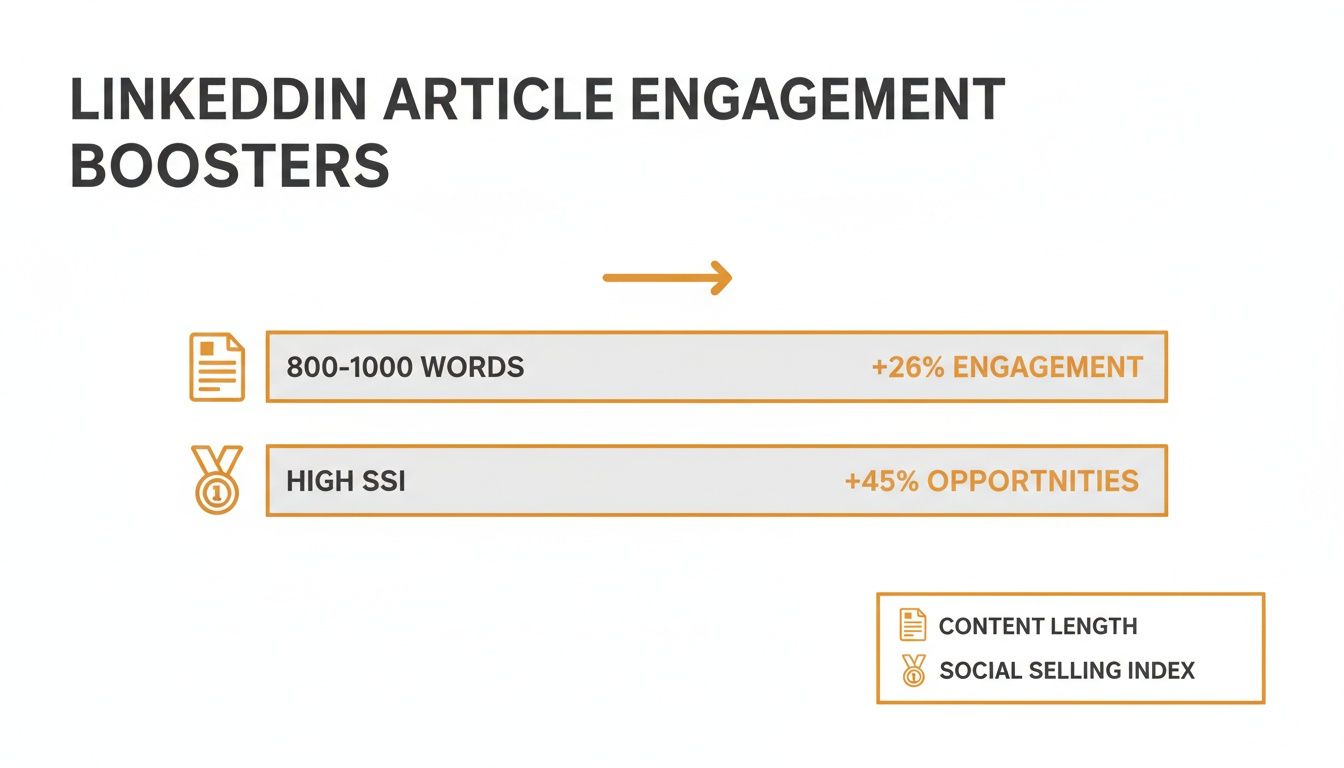
This really drives home the point that LinkedIn’s algorithm tends to reward longer, more thoughtful articles and a strong professional presence (which is what your Social Selling Index, or SSI, measures).
Formatting Impact on Reader Engagement
Let’s look at a quick comparison to see just how much of a difference these formatting choices can make.
| Formatting Element | Poorly Formatted (The 'Before') | Well-Formatted (The 'After') | Impact on Reader |
|---|---|---|---|
| Paragraphs | A single, dense block of text with 10+ sentences. | Short, focused paragraphs of 2-3 sentences each. | Prevents overwhelm and makes the content feel approachable. |
| Subheadings | No subheadings, or generic ones like "Introduction." | Clear, descriptive H3 subheadings that outline the section's content. | Allows readers to skim and find the information most relevant to them. |
| Lists | Key points are buried within a long, rambling sentence. | Bulleted or numbered lists are used to highlight key takeaways or steps. | Makes complex information scannable and easier to remember. |
| Bolding & Emphasis | All text has the same weight and importance. | Bold text is used strategically to emphasize stats, keywords, and critical phrases. | Draws the eye to the most important information, increasing retention. |
As you can see, the "after" column doesn't just look better—it creates a fundamentally better and more effective reading experience.
Key Takeaway: Thoughtful formatting isn't an optional final step; it's a core part of the writing process. A well-structured, visually appealing article is far more likely to be read, understood, and shared than a dense block of text, no matter how brilliant the ideas are.
Optimizing Your Article for Maximum Discovery
You did it. You hit "Publish." But that's just the first step. Now, we need to make sure the right people actually see your work. This is where you put on your marketer hat and think about getting your article discovered, both on LinkedIn and through search engines like Google.
Think of it this way: you’ve just started a great conversation, but now you have to invite people to join in. The whole point is to make your content pop up when professionals are actively looking for the exact expertise you’re sharing.
Weaving in Keywords Naturally
SEO isn’t just a Google thing. LinkedIn has its own powerful search bar, and people in your network are using it every day to find solutions, connect with experts, and learn new things. Before you even write, take a moment to think: what would someone type into that search bar if they needed the advice in my article?
Once you have a few phrases in mind, make sure they show up in a few strategic spots:
- Your Headline: This is prime real estate, don't waste it. A title like "My Thoughts on Project Management" is vague. Something like "5 Project Management Techniques to Keep Your Team on Track" is instantly more searchable and compelling.
- The First Few Paragraphs: State your topic clearly right at the beginning and work your main keywords in naturally. This tells both your reader and the algorithm what to expect.
- Subheadings: Your H2s and H3s are perfect for breaking up text and slotting in related keywords. They act as signposts for your reader and for search.
The key is to sound like a human, not a search-obsessed robot. Write for people first, then go back and make a few small tweaks for discoverability. If a sentence feels clunky or stuffed with keywords, just rewrite it. Authenticity is always the better play.
The Power of Smart Hashtags
Hashtags are your article's best friend. They act as distribution channels, pushing your content far beyond your immediate connections to anyone following that topic. When you publish, LinkedIn prompts you to write a little introductory post. This is your moment to add those crucial hashtags.
Don’t just throw random hashtags at the wall and see what sticks. Take five minutes to search for tags on LinkedIn. Pay attention to how many followers they have. The sweet spot is usually a mix of popular, broad tags and more specific, niche ones.
Let's say you wrote about leading a remote team. Your hashtag mix might look like this:
- #Leadership (Super broad, millions of followers)
- #RemoteWork (Much more specific to your topic)
- #TeamManagement (A related, skill-focused tag)
I’ve found that three to five highly relevant hashtags are all you need. This approach helps your article land in front of a wider, but still very interested, audience. If you want to dive deeper into how LinkedIn's algorithm sees your content, it's worth understanding what goes into measuring your impressions on LinkedIn.
One last pro tip: end your article with a powerful, open-ended question. This is one of the easiest and most effective ways to get a conversation going in the comments. Instead of a bland summary, ask something like, "What's the biggest challenge you've faced with this?" This simple shift turns passive readers into active participants, which sends a strong signal to LinkedIn that your content is creating real engagement.
Don't Just Publish—Promote and Repurpose Like a Pro
That feeling when you hit "publish" on a fresh LinkedIn article is awesome, but don't close that tab just yet. Your work has only just begun. The difference between an article that gets a few likes and one that cements your authority for months? A solid plan for what comes next.
Think of it this way: your article is the main course, and now you need to serve up some delicious appetizers and bite-sized desserts. The first 24 hours are critical for getting that initial burst of momentum. Don't just drop the link and run. Tease a key insight from the article or ask a provocative question in your post to give people a real reason to click.
Get Your Article in Front of New Eyeballs
Your own network is a great start, but it's just that—a start. To really make your article work for you, you've got to get it out there where your ideal audience is already hanging out.
- Drop it in Relevant LinkedIn Groups: Pick two or three active groups in your niche. But please, don't just dump the link. Write a short, custom intro that speaks directly to the group's members and their specific pain points.
- Share it with Your Email List: These are your people! Your email subscribers have already given you permission to land in their inbox. Send them a quick, personal note about why you wrote the piece and what you hope they get out of it.
- Cross-Post to Other Socials: Your article can definitely find a home on platforms like X or Facebook. Just remember to tweak the caption. The professional tone that works on LinkedIn might need to be a bit more casual or punchy elsewhere.
The idea is simple: create more doorways that lead back to your big idea. Meet people where they are.
The True Power of Content Repurposing
This is where the real magic happens. Stop seeing your article as a one-and-done deal. It's a goldmine. You can (and should) be mining it for fresh content for at least a week. If you really want to get the most mileage from your work, understanding effective content repurposing strategies will change the game for you.
This approach also happens to feed the LinkedIn algorithm exactly what it loves: consistency.
Seriously, posting consistently is one of the best things you can do for your visibility. Data from Buffer shows that accounts posting 2 to 5 times per week see a huge lift in impressions and engagement. In fact, some pages that post weekly see 5.6x more follower growth. Repurposing is how you hit that cadence without burning out.
Your deep-dive article is a pillar. From that one pillar, you can build an entire week's worth of content. A single 1,500-word article can easily be sliced and diced into five to seven smaller, engaging posts that keep you top-of-mind.
Here’s how you can start breaking it down immediately:
- Snag a key statistic from the article and whip up a simple graphic for a visual post.
- Pull out a powerful quote and turn it into a text-only post. These perform surprisingly well.
- Summarize one main section into a three-point bulleted list. It's short, scannable, and valuable.
- Record a quick 60-second video of you talking through the article’s number one takeaway.
This isn't just about saving time (though it saves a ton). It's about creating a steady, reliable stream of valuable content that reinforces your expertise. To dive deeper into this process, check out our guide on https://redactai.io/blog/content-repurposing-strategies.
Got Questions About LinkedIn Articles? I've Got Answers.
Jumping into any new content format always brings up a few questions. As you start figuring out how to post articles on LinkedIn, you're bound to have some "wait, how does this work?" moments. I've been there.
Let's clear up some of the most common sticking points I see people run into when they're getting started.
So, How Long Should My LinkedIn Article Actually Be?
This is the big one, isn't it? Everyone wants to know the magic word count for success. The truth is, there isn't one.
Sure, you'll see massive, in-depth guides hitting 2,000 words that do incredibly well. But you don't have to write a novel. Plenty of powerful, high-impact articles land somewhere in the 350 to 800-word sweet spot.
My advice? Stop obsessing over the word count and start obsessing over the value. Your article should be long enough to solve a problem or answer a question completely, and not a single word longer. Don't add fluff just to hit a number. Deliver a complete thought, and you're golden.
Help! My Article Bombed. Should I Just Delete It?
Nope. Don't you dare touch that delete button. It's totally normal to feel a bit let down if your masterpiece only gets a handful of likes in the first day, but deleting it is a massive missed opportunity. A LinkedIn article isn't like a feed post that disappears after 48 hours; it’s a long-term asset.
Think of it this way: Your article's real power isn't just in the initial buzz. Since Google indexes LinkedIn Articles, they can keep pulling in traffic and eyeballs to your profile for months—sometimes even years—after you hit publish. Low engagement right out of the gate doesn't mean it's a failure. It just means the right people haven't found it yet.
Instead of hitting delete, think about how you can breathe new life into it. You could share it again next month with a fresh take, slice it up into smaller, bite-sized posts, or even go back and update it with new insights down the road.
What's the Real Difference Between a Post and an Article, Anyway?
Understanding this is absolutely critical to a solid LinkedIn strategy. They’re two different tools for two different jobs. Using the right one at the right time is what separates the pros from the amateurs.
Here’s how I break it down for people:
| Feature | LinkedIn Post | LinkedIn Article |
|---|---|---|
| Length | Quick hits and soundbites. You've got a 3,000-character limit. | The deep dive. Perfect for 500+ words of in-depth content. |
| Purpose | Great for sparking conversation, sharing quick news, or asking questions. | Built for establishing your expertise and sharing evergreen, foundational content. |
| Lifespan | Here today, gone tomorrow. It lives in the feed for a day or two, tops. | A permanent part of your professional legacy. Lives on your profile and is found on Google. |
| Format | Basic. You get some bold and italics, but that's about it. | All the bells and whistles. Think headlines, subheadings, images, video embeds, and more. |
A post is like a quick chat you have in the hallway at a conference. An article is the keynote presentation you give from the main stage. You need both to build a powerful presence. Use posts for daily interaction and articles to build that deep, unshakeable authority in your field.
Ready to stop staring at a blank screen and start publishing content that builds your brand? RedactAI creates a personalized language model based on your unique expertise and style, giving you an endless stream of post ideas and one-click drafts. Join over 21,000 creators and craft high-impact LinkedIn posts in minutes. Start for free at RedactAI.
























































































































































































