
First things first, to get your LinkedIn Page off the ground, you'll start from your personal profile. Just log in, find the "Work" dropdown menu in the top right corner, and click "Create a Company Page." LinkedIn will then walk you through choosing your page type, plugging in your company details, and uploading a logo. Once you hit that "Create page" button, your brand officially has a professional home on the platform.
Why Your LinkedIn Page Is a Deal-Maker (Or a Deal-Breaker)
Before we get into the nitty-gritty of setup, let's get our heads in the right space. A LinkedIn Page isn't just another social profile you create and forget. It’s your company's digital handshake, your main stage for networking, generating leads, and finding your next great hire.
Think about it. When a potential high-value client or that dream candidate looks you up, your LinkedIn Page is often the first thing they'll see. What does it say about you? Does it scream "expert," or does it whisper "we're not really trying"? A polished, active page immediately sets you apart from the competition, turning a simple profile into a serious business tool.
It's a Hub, Not a Brochure
If your page is just a static list of services, you're missing the point entirely. It needs to be a living, breathing hub that proves you know your stuff and builds genuine trust.
I worked with a small consulting firm that landed a massive B2B contract for one simple reason: their page was packed with insightful case studies. The client saw tangible proof of their results before ever picking up the phone. Another great example is a tech startup that snagged two senior engineers by showing off their team's collaborative projects and fun company culture. Their page told a story that a boring job description never could.
A well-tended LinkedIn Page is an active engine for growth, not a passive online listing. It validates your brand, attracts the right people, and brings in qualified leads by showing your value in real time.
Tying It All Together
This all makes even more sense when you zoom out. A strong LinkedIn presence is a cornerstone of most successful social media strategies for B2B marketing. It’s where you share your best content, engage with your audience, and run targeted ads. Without a credible page as your home base, all those other efforts can fall flat.
So, let's shift our thinking from "I guess I need a page" to "I'm building a strategic asset that works for my business 24/7."
Building Your Page Foundation from Scratch
Alright, let's roll up our sleeves and get this page built. The first few steps are easily the most important—they lay the entire groundwork for your brand's professional presence on LinkedIn. We're not just filling in the blanks here; we're making strategic choices from the very beginning.
The whole process kicks off from your personal profile. Just head to the "Work" menu in the top right corner and click "Create a Company Page." This brings you to your first big decision: picking the right page type. For most businesses, Company is the way to go. But if you’re launching a page for a specific product line or a school, LinkedIn gives you Showcase page and Educational Institution options, too.
Defining Your Brand in 120 Characters
Once you've picked your page type, you'll fill in the basics like your company name and industry. Now, here's a spot where I see a lot of people miss a huge opportunity: the tagline. This isn't just a catchy slogan. It's a 120-character elevator pitch that sits right under your company name, and it needs to instantly tell people what you do and why they should care.
Skip the generic "Marketing Solutions Provider." Instead, get specific and hook the reader. Something like, "We Help B2B SaaS Startups Build Unforgettable Brands," immediately tells visitors if they're in the right place. That kind of clarity is gold because it helps you attract the right audience from the get-go. While you're at it, make sure you claim a clean, simple custom URL (like linkedin.com/company/your-brand-name). It just looks so much more professional than a random string of numbers.
Think of it this way: a well-built LinkedIn Page becomes a powerful asset that drives credibility, pulls in leads, and even helps you find great talent.
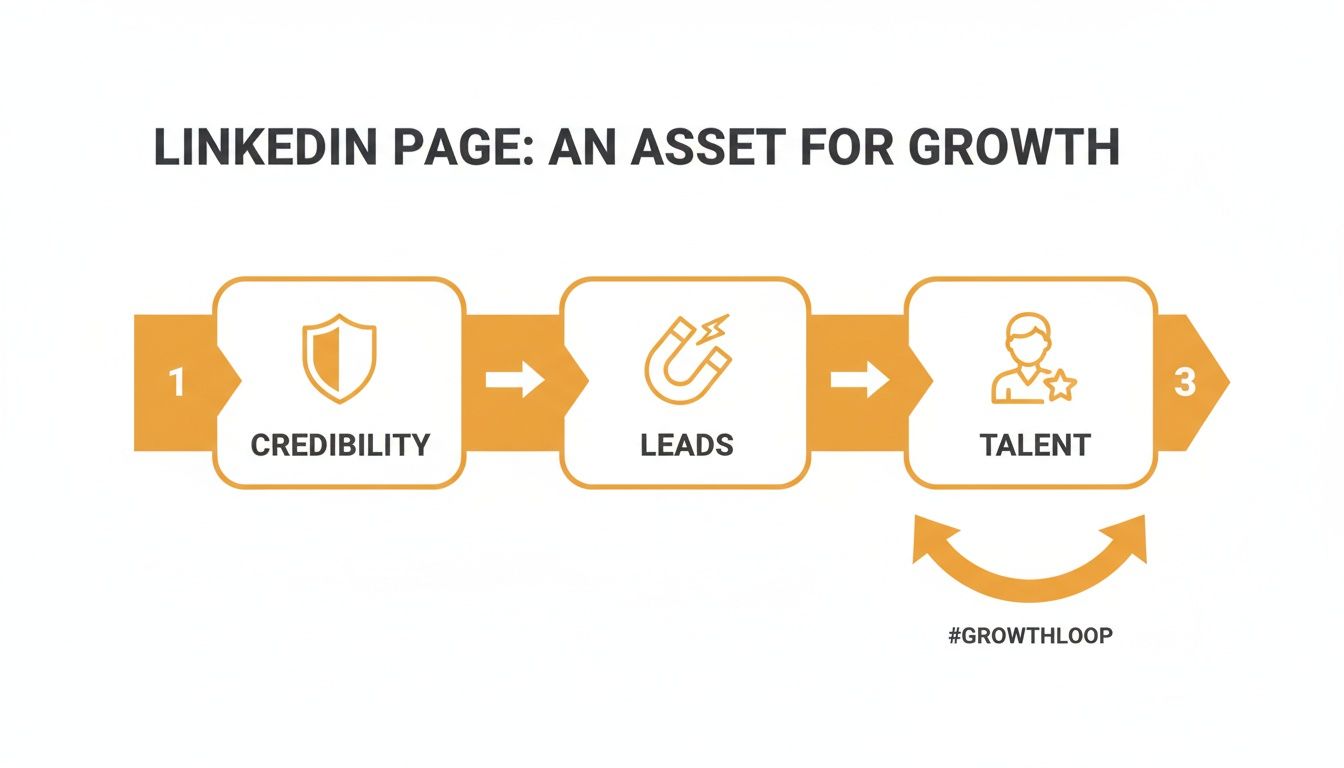
Every single element you add contributes to this growth cycle. It's what turns your page from a static, passive profile into an active, lead-generating machine.
Crafting a Compelling About Section
Your "About" section is your chance to tell your story. You've got up to 2,000 characters, so don't waste them on a dry, boring list of services. No one wants to read that.
Instead, think of it as a mini-narrative:
- The Hook: Kick things off with a strong statement about the problem you solve.
- The Solution: Naturally, this is where you explain how your products or services fix that problem.
- The Proof: Mention who you serve (your ideal customer) and what sets you apart from the competition.
- The Call to Action: End with a clear next step. Tell them what you want them to do, whether that's visiting your website or booking a demo.
Getting all these details right is about more than just looking good—it's about being seen. The data doesn't lie: pages with complete information get a serious boost. According to LinkedIn, they see up to 30% more weekly views. Active pages can get 5× the page views compared to incomplete ones. If you're interested in diving deeper into these kinds of numbers, the team at Sprout Social often shares great insights.
To make this super clear, here’s a breakdown of the essentials for a complete and effective page.
Key Elements for a Complete LinkedIn Page
This table outlines the essential components needed to fully optimize your new LinkedIn page for maximum visibility and engagement.
| Element | Best Practice | Impact on Visibility |
|---|---|---|
| Profile & Cover Photo | Use a high-resolution logo and a branded, visually appealing cover image. | Creates a professional first impression and reinforces brand identity. |
| Custom URL | Claim a clean, memorable URL that matches your brand name. | Improves searchability and makes your page easier to share and find. |
| Tagline | Write a clear, benefit-driven 120-character pitch. | Instantly communicates your value proposition to visitors. |
| About Section | Fill out the full 2,000 characters with a compelling narrative and keywords. | Significantly boosts SEO within LinkedIn and tells your brand story. |
| Location & Contact | Add your primary address, phone number, and website. | Helps local customers find you and provides clear contact paths. |
| Custom Button | Choose a relevant call-to-action like "Visit website" or "Contact us." | Drives traffic and conversions directly from your page. |
Filling out these sections signals to both the algorithm and your audience that you’re serious, which is exactly the message you want to send.
Remember, every field you complete is another signal to both the LinkedIn algorithm and potential followers that your business is legitimate, active, and worth paying attention to. A half-finished page suggests a half-hearted effort.
Designing Visuals That Capture Attention
On a platform famous for its sea of blue and white, your visuals are your single best shot at making a lasting first impression. You don't need a fancy design degree to pull this off, but you absolutely need a smart approach for your two most critical visual assets: your logo and your cover image.
These aren't just there to fill empty space; they're your brand's digital handshake. A sharp, clean logo tells people who you are, while the cover image tells them your story.
Optimizing Your Logo and Cover Image
Let’s get the technical stuff out of the way first. Your logo needs to be a 400x400 pixel square. This spec is crucial because LinkedIn will shrink it down into that tiny circle next to your posts, and anything less will look blurry. Pro tip: don't cram a bunch of text in there. Your brand mark or a simplified version of your logo almost always works best.
Your cover image is where you can really let your brand’s personality shine. The magic number here is 1128x191 pixels. Think of this space as your company’s billboard—it’s the first thing people see, so make it work for you. If you ever need a quick cheat sheet for image sizes, our guide on LinkedIn post specs is a great resource to have on hand.
Your LinkedIn cover image isn't just decoration; it's a strategic piece of marketing real estate. Use it to communicate your value proposition, showcase your work, or highlight a key message in the few seconds you have to capture a visitor's attention.
Smart Strategies for Your Cover Image
A great cover image should be doing some heavy lifting. Please don't just splash your logo on a solid background and call it a day. Instead, ask yourself: what’s the one thing I want a new visitor to know about us instantly?
I’ve seen some brilliant examples out in the wild:
- A SaaS company used their banner to hype a huge new feature integration, using a clean graphic and a snappy tagline.
- A creative agency turned their cover image into a mini-portfolio, cycling through a collage of their most impressive client projects.
- A B2B consultant put a powerful one-sentence client testimonial right in their banner, which is an instant way to build credibility.
Your cover image should always support your main business goal. Are you trying to drive website traffic? Announce a webinar? Show off your team? Use simple, high-contrast text and compelling visuals that feel like your brand. Getting this visual one-two punch of a sharp logo and a strategic cover right is a foundational step when you create LinkedIn Pages that are built to perform.
Creating Content That Connects and Converts
An empty LinkedIn Page is like a ghost town—it has potential, but no one's sticking around. Now that you’ve laid the groundwork, it's time to bring your Page to life with content that people actually want to read, share, and talk about. This is where you turn a static profile into a lively community hub, and it all starts with getting off the content hamster wheel.
Instead of just posting to post, you need to think about what your audience genuinely needs. I’ve found that the best-performing content on LinkedIn is generous. It gives away real value, whether that’s a hard-won insight, a practical tip, or a story that resonates. That’s how you build the trust and authority that matter on this platform.
Planning Your First Few Posts
Those first few posts you make are critical; they set the tone for everything that follows. Please, don't just announce "We're on LinkedIn!" and call it a day. Make your launch week count with a strategic mix of content that leaves a strong first impression and earns you those crucial first followers.
To get the most out of your efforts, it's worth learning how to create a robust content strategy specifically for your LinkedIn Page. Here are a few ideas to get you started for that first week:
- The Welcome Post: Think of this as your grand opening. Share your mission, introduce the real people behind the brand, and tell followers exactly what kind of value they can expect from following you.
- A "Behind the Scenes" Look: People connect with people. Post a photo of your team in a brainstorming session, a quick video tour of your workspace, or a short story about a recent challenge your company overcame. Authenticity goes a long way.
- Your First "Value Bomb": Give away something genuinely useful. It could be a piece of advice, a quick industry tip, or a surprising statistic your audience will find valuable. This immediately positions your Page as a resource, not just a billboard.
Diversifying Your Content Formats
Text-only posts are fine, but relying on them alone will make your feed feel stale. To keep your audience hooked, you need a variety of content formats. The format you choose can make a huge difference in your reach and engagement. For example, video content typically gets around 5× more engagement than a simple text update.
In fact, video is blowing up on the platform, with viewership expected to jump by about 36% in early 2025. Here’s the real kicker: only about 1% of LinkedIn users post content every week, yet they generate a massive slice of the platform's impressions. This is a golden opportunity—if you show up consistently with quality content, you will stand out.
Don't just share information; create experiences. Use carousels to tell a data-driven story, run polls to gather audience opinions, and ask open-ended questions to spark genuine conversations in the comments.
A great LinkedIn content strategy is all about this kind of variety. For example, you can take a single blog post and spin it into multiple pieces of content: a carousel highlighting the key stats, a short video summarizing the main takeaways, and a text post asking a related question. This approach gets more mileage out of your work and keeps your feed fresh and interesting.
Your Game Plan for Getting the First 100 Followers
Alright, your page is built and looking sharp. But now comes the real challenge: getting people to actually see it. Getting that first wave of followers is all about being strategic and personal, not spammy. The goal isn't just to hit a number; it’s to build a core audience that will actually care about and engage with what you post.
Your first move? Tap into the connections you already have. LinkedIn gives every page admin a bank of monthly credits to invite their personal connections to follow the page. Don't just spray and pray by inviting everyone. Be thoughtful. Start with your colleagues, current and past clients, and industry friends who you know will be genuinely interested. A personal invite from someone they know goes a long, long way.
Expanding Your Reach Organically
Once you’ve worked through your immediate circle, it's time to weave your new page into your everyday activities. These small, consistent actions can drive follower growth without you having to do a hard sell.
Here are a few simple but surprisingly effective tactics:
- Tweak Your Email Signature: Add a “Follow us on LinkedIn” link or button. Seriously, think about how many emails you send a day. Every single one is a tiny billboard for your new page.
- Cross-Promote on Other Socials: Let your followers on other platforms know you have a new professional home on LinkedIn. Tell them what kind of exclusive content or insights they can expect to find there.
- Get Your Team on Board: Your employees are your biggest brand champions. Ask them to add the new Company Page to the "Experience" section of their personal profiles. This is huge—it links their profile directly to your page and puts it in front of their entire network.
The smartest launch strategies always start with warm outreach. Begin with the people who already know and trust you, then build simple, organic pathways for new people to find their way to your page.
Nailing Your First Week of Content
To make a killer first impression, you can't just launch your page and then go silent. You need a content plan for that first week that immediately shows people what you're all about. A steady drumbeat of quality content is what turns a page visitor into a follower.
I'd recommend aiming for at least 3-5 solid posts during that first launch week. This shows you're active and committed.
Start with a genuine "welcome to our new page" post. Then, follow it up with content that showcases your expertise, gives a peek into your company culture, or talks about the problems you solve. That initial push to get your first 100 followers really does set the tone for long-term growth.
And if you’re hungry for more, our deep-dive guide on how to get more LinkedIn followers is packed with next-level strategies.
Got Questions About Your LinkedIn Page? We’ve Got Answers.
When you first start building a LinkedIn Page, a few questions always pop up. It's totally normal. Getting these sorted out from the beginning will save you a ton of headaches down the road and let you build your page like you know what you're doing.
So, let's tackle the big ones.
The most common question I hear is, "What's the real difference between my personal profile and a company page?" Here's the simplest way to think about it: your personal profile is your professional handshake. It's your story, your network, your individual voice. Your company page, on the other hand, is the company's official storefront. It's the voice of the entire brand, a window into your culture, and the central place where all your employees can gather online.
And yes, you absolutely need a personal profile to start a company page. Your profile has to be at least seven days old and in good standing. This is LinkedIn's way of making sure there's a real, accountable human behind every brand, which keeps the platform trustworthy.
Who Holds the Keys? Managing and Measuring Your Page
People often ask if one person can run the whole show. Technically, yes, but I strongly advise against it. What happens if that one person wins the lottery and quits? You're locked out. Always, always add multiple page admins.
LinkedIn has different admin roles for a reason. You can assign a "Super Admin" with total control, or you can give someone "Content Admin" access so they can post but can't touch the core settings. This lets you spread the work around without giving everyone full access.
Then there’s the big question of success. It's easy to get hung up on your follower count, but trust me, that number is mostly for vanity. The real magic is in your engagement.
Don't just chase followers. The metrics that truly matter are your engagement rate (how many people interact with your posts), your click-through rate (how many people click your links), and the actual conversations happening in the comments. That's how you know your page is actually working.
These numbers tell you if you're connecting with the right people, not just collecting a bigger audience.
The Nitty-Gritty: Your Page URL
Okay, let's talk about that custom URL you set up. A lot of people worry, "Can I change it if I need to?" The short answer is yes, you can. The catch? You can only do it once every 30 days.
But just because you can change it doesn't mean you should. Think about it: that URL is probably in your email signature, on your business cards, and linked all over your website. Changing it will break every single one of those links. My advice has always been to nail it on the first try. But it's good to know you have an out if your company ever goes through a massive rebrand. Getting these details right from the start is how you build a LinkedIn page that lasts.
Tired of staring at a blank screen trying to come up with your next LinkedIn post? Let RedactAI do the heavy lifting. Our AI-powered tool analyzes your unique style to generate authentic, high-impact posts in minutes, so you can focus on building your brand, not just your content calendar. Start for free and see the difference.















































































































































































