
So, what exactly is a LinkedIn impression? Put simply, it’s the number of times your post shows up in someone's feed. That’s it.
Think of it like a billboard on a busy highway. Every single time a car drives by, that's one impression. The driver doesn't have to read the sign or even remember it, but their car passed it. On LinkedIn, it's the most basic way to measure if your content is getting out there at all.
What LinkedIn Impressions Mean A Simple Analogy
Let's ditch the marketing jargon for a second. Imagine you're at a huge industry conference and you've set up a booth. An impression is counted every time someone walks past and lays eyes on your sign.
They don't have to stop and chat. They don't even need to slow down. If their gaze sweeps across your booth for just a moment, that counts as one impression. This is a crucial distinction: impressions track opportunity, not engagement. If the same person wanders past your booth three times during the day, that's three separate impressions.
Visibility as the First Step
Why should you care about this? Because visibility is the first step to everything else. Before anyone can like, comment on, or share your post, they have to see it first. Impressions are the very top of your content funnel.
An impression is the foundational metric for all other LinkedIn activity. Without impressions, you can't get reach, engagement, or conversions. It's the first and most critical signal that the algorithm is giving your content a chance to perform.
For anyone trying to build a brand or professional presence, getting those initial eyeballs is non-negotiable. This is where creating compelling posts with tools like RedactAI comes in. You need content that grabs attention in that split second, turning a passing glance into something more.
The Power of Different Formats
Here's the thing: not all content is created equal in the eyes of the algorithm. Certain formats get way more screen time. Video, for instance, has been on a tear.
A recent analysis of over 577,000 posts found that video impressions shot up by a whopping 73% year-over-year. That led to a 36% jump in watch time. If you want to learn more about what's working right now, you can dig into the full 2025 LinkedIn study to see how different types of content can seriously boost your visibility.
Impressions vs. Reach vs. Engagement: What's the Real Difference?
When you dive into your LinkedIn analytics, you'll see "impressions," "reach," and "engagement" everywhere. It’s easy to lump them together, but they actually tell you three completely different things about how your content is performing. Nailing down what each one means is the first step to figuring out what's working and what's not.
Let's break it down with a simple analogy. Think of impressions as the total number of times your post was simply shown on someone's screen. If Sarah scrolls past your post in her feed in the morning and then sees it again that afternoon, that’s two impressions. It's all about raw visibility—how many times your content made an appearance.
Reach, however, is about unique eyeballs. In that same scenario, Sarah only counts as one person reached, even though she saw the post twice. Reach tells you how many individual people laid eyes on your content.
From Just Seeing to Actually Doing
Then you have engagement, which is where the magic really happens. This is the good stuff: the likes, comments, shares, and clicks. Engagement tells you if people didn't just see your post, but if it actually made them stop and do something. It’s the difference between someone walking past a billboard and someone stopping to read it and then telling a friend about it.
This quick visual breaks down how these pieces fit together.
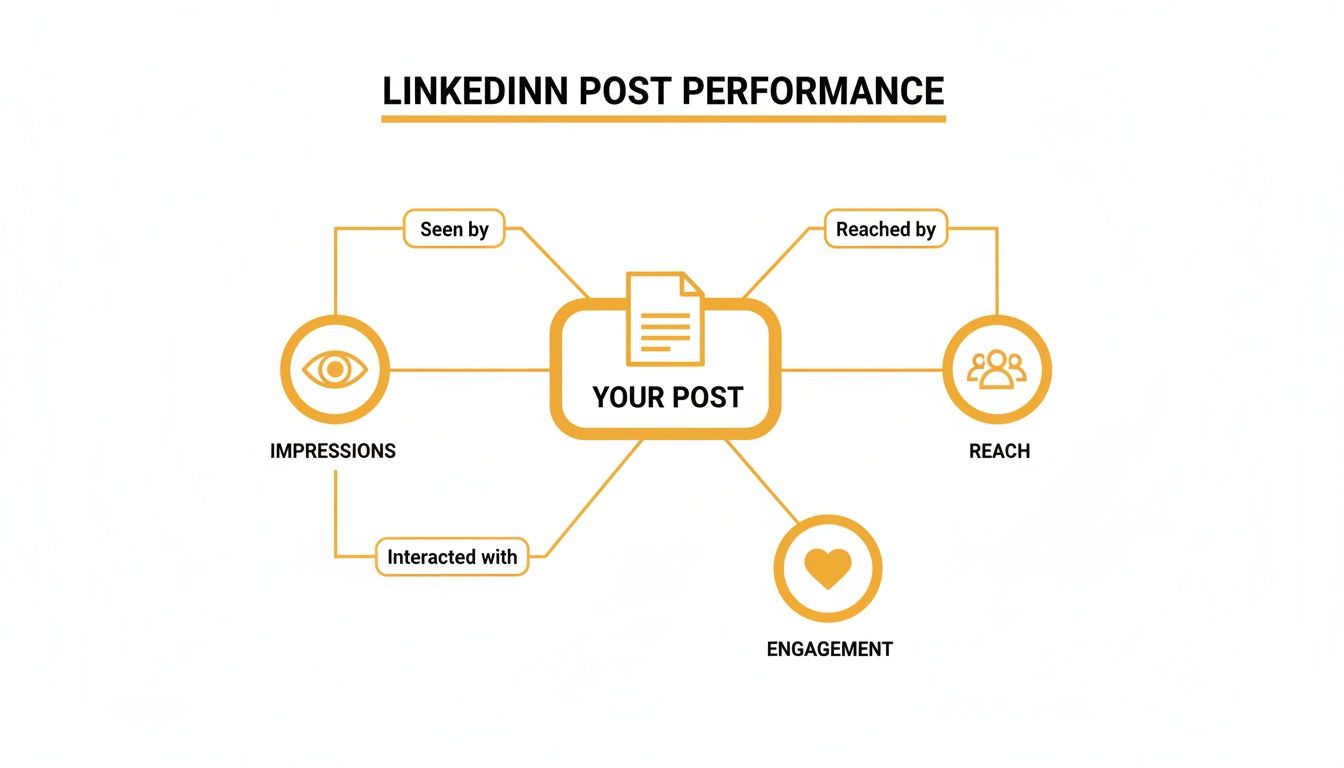
As you can see, impressions are the foundation. They open the door for reach, which in turn creates the chance for genuine engagement. A massive impression count is a great start, but if it doesn't lead to a decent number of unique viewers and interactions, it's just shouting into the void.
A common pitfall is treating all these metrics as equals. In reality, they're part of a funnel. Impressions lead to Reach, and Reach leads to Engagement. Grasping this flow is crucial.
For example, imagine your post has 10,000 impressions but only 2,000 reach. That tells you the average person who saw it saw it five times. This could mean a small, highly engaged group is seeing your content over and over. For a deeper dive, check out our guide on impressions versus views and what each means for your content strategy.
Why This Distinction Is So Important
Impressions aren't just a vanity metric; they're a critical part of a bigger equation: your engagement rate. The classic formula is (Likes + Comments + Shares) / Impressions x 100. So, a post with 1,000 impressions and 65 total engagements has a 6.5% engagement rate—which is pretty solid for most brands.
Understanding this is more important than ever. Overall impressions on company posts are on the rise, with 310 million monthly active users on the platform and more than 1.7 million feed updates being viewed every single minute, according to a recent LinkedIn statistics report from Metricool.
Knowing the difference helps you decide what you're really aiming for. Are you trying to build broad brand awareness (go for high impressions!) or are you trying to build a tight-knit community (focus on that engagement!)?
How LinkedIn's Algorithm Counts An Impression
So, what does it actually take for LinkedIn to count an "impression"? It's not just about your post flashing on someone's screen for a split second as they scroll past.
LinkedIn has a specific rule: for an impression to register, at least 50% of your post needs to be visible on a user's screen. It only needs to be there for a brief moment, but this standard ensures the metric reflects a real opportunity for someone to have seen your content, whether they're on their phone or a desktop.
It’s a small detail, but it’s what gives the impression metric its weight. It confirms your post didn't just fly by in a blur—it actually had a chance to be seen.
Organic vs. Sponsored Impressions
Now, let's get a little more specific. When we talk about what are impressions in LinkedIn, it's important to know they come in two main flavors: organic and sponsored. The algorithm handles these differently.
Organic Impressions: Think of these as the views you earn fair and square. They come from your post showing up naturally in the feeds of your followers, connections, or people who stumble upon it through shares or hashtags. It’s the digital equivalent of word-of-mouth.
Sponsored Impressions: This is the "pay-to-play" version. You use LinkedIn Ads to push your content directly in front of a specific audience you've chosen based on things like their job title, industry, or location. It’s a guaranteed way to get eyeballs on your post.
The real magic happens when your organic content is so good that it catches fire on its own, cutting down on how much you need to spend on ads. The algorithm naturally rewards quality content with more visibility.
This is where a tool like RedactAI comes in handy—it helps you craft posts that are genuinely engaging and hit the right notes with your audience, which is the secret to boosting those organic impressions. When your content resonates, the algorithm shares it more widely, creating a snowball effect. To really get a grip on this, it's worth understanding the LinkedIn algorithm and what it prioritizes.
While sponsored impressions give you precise control, a killer organic strategy is what builds a genuine community and establishes you as a credible voice. The best approach often uses a bit of both. You can use a sponsored post to give important content an initial push, then let its quality carry it the rest of the way with organic momentum.
Finding and Understanding Your Impression Data
Alright, so you know what impressions are. Now for the fun part: finding them and figuring out what they actually mean for your strategy.
LinkedIn doesn't bury this info. It’s right there, waiting for you to use it as your command center to see what's working and what's... not. Diving into your analytics is how you go from just posting content to building a real plan based on what your audience responds to.
Think of your analytics dashboard as a feedback loop. When you see a sudden spike in impressions on a post about a certain topic, that’s a massive clue. It's your audience telling you, "Hey, we liked that! More, please." You can dig into the data for a single post or zoom out to see how your whole company page is performing over time.
Accessing Your Post Analytics
Getting to your impression data is a piece of cake. It only takes a couple of clicks, whether you're looking at your personal profile or a company page.
For any post you share, just look right below it and click the little bar chart icon or the view count. Boom. A detailed dashboard pops up showing all the key metrics for that specific piece of content, with your total impressions right at the top. It’s designed to give you a quick, digestible snapshot of your post's performance.
This immediate feedback is your starting line for analysis. It tells you exactly how many times your content has been seen.
How to Interpret the Numbers
So, you’ve got the number. Let's say it’s 10,000 impressions. Great! But what does that really mean? This is where the real work begins. A high impression count is a good start, but without context, it’s just a vanity metric.
The biggest mistake you can make is looking at impressions in a vacuum. You have to put that number next to your engagement metrics to get the full story.
Let's break it down. A post with 10,000 impressions but only 10 likes tells a very different tale than a post with 2,000 impressions and 200 likes. The second post, while seen by fewer people, clearly hit a nerve with the audience it did reach. The goal isn't just for people to scroll past your content; it's to make them stop, think, and maybe even click that "like" or "comment" button.
Use this data to ask smarter questions that will directly influence your next post, especially when you're using a tool like RedactAI to create content.
- Which topics are consistently getting the most eyeballs? This is your audience telling you what they care about.
- Do my videos get more impressions than my text-only updates? This helps you figure out where to invest your time and energy.
- What time of day gives my posts the biggest initial boost? A little scheduling tweak based on this data can make a huge difference.
Making a habit of checking your analytics is how you shift from guessing to a data-driven strategy. For an even deeper dive into tracking your performance, check out some of the best social media analytics tools out there. This turns your dashboard from a simple report card into a roadmap for creating content that truly connects.
Actionable Strategies to Boost Your LinkedIn Impressions
Alright, so you know what impressions are. But knowing is one thing, and actually getting more of them is a whole different ballgame. This is where we roll up our sleeves and put that knowledge into practice.
Boosting your visibility isn't about crossing your fingers and hoping for the best. It's about having a solid playbook that convinces the LinkedIn algorithm your content is the real deal—something worth showing to more people.
Let’s dive into the proven strategies that will get your content seen. From crafting a killer opening line to timing your posts just right, each tactic is designed to get you the most eyeballs possible.
Craft Scroll-Stopping Content
The absolute fastest way to earn more impressions? Create posts people actually want to read and share. Bland corporate updates and lazy sales pitches are a one-way ticket to the bottom of the feed.
Instead, zero in on providing genuine value. Solve a common problem, offer a fresh perspective, or teach your audience something they didn't know before. Before you hit "post," ask yourself a simple question: "What's the single biggest headache my audience is dealing with right now?" Then, write a post that feels like the cure.
When your post is truly helpful, that first burst of likes and comments signals to the algorithm that you've got quality content. That's what kicks off the snowball effect of more and more visibility.
Mix Up Your Content Formats
If you're only posting text, you're leaving a huge opportunity on the table. The LinkedIn algorithm loves variety, and different formats are simply better at grabbing attention and sparking interaction. Keeping your feed fresh is a simple but incredibly effective way to bump up your impression count.
- Carousel Posts (PDFs): These are absolute gold for breaking down complex ideas into easy-to-digest visual slides. Pro tip: make your first slide a bold, curiosity-piquing headline to get people swiping.
- Native Video: Keep your videos short and sweet (under 90 seconds is a good rule of thumb) and always include captions. Most people are scrolling with the sound off. Video is unbeatable for building a real, human connection.
- Polls: Polls are engagement magnets. They give your audience a super easy, low-effort way to interact, which sends powerful positive signals to the algorithm.
Here's a little perspective: impressions have come a long way from just being a simple view count. After 2020, with the boom in remote work, platform engagement went through the roof. Today, the average company page might see around 4,170 monthly impressions, but if you use dynamic content, you can blow that number out of the water. For more benchmarks, check out these detailed LinkedIn insights.
Your Impression-Boosting Content Checklist
Before you publish your next LinkedIn post, run through this quick checklist. It's designed to make sure you've ticked all the boxes for maximum visibility and impressions.
| Optimization Tactic | Why It Boosts Impressions | RedactAI Application |
|---|---|---|
| Hook 'Em Fast | Your first 1-2 lines determine if people click "see more." A strong hook stops the scroll and signals interest to the algorithm. | Use RedactAI to generate a few punchy opening lines. Pick the one that creates the most curiosity or emotional connection. |
| Add a Relevant Image/Video | Visuals make posts stand out in a crowded feed. Posts with images get 2x higher engagement. | Create a simple branded graphic or a short video clip to go with your text. Make sure it visually reinforces your main point. |
| Tag Relevant People/Companies | Tagging notifies others, encouraging them to engage. Their engagement exposes your post to their network. | If you're referencing a person, a client's success story, or a specific company, tag them! (Just don't overdo it.) |
| Include a Clear CTA | Tell people what to do next! Asking a question or prompting a specific action drives comments and shares. | End your post with a clear call-to-action, like "What's the #1 challenge you're facing with X? Let me know in the comments." |
This checklist isn't about adding more work; it's about making the work you're already doing more effective. A few small tweaks can lead to a big difference in how many people see your content.
Optimize Your Posting Time and Hashtags
When you post is just as important as what you post. The goal is to share your content when your audience is online and ready to engage. While the general advice often points to mid-week mornings, your specific audience could be totally different.
Don't guess—test! Try posting on different days and at different times, then dive into your analytics to see what works for your unique followers. Find your sweet spot.
Hashtags are your content's passport to audiences beyond your immediate network. Use a strategic mix of 3-5 relevant hashtags for each post. Combine broad industry tags (like #Marketing) with more specific, niche tags (like #B2BContentStrategy) to cast a wide yet targeted net.
Engage With Your Community
LinkedIn is a social network, not a billboard. Your job isn't over the second you publish a post. In fact, what you do in the minutes before and after you post can make or break its reach.
Try this: spend 15 minutes before you post engaging with other people's content in your feed. I'm talking about leaving thoughtful comments, not just dropping a "like." Then, once your post is live, stick around. Respond to comments as they come in. This shows the algorithm that your post is sparking a real conversation, which encourages it to show it to even more people.
To get a wider view on how to get your content seen, looking into general content marketing best practices can offer some great, foundational principles. The core idea is the same everywhere: create valuable, engaging content, and you'll earn the visibility you're looking for.
Why Impressions Are the Bedrock of Your LinkedIn Presence
Think of your LinkedIn strategy like building a house. Before you can put up walls, add a roof, or even think about decorating, you need a solid foundation. On LinkedIn, impressions are that foundation.
They aren't just a feel-good number; they're the absolute first step. Without impressions, nothing else follows. No reach, no engagement, and definitely no new business or job offers. Every single like, comment, share, and connection request starts with that one simple moment: someone seeing your post.
Turning Eyeballs into Opportunities
When people in your network keep seeing your name pop up next to genuinely useful insights, a subtle but powerful shift happens. You stop being just another name in their connection list and start becoming a go-to voice in your field. This is how you transform your profile from a static online resume into an active, opportunity-generating machine.
Impressions are the currency of opportunity on LinkedIn. Each one is a chance to influence, connect, or be seen by the very recruiters, partners, or clients actively searching for someone with your expertise.
Getting a handle on generating impressions means you’re building a presence that pulls people in, leading to those coveted inbound messages and career doors you didn't even know were there. It's why tools like RedactAI exist—to help you consistently create quality content that keeps you visible and your opportunity funnel full. By focusing on this foundational metric, you're not just chasing stats; you're building a reputation that lasts.
Got Questions? We've Got Answers
Even after you get the hang of the basics, a few specific questions always seem to pop up when you're staring at your LinkedIn analytics, trying to figure out what it all means. Let’s clear up the common head-scratchers so you can look at your data with total confidence.
So, a High Impression Count is Always Good, Right?
Not so fast. While a big number looks great on the surface and means lots of eyeballs saw your content, what really matters is whose eyeballs they were.
Think of it like this: a super-technical post about B2B marketing tactics could get 100,000 impressions. But if those impressions came from college students, it's a miss. It would be far more powerful to get just 10,000 impressions from VPs of Marketing. See the difference?
The real win is getting "quality impressions" from people who actually matter to your goals. You can get a feel for this by clicking into a post's analytics and looking at the job titles and companies of the people who saw it. Big numbers plus the right audience—that’s the magic formula.
How Fast Do Impressions Actually Roll In?
Most of a post's impressions will hit within the first 24 to 48 hours. The first few hours are absolutely make-or-break. This is when the LinkedIn algorithm is watching closely, using early likes, comments, and shares as signals to decide whether to show your post to more people.
If your post gets a good reaction right out of the gate, it might have a longer "tail" and keep getting impressions for a few days. But that initial surge is usually what decides if it's going to be a hit or a dud.
A post's fate is often sealed on its first day. That early engagement is the key that unlocks wider visibility, because the algorithm rewards content that gets people talking right away.
Can I See a List of Everyone Who Viewed My Post?
Nope, LinkedIn keeps that information private. You can't see a list of every single person who added to your impression count. It's an anonymous metric that tracks the total number of times your post was seen, not who saw it.
But don't worry, you can still get some incredibly useful intel. When you click on the impression count for any post, LinkedIn gives you a demographic snapshot of your viewers, including:
- Companies: The top places where your viewers work.
- Job Titles: The most common roles, like "Marketing Manager" or "Founder."
- Locations: The main cities and regions your post reached.
This breakdown is your best friend for figuring out if your content is landing in the right professional circles and actually connecting with the people you’re trying to reach.
Ready to stop guessing and start creating LinkedIn content that consistently earns high-quality impressions? RedactAI analyzes your unique style to help you craft compelling posts in minutes, so you can build your brand and connect with the right audience. Start creating for free on RedactAI.






























































































































































































