Employees estimate they waste about 91 business days each year on low-impact tasks, while a unified workflow could create 38 extra efficient days. Workflow matters because it turns that lost capacity into controlled, repeatable work that moves faster, protects revenue, and gives teams a safer foundation for automation.
A busy company rarely loses time in one dramatic failure. The waste appears in small interruptions: a request arrives without context, someone searches through old messages, a manager asks for a status update, a reviewer catches an avoidable mistake, and a handoff sits untouched because nobody owns the next step. Each event looks manageable. Together, they shape the company's operating speed.
That's why workflow isn't just a productivity preference. It's the system that determines how work enters the business, who acts on it, what quality checks apply, and how quickly the result reaches a customer or colleague. The Adobe Workfront productivity survey also found that employees automate only 11% of their tasks on average, even though they believe nearly a quarter could be automated. The gap points to a practical problem: many teams have useful tools, but lack the process structure needed to use them well.
The Hidden Cost of Unorganized Work
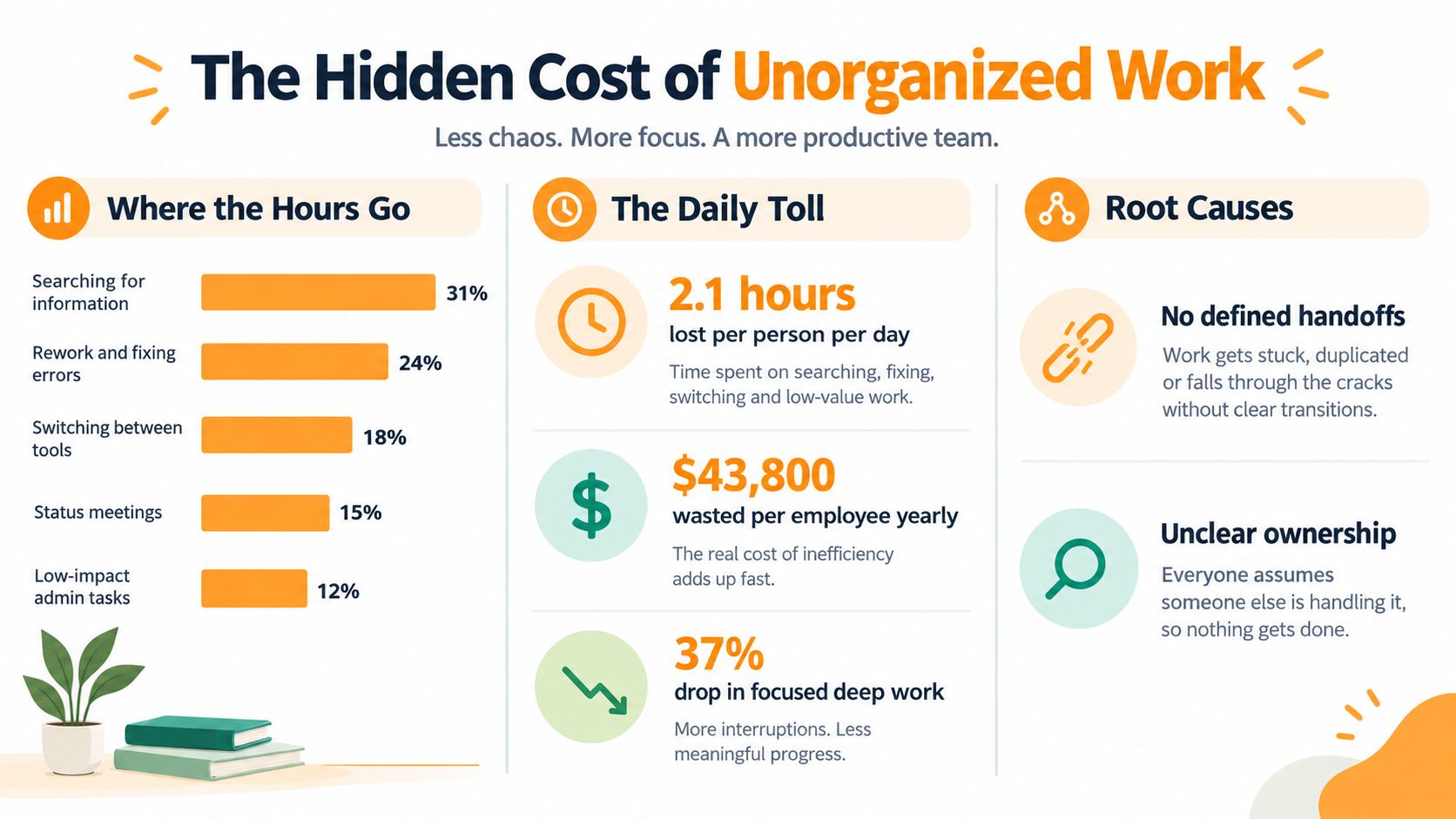
Full-time U.S. employees estimate they waste about 91 business days, or more than 18 weeks, each year on low-impact tasks, according to Adobe Workfront's research on workplace productivity. The same research indicates that a unified workflow could create 38 extra days of efficiency annually. Those figures put a business cost on work that often looks like routine administration.
The waste rarely comes from one dramatic failure. It appears when a marketer checks several project boards, an email thread, and a shared document to find the latest approval. A sales colleague asks whether a case study is ready. The writer searches for approved positioning, finds conflicting versions, and messages the team to confirm which one is current. Before customer-facing work begins, people have spent valuable attention rebuilding the process.
Busy work hides in the handoffs
Poor organization consumes time indirectly as well. People switch context, wait for decisions, repeat information, and compensate for missing instructions. A request without an owner creates follow-up messages. An incomplete brief leads to rework. An approval without a deadline turns a routine task into a scheduling risk.
The practical barrier to automation is often process design. A team may have project software, document storage, and communication tools, yet still lack a defined sequence for actions, exceptions, responsibilities, and decisions. For example, a content request can move from marketing to writing, design, legal review, and publication without a reliable record of what was approved. Each handoff then depends on memory and individual follow-up.
The personal cost becomes an operating cost
Employees feel this friction directly. Repeated status requests make coordination part of the job instead of a support activity. Constant interruptions reduce the time available for careful analysis and creative work. When unclear ownership causes a deadline to slip, teams often respond with urgency, longer hours, and rushed reviews.
Practical rule: If a team repeatedly asks where something is, who owns it, or what happens next, the workflow is carrying too much information in people's heads.
A useful workflow records the request, assigns an owner, defines the expected output, and sets a route for review or escalation. That structure does not remove judgment. It reserves judgment for decisions that need human attention, while giving automation a reliable process to follow.
The goal is selective automation, not the removal of every human interaction. Clear workflows reduce avoidable coordination in high-volume work, protect time for higher-value decisions, and give AI systems the structured inputs they need to operate safely. That makes workflow infrastructure an operating requirement, not merely a productivity preference.
Workflow as a Revenue Protection System
Executives approve workflow improvements more readily when the commercial risk is clear. Workflow protects revenue the company has already spent time and money creating. A prospect may be ready to buy while an internal request waits for clarification. A campaign may miss its launch window because legal review has no assigned owner. A service team may delay a renewal response because relevant information is scattered across disconnected systems. The failure looks operational, but the consequence reaches the bottom line.
One widely cited automation summary estimates that businesses lose 20% to 30% of revenue each year to inefficient business processes, as reported by FounderJar's business automation statistics overview. Treat that figure as a broad market estimate, not a diagnosis for every company. Its practical point is clear: process failures can reduce revenue, not just employee convenience.
Broken intake creates commercial leakage
Zapier reports that 63% of project managers and operations professionals said poor request handling had delayed revenue, caused revenue loss, or both, in its workflow management guidance. The commercial effects usually appear in four forms:
- Revenue delay: time between a request and the customer-facing action it should trigger.
- Rework cost: effort spent correcting incomplete, inaccurate, or misdirected work.
- Bottleneck cost: productive capacity held up by one missing decision, approval, or input.
- Leakage risk: opportunities that become harder to win or retain because the process stalled.
These categories give leaders a practical way to discuss workflow risk without treating every delay as equally valuable. They also show why intake deserves attention. The first missed detail can create waiting, rework, and escalation before anyone recognizes a revenue problem.
A strong intake process collects enough information to support a decision without forcing requesters through an elaborate form. It should identify the need, urgency, expected value, and next action, then route the request to a named owner. Set a priority that matches the commercial consequence and define the escalation path. Too little structure creates confusion. Too much slows legitimate work and encourages people to bypass the process.
Track when a commercial request arrives, when ownership is accepted, when the work is ready, and when the customer receives the outcome. Compare those stages by request type, then examine where time and rework accumulate. For teams assessing the wider case, this explanation of business process automation benefits outlines areas where automation can reduce manual coordination.
Governance protects speed
Workflow also defines what employees and systems may do, under which conditions, and with what record of approval. Deloitte's 2026 workflow automation outlook describes enterprises replacing fragmented systems with adaptive, unified foundations where trusted AI can act decisively, while governance supports innovation.
That changes the question leaders should ask: what information, approval, exception handling, and audit trail must exist before automation acts safely? A revenue-protection workflow makes those conditions explicit. It gives AI structured inputs and bounded actions, so faster execution does not create faster commercial mistakes.
How Systematic Workflows Ensure Quality
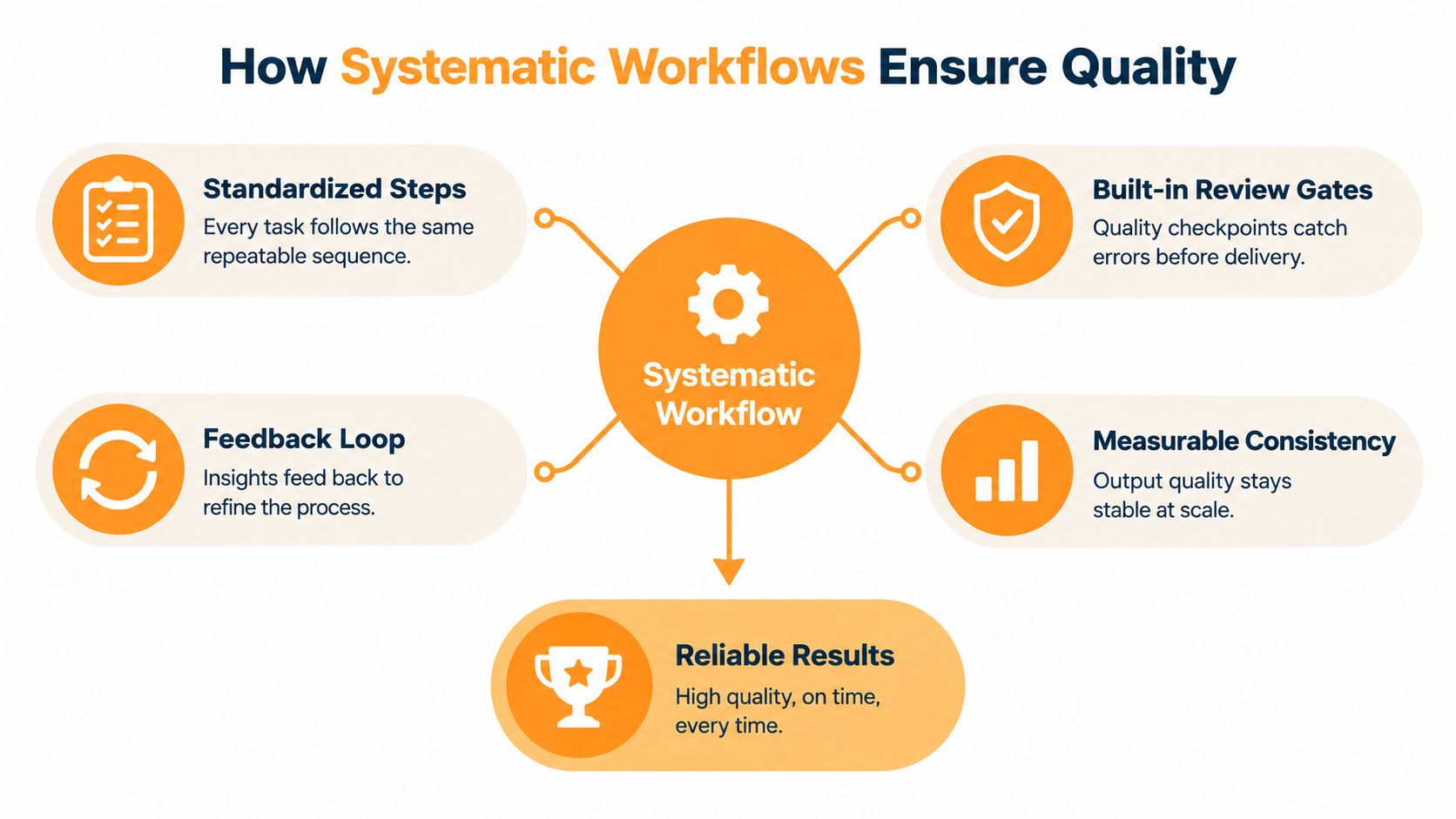
Quality becomes unreliable when every employee invents a personal method for completing the same type of work. One person checks source material before drafting. Another drafts first and verifies later. A third sends work directly to a client because the review step was never visible.
A systematic workflow creates a shared sequence without turning every task into bureaucracy. The University of Stuttgart research on workflow management performance describes reproducible workflows as critical in data-intensive work because they help turn raw data into a coherent research question and insightful contribution. It also recommends documentation and unit testing as workflow standards that improve output quality and establish a repeatable baseline.
Make quality visible inside the process
Documentation explains what “done” means. Review gates test whether the work meets that definition before it moves forward. Unit testing, whether applied to software, data transformations, or repeatable content operations, checks individual parts before errors spread downstream.
For a content team, a useful sequence might include:
- Brief validation: confirm audience, purpose, evidence, and required format.
- Drafting: produce the asset using the approved inputs and constraints.
- Fact and compliance review: verify claims, permissions, and sensitive details.
- Editorial review: assess clarity, usefulness, tone, and structure.
- Publication handoff: transfer the approved version with its metadata and distribution instructions.
The sequence is valuable because it separates types of judgment. An editor shouldn't have to discover missing source material at the same time as they assess the writing. A legal reviewer shouldn't be asked to resolve basic ownership questions. Clear gates reduce the number of defects that reach the next person.
Teams can formalize this through a content approval workflow, provided the workflow reflects real decisions rather than adding approvals for their own sake.
Consistency is not sameness
A repeatable workflow doesn't require identical outputs. It standardizes the conditions around the work, including inputs, checks, ownership, and escalation. The creative or analytical result can still vary because the person doing the work retains room for judgment.
That distinction matters in professional environments. Unstructured flexibility often creates unpredictable quality, while rigid scripts can prevent people from responding to unusual situations. The practical design is a stable default path with documented exceptions.
Why Your Business Needs Workflow Infrastructure
A small team can coordinate through memory, chat, and informal agreements for a while. As work volume and dependencies increase, that approach becomes fragile. The business starts depending on individual employees to remember context, chase approvals, and compensate for missing system rules.
Infrastructure gives those rules a durable home. It connects intake, assignment, execution, review, reporting, and escalation. The workflow benchmarking research from the University of Stuttgart argues that enterprise application throughput and reliability largely depend on the underlying workflow engine, which must meet dependability and scalability requirements. Workflow design is therefore a technical determinant of business performance, not just an administrative layer.

Fragmented habits versus shared infrastructure
The difference between an ad hoc process and workflow infrastructure is visible in how each handles ordinary events.
| Operating approach | What happens in practice |
|---|---|
| Informal request | Context arrives across messages, documents, and meetings |
| Shared workflow | The request enters one defined intake path |
| Personal follow-up | Employees remember to chase the next person |
| Assigned ownership | The system identifies responsibility and status |
| Final review by habit | Quality depends on who remembers the check |
| Review gate | The required check appears before delivery |
| Tool-by-tool reporting | Leaders assemble status manually |
| Workflow reporting | Bottlenecks and aging work are visible in one process |
The structured approach isn't automatically better. A badly designed workflow can force unnecessary fields, create duplicate data entry, or make simple work slower. The test is whether the process reduces uncertainty and manual coordination without hiding important exceptions.
For a practical explanation of how workflow automation works, look for the mechanics rather than the marketing language: triggers, conditions, actions, integrations, ownership, and error handling. Those components show whether a proposed system can operate reliably when real work deviates from the happy path.
AI needs structure before autonomy
Deloitte's 2026 outlook describes a move toward adaptive, unified foundations that allow trusted AI to act decisively. That direction makes workflow design a prerequisite for responsible AI adoption because an agent needs more than a prompt. It needs defined inputs, permitted actions, approval boundaries, and a way to handle uncertainty.
Standardization can become a constraint when leaders force every team into one identical process. It becomes an enabler when the company standardizes the controls that matter, while allowing teams to adapt the work inside those controls. A useful foundation tells an AI agent what it can do, when it must ask for help, and how a human can inspect the result.
Practical Steps to Design Effective Workflows
Start with the work as it happens, not the ideal process in a presentation. Follow one request from arrival to completion and record every handoff, clarification, wait, revision, and approval. The goal is to find where people spend effort maintaining the process instead of delivering the outcome.
1. Define the trigger and the finished result
A workflow needs a clear starting event. For a content team, that might be a completed campaign brief, a sales request, or a scheduled editorial slot. It also needs a concrete endpoint, such as an approved post, a published article, or a package delivered to a client.
Write the entry conditions and exit conditions in plain language. If a request can enter through email, chat, and a spreadsheet, decide whether those routes serve different use cases or merely create competing queues. Consolidate where possible, but keep an exception route for urgent or unusual work.
2. Assign ownership at each decision
“Marketing owns it” isn't a useful assignment. Name the person or role responsible for the next action, the person who approves the outcome, and the person who needs visibility without being asked to participate.
This separation prevents a common failure mode: several people believe they're involved, but nobody believes they're accountable. Use escalation rules for stalled decisions, and make those rules visible before an urgent request arrives.
3. Automate repetition, not judgment
Automate notifications, data transfers, reminders, status changes, template creation, and routine sorting when the conditions are stable. Keep strategic positioning, sensitive decisions, nuanced editing, and exception handling with accountable people.
Teams that automate a broken process usually make the confusion move faster. Before adding a tool, remove duplicate approvals, clarify required inputs, and decide what should happen when information is missing.
For customer-facing teams, a practical example is automating follow-ups for SMEs, where repeatable reminders and response sequences can support consistency without replacing judgment about the relationship.
4. Build a content production loop
High-volume creators can use a straightforward operating loop:
- Capture: collect ideas, source material, audience questions, and personal observations.
- Shape: turn one input into a defined angle, audience promise, and draft brief.
- Create: write the draft using the approved voice and evidence.
- Review: check accuracy, clarity, brand fit, and sensitivity.
- Publish: schedule or distribute the approved version.
- Learn: record useful feedback and update future briefs.
RedactAI is one tool option for this type of work. It analyzes a user's LinkedIn profile, posting history, and experiences to create a personalized language model, then supports post ideas, draft generation, optimization, scheduling, and content reuse.

A platform won't solve unclear positioning or weak editorial standards. Use it inside a workflow with a defined brief, human review, and a feedback step. The workflow optimization guide can help teams examine those steps and remove friction without stripping away the human voice that makes professional content credible.
Measuring the Impact of Your Workflows
A workflow earns its place when it reduces avoidable delay, prevents errors, and makes ownership visible. A tidy dashboard is useful only if it helps the business protect revenue, serve customers, or make better operating decisions.
Begin with a baseline for one process. Record how long a request waits, how much active work it requires, how many handoffs occur, how often people redo the work, and where delay can affect revenue or customer value. The first baseline does not need to be perfect. It needs consistent definitions so the original process can be compared fairly with the revised one.
Measure three outcomes
Time recovered shows whether the team has reduced coordination and repetitive administration. Separate active work from waiting time, then identify the steps that create the longest queues. A shorter cycle time matters less if staff are still spending the same effort chasing approvals or correcting missing information.
Revenue protected connects workflow performance to commercial exposure. Track delayed proposals, stalled campaign launches, overdue renewal actions, and customer requests that missed their intended window. Do not treat every prevented delay as booked revenue. Record the exposure, the intervention, and the outcome using the same definitions each time.
Quality improved captures defects that time metrics miss. Count rework, rejected submissions, missing information, approval reversals, and customer-facing corrections. A faster process that creates more errors has shifted the cost rather than reduced it.
Build a credible business case
Industry summaries place the workflow automation market in the tens of billions, but adoption headlines matter less than your own baseline data. Broad investment may show that companies are taking workflow automation seriously, yet it does not prove that a particular workflow will produce a return.
Build the case around one visible bottleneck. Compare the cost of delay, rework, or unclear ownership with the resources required to change the process. Include implementation effort, training, maintenance, and exception handling. This keeps the business case grounded in operating reality rather than market enthusiasm.
Start with one workflow where delay, rework, or unclear ownership already has a visible cost. Improve it, measure it, then use the evidence to decide what deserves expansion.
Review the process regularly. Remove steps that no longer protect quality, update rules when responsibilities change, and keep a human owner accountable for exceptions. Automation can execute a weak process faster, so workflow design must remain tied to judgment and commercial outcomes.
Workflow also creates the measurement layer AI systems need. Reliable steps, defined inputs, approval rules, and outcome records give AI a controlled operating environment. Without that structure, automation may increase activity while making errors harder to trace. With it, the business can see where time and revenue leak, test improvements, and choose technology investments based on evidence rather than frustration.