Scroll your LinkedIn feed for ten minutes and you'll see the same handful of formats over and over. A founder shares a strong opinion in plain text. A consultant publishes a carousel. Someone posts a talking-head video, while a company page drops a polished announcement that earns a few polite reactions and disappears.
Most formats do one specific job well. A text post can start a conversation quickly, but it may not explain a complicated framework. A document can teach and earn saves, but it takes longer to produce. A poll can reveal what your audience thinks, but it won't automatically create qualified demand.
That's why the format you pick matters almost as much as the idea itself. The best LinkedIn content format depends on the result you want from a normal posting week, whether that's building trust, getting replies, demonstrating expertise, or generating leads.
This list breaks down 10 types of LinkedIn content, what each format is good at, where it falls flat, and when to use it or skip it. The aim isn't to publish everything. It's to choose formats that match your message, your audience, and the time you can realistically spend creating content. For a broader look at structuring content for search visibility, see this SEO snippet optimization guide.
1. Text-Based Thought Leadership Posts
Text posts are still the fastest way to test whether an idea deserves more attention. You can write about a shift in your industry, a difficult decision, a customer pattern, or a professional belief without designing slides or setting up a camera.
They work best when the post has a clear point of view. “AI is changing marketing” won't give people much to respond to. “Most marketing teams are using AI to produce more content when they should be using it to remove weaker content” gives readers something to agree with, challenge, or expand.
Keep the opening direct, use short paragraphs, and support the argument with a specific observation. A founder discussing why a product launch failed will usually create more interest than a generic post about resilience. Strong B2B publishing also connects the opinion to a business problem, as explained in this guide to B2B social strategy for founders.
Use it when
- You want replies: Ask a focused question that follows naturally from the argument, rather than adding a generic “thoughts?” at the end.
- You're testing an idea: Publish the opinion as text before investing in a video or document.
- You need speed: Text is useful when an industry development needs a considered response while it's still relevant.
Practical rule: If the idea can be understood in one breath, start with text. Don't turn a simple point into a ten-slide production project.
Skip it when the post is only a company announcement with no insight, lesson, or useful context. A plain-text product pitch usually asks for attention before earning it.
2. Carousel Posts
You have more than one point to make, and each point needs a little proof. That is the week to use a carousel.
Carousel posts do a specific job well. They help readers follow a process, compare options, or work through a decision without forcing everything into one dense block of text. I use them for frameworks, teardown-style explanations, hiring advice, and practical how-tos. If the goal is saves, shares, or quiet authority, this format usually beats a plain opinion post.
The cover slide decides whether the rest gets seen. Give it one clear promise. Then let each slide earn the next swipe by advancing the argument one step at a time. A useful sequence might show the problem first, then the rule for judging it, then the mistake people keep making, then the fix. That rhythm works because the reader can process one claim at a time instead of decoding a crowded graphic.
Carousel posts also sit in a different lane from image posts and native documents. LinkedIn's publishing options developed over time, and the format now matters because each one supports a different communication job. The history of LinkedIn's content development gives context for how that shift happened.
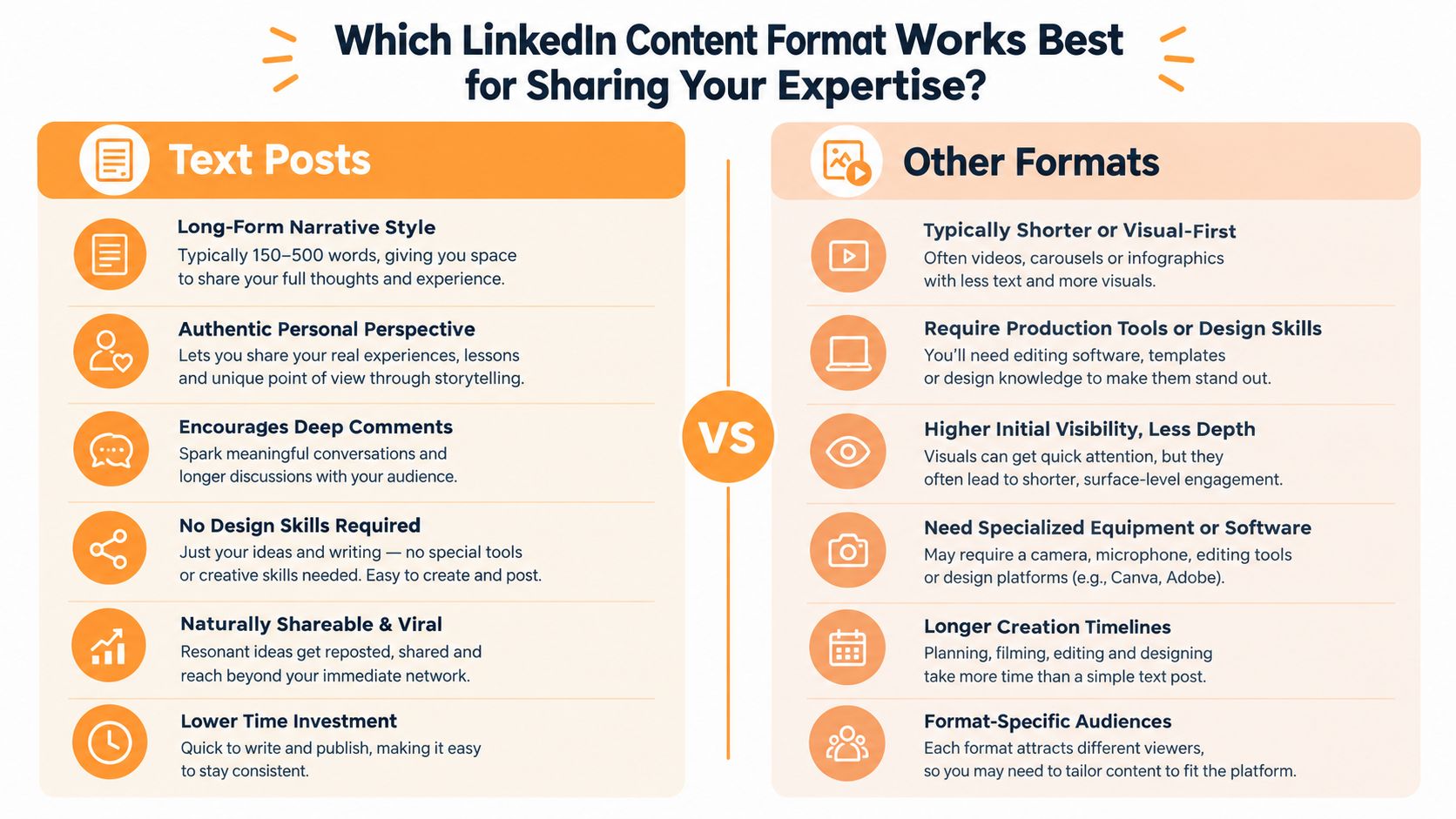
Use carousel posts when the reader should leave with something reusable, a checklist, framework, comparison, or step-by-step explanation. Skip them when the idea only has one strong sentence. Spreading a simple opinion across eight or ten slides wastes time and usually feels padded.
For build advice, file setup, and layout examples, this LinkedIn carousel post guide is a solid reference.
3. Video Posts
You publish a solid idea, then watch it stall because the point needed a face, a voice, or a quick demo. That is the job video does in a normal LinkedIn week. It helps people judge how you think, how clearly you explain, and whether they would trust you with a call, a budget, or a reply.
Use video for posts where delivery changes the message. Founder commentary works well here. So do product walkthroughs, event reactions, customer education, and any post where showing the process is faster than describing it. A screen recording is often enough for software. A talking-head clip usually does better when the opinion itself is the product.
Execution matters more than polish. Open with the problem or the conclusion. Keep it to one lesson. Add captions because plenty of people scroll LinkedIn without sound, and weak structure gets ignored fast.
Analysts cited in this LinkedIn video benchmark analysis note that engagement and views measure different things. That matters because video can earn attention without earning trust, and trust is usually the primary goal on LinkedIn.
Here is the practical filter I use.
Use it when the post needs proof in motion, a product step, a workflow, a reaction, a visible result, or a judgment call where tone carries the argument. Skip it when the idea is really one sharp sentence, one contrarian take, or one simple checklist. In those cases, text is faster to produce and easier to consume.
Skip it when you are filming just to keep up with everyone else. A rushed clip with no hook, no captions, and three ideas jammed together usually underperforms a focused written post. If you want format ideas before recording, browse social video content types. For tighter execution advice, this LinkedIn video content guide covers what to script, show, and cut.
4. Document Posts
A good document post earns saves. It gives someone a tool they can reuse during the week, not just a post they nod at and forget.
That makes this format useful for frameworks, audit templates, research summaries, hiring rubrics, and sales checklists. If the reader may need to revisit the idea, a native PDF or slide deck usually does the job better than forcing everything into one caption.
The format is only as good as the structure. The cover needs one clear promise. Each page should carry one idea, one step, or one decision. If you are explaining a content audit, for example, build the sequence so the reader can follow it without guessing: symptoms first, then diagnosis, then prioritization, then the workflow. Keep the caption for context, stakes, and discussion. Do not repeat the whole document underneath it.
There is also a clear performance case. Analysts at LinkedIn benchmark analysis from Socialinsider found that native documents led their benchmark set on average engagement rate. Their methodology note matters too. Company pages and personal profiles should not be judged as if they behave the same way, and engagement definitions need to stay consistent.
Here is the practical call. Use document posts when the job is to teach a process, package research into something usable, or hand over an asset people can share internally. Skip them when you only have three thin tips and a branded cover. In that case, the format adds friction and the reader gets very little back.
Here's a short visual example of how a document can support a professional explanation:
5. Personal Story or Narrative Posts
You post a solid tactical tip and get a few likes. You share the moment that changed how you work, and people reply with their own version of the same problem. That is the job of a narrative post. It turns expertise into something people can trust.
The format works best when the story carries professional weight. Start with a specific scene the reader can see. A rough client call. A bad meeting. The hour before a presentation where you changed the deck again because you knew the message was off. Then move to the decision, the mistake, or the assumption that did not hold up. Good narrative posts earn attention because they show judgment under pressure, not because they reveal personal details.
I have found this format useful when a plain advice post would sound too polished. A story gives the lesson friction. It shows the cost of getting it wrong and why your current approach exists.
You do not need a tidy moral at the end. In fact, forcing one usually weakens the post. The stronger move is to connect the event to a practical takeaway. A career pivot can show how you assess risk. A difficult client conversation can explain your boundary-setting. A failed presentation can show what preparation looks like. If you need help shaping the structure, this personal narrative writing guide is a useful reference.
Use narrative posts when the goal is trust, context, or better comments. Skip them when the story only exists to make you look resilient, insightful, or admirable. Readers spot the victory lap fast, and once they do, the trust is gone.
6. Industry News Commentary and Hot Takes
A big announcement drops at 9 a.m. By noon, LinkedIn is full of people repeating the same headline. The posts that earn attention are the ones that help readers decide what to do with it.
This format has a clear job in a normal posting week. It builds authority fast if you can explain the second-order effect of the news, not just the event itself. A pricing change, policy update, product launch, or acquisition matters because it changes budgets, buying risk, switching costs, hiring plans, or competitive positioning. That is the level worth posting about.
I use this format when I have a real read on the consequence. If I do not, I skip it. Speed helps, but being early with a vague opinion is a waste. Being a little later with a sharper angle usually performs better with the right audience and does less damage to trust.
A useful structure is simple, even if the post itself does not read like a template. Start with the event. Add your interpretation. End with the practical implication. Tell readers what to watch, what may change, or which teams will feel it first. Link to the original source when people need the full context, and keep confirmed facts separate from your own view.
Use it when the news changes an active decision your audience is making and you can explain that decision clearly. Skip it when you are posting just to be seen near a trending topic. Generic outrage, summary posts, and bold predictions without support fade fast, and the credibility loss lasts longer.
7. Question Posts and Polls
You post a poll on Tuesday because the calendar looks empty. It gets clicks, a few votes, and almost nothing you can use. That is the failure mode.
Question posts and polls earn their place when they help you learn something you can turn into a better post, a sharper offer, or a more relevant sales conversation. In a normal posting week, their main job is research and reply generation. Trust can come from the follow-up if people see that you listened and understood the nuance.
The question has to narrow the decision. Broad prompts invite broad, lazy answers. Ask about a specific bottleneck, trade-off, or choice your audience is already dealing with. “What's the hardest part of managing a distributed sales team?” works because people can answer from experience. Poll options should reflect real positions, with enough tension that a smart person could reasonably choose any of them.
Then do the actual work in the comments.
Ask why someone picked an option. Probe for context. Pull out differences by role, team size, or stage. A poll without follow-up gives you surface-level engagement and very little insight.
The benchmark data also supports treating polls as a useful format, not a default one. A 2026 summary in this LinkedIn format benchmark overview reports 4.40% average engagement for polls, compared with about 4.00% for text-only posts, 4.85% for image posts, and 5.60% for native video. Those numbers are directional. Execution and audience fit still decide whether a poll helps or wastes a slot.
Use question posts and polls when you need audience language, want to expose a real disagreement, or are prepared to stay in the thread. Skip them when you already know the answer, do not plan to respond, or are posting one just to keep your streak alive.
8. Before-and-After and Transformation Posts
A good transformation post earns belief fast. Someone sees the before, sees the after, and can judge whether your work would help with a problem they actually have.
That only happens if the contrast is honest.
The weak version shows a messy starting point and a polished finish, then leaves out the hard part. The useful version explains what was broken, what constraints shaped the work, which choices mattered, and what stayed imperfect. If you are sharing a homepage rewrite, say what the old page failed to do. If you are sharing a sales process change, name the bottleneck it fixed and the trade-off that came with the new setup.
This format does a specific job in a normal posting week. It helps qualified leads decide whether you solve the kind of problem they are dealing with. It also teaches well when you focus on the decisions behind the result, not just the reveal.
Evidence matters here. If you have permission to share metrics, explain what they measure. If you cannot share numbers, use approved screenshots, drafts, comments, quotes, or a clear walkthrough of the process. Anonymous wins with no proof read like marketing copy.
Use it when the change is concrete, the path from before to after is clear, and you can show enough evidence to make the claim believable.
Skip it when the before state is exaggerated, the result depended heavily on factors outside your control, or the post turns into a vanity reveal. Readers do not need perfection. They need a result they can trust.
9. Lessons Learned and Failures Posts
You publish a post about something that went wrong, and the comments tell you fast whether it helped anyone. If the post reads like damage control, people move on. If it shows how a solid decision turned into a bad outcome, readers pay attention because they can see themselves making the same call.
That is the job of this format in a normal posting week. It builds trust with people who are still deciding whether your advice is grounded in real work. It can also start better conversations than a polished win, because people will often reply with their own version of the same mistake.
What makes these posts work is judgment. Name the choice. Explain why it felt reasonable at the time. Then point to the missed signal or bad assumption that changed the result. A sales leader might show how a qualification process created false confidence. A hiring manager might admit the team overvalued a strong interview and ignored a weak work sample. A consultant might explain why a complicated strategy got approved when a simpler fix would have done the job.
Specific lessons carry weight. “I should have communicated better” says almost nothing. “I sent the implementation plan before confirming who owned the approval step, so the project stalled at the first review” gives the reader a failure pattern they can spot in their own work.
Use it when the lesson is clear, you can own your part without hedging, and the takeaway helps someone else make a better decision.
Skip it when the details are confidential, legally sensitive, or still too raw to assess well. Skip it too when the post is really a way to blame a client, the market, or a colleague in public.
“The failure is the entry point. The lesson is the reason to publish.”
10. Expert Tips and List-Based Posts
A good list post earns its place in a working week because people save it, send it to a teammate, or use it before a call. That is the bar. If the post does not help someone do a task better, it reads like filler with numbers in front of it.
The strongest ones are built for one job. A hiring checklist can help a manager run a cleaner interview. A set of sales discovery questions can help an AE get better answers on the next call. A content prompt list can help a founder post without staring at a blank screen. Different jobs, same rule. Each point needs to be specific enough to use today.
That is why vague advice dies fast here. “Be consistent” gets skimmed and forgotten. “Review your last five posts, spot the topics that brought qualified comments, then write a new angle on the best one” gives the reader something to do. Keep each item distinct. If points two, four, and six all say the same thing in different words, cut them.
The format should match the weight of the advice. Short, practical tips work well as a text post. A checklist with nuance usually works better as a document. If one step keeps confusing clients or prospects, explain that part in video and keep the rest simple.
Use this format when you want saves, when you are teaching a repeatable process, or when you want a useful lead-in to a service. Skip it when you only have one real insight, or when the list exists mainly to make basic advice look bigger than it is.
10 LinkedIn Content Types Comparison
| Content Type | Implementation Complexity 🔄 | Resource Requirements ⚡ | Expected Outcomes ⭐📊 | Ideal Use Cases | Key Advantages / Quick Tip 💡 |
|---|---|---|---|---|---|
| Text-Based Thought Leadership Posts | 🔄 Medium, strong writing skill required | ⚡ Low, time to write; no design tools | ⭐ High credibility; 📊 deep comments & shares | Executives, thought leaders, solo founders, HR | Establishes authority; easily shareable. 💡 Hook in first 2 sentences; end with a question |
| Carousel Posts (Multiple Images) | 🔄 High, design + sequencing skills | ⚡ Medium–High, design tools, more time | ⭐ Very high engagement; 📊 longer view time per post | Marketers, sales teams, educators, consultants | Teaches processes; memorable format. 💡 Make slide 1 compelling; keep text minimal |
| Video Posts | 🔄 High, recording & editing required | ⚡ High, camera, audio, editing tools | ⭐ High connection & recall; 📊 strong reach | Sales demos, CEOs, recruiters, trainers | Humanizes brand; great for demos/testimonials. 💡 Hook in first 3s; include captions |
| Document Posts (PDFs/Infographics) | 🔄 Medium, layout & formatting needed | ⚡ Medium, PDF/design tools and time | ⭐ High authority; 📊 good downloads & saves | Consultants, agencies, HR, marketers | Deep resources; lead-generation friendly. 💡 Design an engaging first-page preview |
| Personal Story / Narrative Posts | 🔄 Medium, authentic storytelling skill | ⚡ Low, writing and optional photo | ⭐ Very high engagement; 📊 builds loyalty | Founders, career changers, executive leaders | Builds deep connection; memorable. 💡 Start with a concrete moment and be honest |
| Industry News Commentary & Hot Takes | 🔄 Low–Medium, quick analysis under time pressure | ⚡ Low, monitoring + timely writing | ⭐ High visibility when timely; 📊 reach spike | Consultants, marketers, founders, thought leaders | Demonstrates topical authority quickly. 💡 Post within 24h and back claims with data |
| Question Posts & Polls | 🔄 Low, simple prompt or poll setup | ⚡ Low, minimal time to craft | ⭐ Highest comment rates; 📊 strong audience insights | Community builders, researchers, marketers, sales | Drives engagement and feedback fast. 💡 Use 3–4 thoughtful options and follow up in comments |
| Before-and-After / Transformation Posts | 🔄 Medium, need evidence & visual prep | ⚡ Medium, visuals + supporting data | ⭐ High credibility; 📊 persuasive social proof | Agencies, consultants, freelancers, coaches | Shows tangible value; attracts clients. 💡 Quantify results and show honest before state |
| Lessons Learned & Failures Posts | 🔄 Medium, careful framing & reflection | ⚡ Low, writing + context | ⭐ High trust-building; 📊 viral potential when authentic | Founders, consultants, leaders, educators | Authenticity differentiates you. 💡 Own the mistake and focus on actionable lessons |
| Expert Tips & List-Based Posts | 🔄 Low–Medium, clear structure required | ⚡ Low, concise knowledge; minimal tools | ⭐ Consistent authority; 📊 steady saves & shares | Consultants, marketers, HR, educators | Scannable, evergreen, repurpose-friendly. 💡 Make tips actionable; use 3–7 items |
Pick Two Formats and Test Them for a Month
Don't try all ten formats at once. A busy professional needs a publishing system that can survive client work, meetings, delivery deadlines, and the occasional week when inspiration disappears.
Start with the outcome you care about most. If you want replies and stronger relationships, choose text-based thought leadership and personal stories. If you want to teach a process and create reusable assets, choose carousels or document posts. If you need to show how something works, test video. If you want audience research, use a focused question or poll. If you want qualified leads, transformation posts and practical lists can show both your expertise and the problems you solve.
Choose two formats that match that goal, then publish each one at least three times over a month. Keep the subject area reasonably consistent so you're not comparing a personal story about burnout with a technical document about procurement and pretending the format caused every difference.
Track more than likes. Record the number and quality of comments, direct messages, profile visits, saves, shares, and conversations that continue after the post. A poll may attract easy participation, while a detailed document may produce fewer visible reactions but better discussions with the right people. The useful question is not “Which format gets the biggest number?” It's “Which format creates the result my business needs?”
Protect the test from bad conclusions
- Keep the production effort visible: A format that performs well but consumes your entire week may not be sustainable.
- Separate format from execution: A weak hook can make a good format look ineffective.
- Review comments manually: Qualified replies tell you more than a surface engagement total.
- Reuse the winning idea carefully: Change the example, evidence, and conclusion instead of copying the same post repeatedly.
Native documents are a useful format to test for expertise-heavy topics. Video deserves its own test when you have a clear demonstration or perspective, not because it's prominent in content advice. And if you use AI to draft or repurpose posts, keep the human review step essential. Verify claims, remove invented anecdotes, protect confidential information, and check that the language sounds like the person publishing it.
RedactAI can help turn keywords, profile information, posting history, and personal experiences into LinkedIn drafts across formats such as text posts, breaking-news commentary, trend analysis, expert opinions, and report summaries. Use it to create options faster, then apply your own judgment before anything goes live.
After the month, double down on the format that earns real replies or business conversations. Drop the weakest one, or change the execution before abandoning it entirely. Keep testing until your own audience tells you what it wants through behavior, not assumptions about a universal “best” LinkedIn format.
RedactAI helps professionals generate and refine LinkedIn posts from their expertise, profile context, posting history, and content ideas, while supporting formats such as text posts, trend commentary, expert insights, and document-led content. Explore RedactAI to build a more consistent format-testing workflow and turn one strong idea into several publishable angles.