
It's Monday, the calendar looks finished, and you still don't have a post that fits. Dates are color coded. Captions were written on a quiet Friday three weeks ago. A client question or an industry story shows up before lunch, and none of those lines can run without sounding off.
That sheet isn't doing the job you hired it for. A social media content calendar template should record decisions, not stack posts that already feel stale. If the grid is full and the week still feels reactive, you're planning the wrong thing.
Why a Full Calendar Still Feels Empty
You open the file and every cell has a caption. The launch note is locked. The "lesson" posts were polished when nothing was happening. Then a customer asks something sharp, or a competitor story moves, and the scheduled lines don't fit. You scramble in chat, paste a half-edited draft, and the pretty calendar stays untouched.
That scramble is the tell. A useful social media content calendar template is an operating record, not a mural of scheduled posts. One row should hold the publication date, platform, format, topic, owner, approval status, and the creative assets that ship. Those fields exist so ideas stop living in threads and in someone's head.
Filling every cell is the habit that breaks this. A packed month can make publishing more reactive, not less, because the only open move is to ignore the plan. Feeds don't hand out reach for tidy dates.
A 2025 study covering more than 1 million accounts and 21 million posts across eight networks found that platforms including Instagram, YouTube, and TikTok increasingly promoted content based on quality and interactions rather than account size. In that same report, short-form video was the most influential social trend for 39.7% of surveyed marketers. A date-fixed grid that can't change format is arguing with the feed.
Fixed rows and open slots
Split the month on purpose. Don't treat every row as a finished caption.
Fixed content: launches, events, and recurring lessons. Lock the date, the owner, and the asset. These move only when the business moves.
Flexible slots: audience questions, news, and trend responses. Leave the caption blank. Write a prompt. "Answer the objection from last week's sales calls" is enough until the week arrives.
A tightly filled month can make you slower. Interest-driven feeds pay people who can still answer what's happening.
How far ahead should you lock plans? About a month for fixed items. Keep at least a couple of rows each week movable. Executives get hurt when a scheduled post sounds tone-deaf during a fast-moving event. The cost is credibility, not a missed like.
A silent week is worse than a plain post only when the baseline is one you can keep. One honest LinkedIn note beats a copied high-volume schedule you drop by Thursday. If the blank rows are stuck on visuals, a visual workflow for busy creators is a better use of a flexible slot than another caption written too early.
Build the Template Columns That Make Decisions
Build one master calendar in Google Sheets, Excel, or a CSV. Platform views come after that. LinkedIn, a short video, and a newsletter can share the idea and still change format, cadence, and who approves. Pasting one caption into every channel isn't a system. It's a copy error with extra tabs.
The sheet has to force a decision before anyone writes. If a column doesn't change what you publish, drop it.
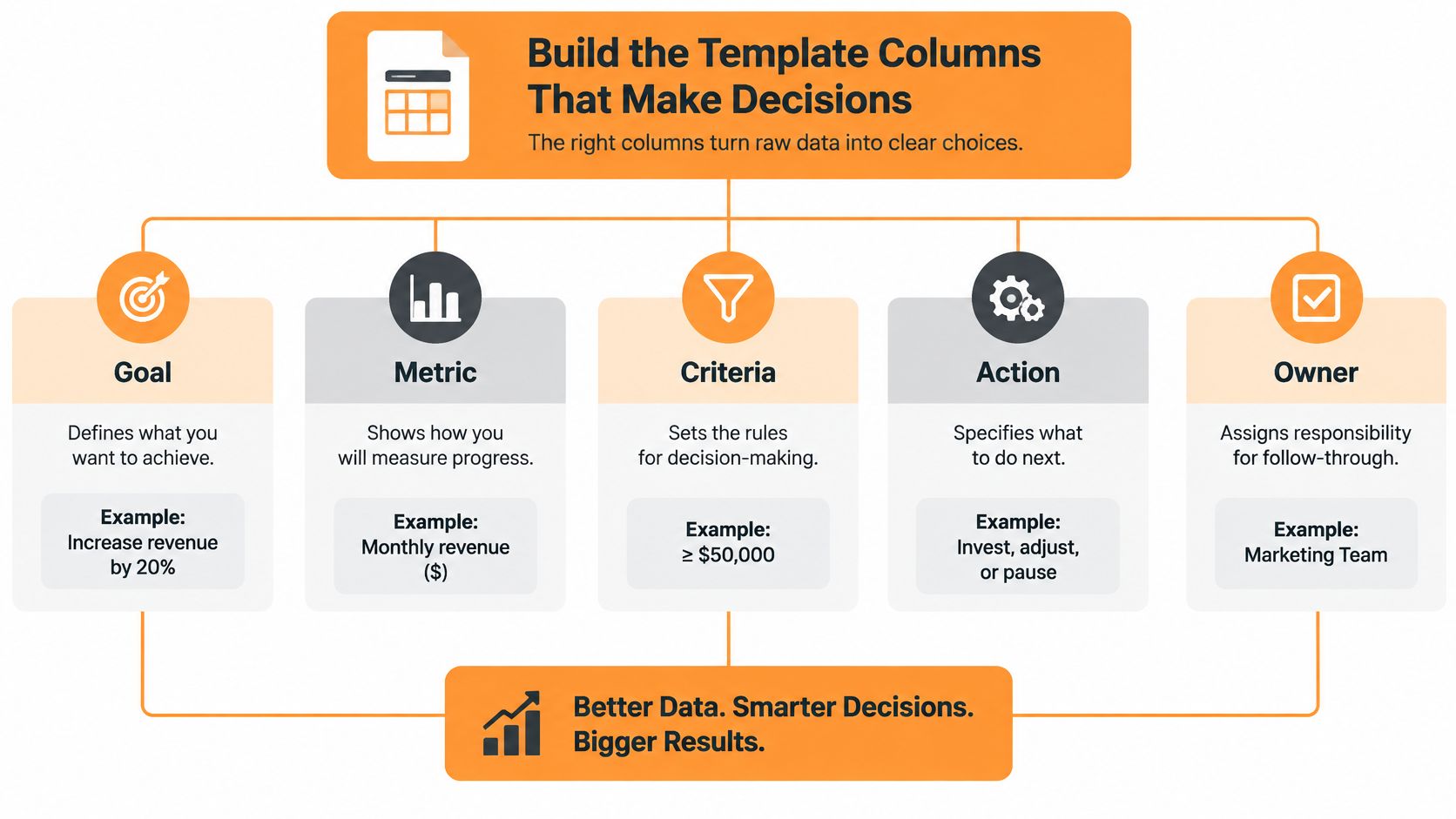
Columns you add before anyone drafts
Paste this set into a blank workbook. Then stop adding fields until you've used them for two weeks.
- Date and channel: when it could go, and which native version you're making.
- Content pillar, objective, and one KPI: one business aim and one number you'll check. Not five vanity metrics.
- Audience and funnel stage: who it's for, and whether they need a lesson, proof, or an offer.
- Format, draft status, visual asset, and call to action: the shape of the post, not just the topic name.
- Owner, deadline, and approval: a person's name, a date, and who may move the row to scheduled.
- Hypothesis and success threshold: the bet, plus the line that says it worked.
- Result: filled after it publishes. Leave it blank on purpose until then.
A usable hypothesis sounds like this: "An executive lesson plus a question will increase qualified comments." The threshold might be five comments from people in the target role. Total likes don't count. If you can't name the bet, the row isn't ready to schedule.
Accessibility belongs in the approval path
Most templates track copy, graphics, hashtags, and a status dropdown. That's how inaccessible posts get a green light. A 2025 public-health communications guide recommends informative alt text, spelling out acronyms, skipping jargon and excessive emoji or decorative fonts, captioning videos, and keeping captions legible against the background.
Add columns for alt-text status, captions or a transcript, a contrast check, an inclusive-language review, language or market, and an accessibility approver. Put them in at ideation. A visual that only makes sense as on-screen text can't be rescued after design. Global teams often need a cultural adaptation, not a word-for-word translation, and the resized or recycled cut has to keep the same checks.
Practical rule: A row doesn't move to scheduled until the owner and the accessibility approver are both named, even when both names are yours.
That diagram is the short version of the same idea: goal, metric, criteria, action, owner. Everything else is detail hanging off those five.
Fill One Month Without Writing Every Post
Many teams aren't planning a quarter. They're filling whatever slot is next. In a worldwide survey of 1,000 marketers, 38% planned only one week ahead, 18% planned two weeks ahead, 20% worked on a monthly cycle, and just 14% planned three or more months out. 56% had no more than two weeks of visibility. Only 34% used a monthly horizon or longer.
| Planning horizon | Share of marketers |
|---|---|
| One week | 38% |
| Two weeks | 18% |
| Monthly | 20% |
| Three or more months | 14% |
A month on the sheet is the bridge, not twelve weeks of finished captions. You can see next week's slots and the mix around them.
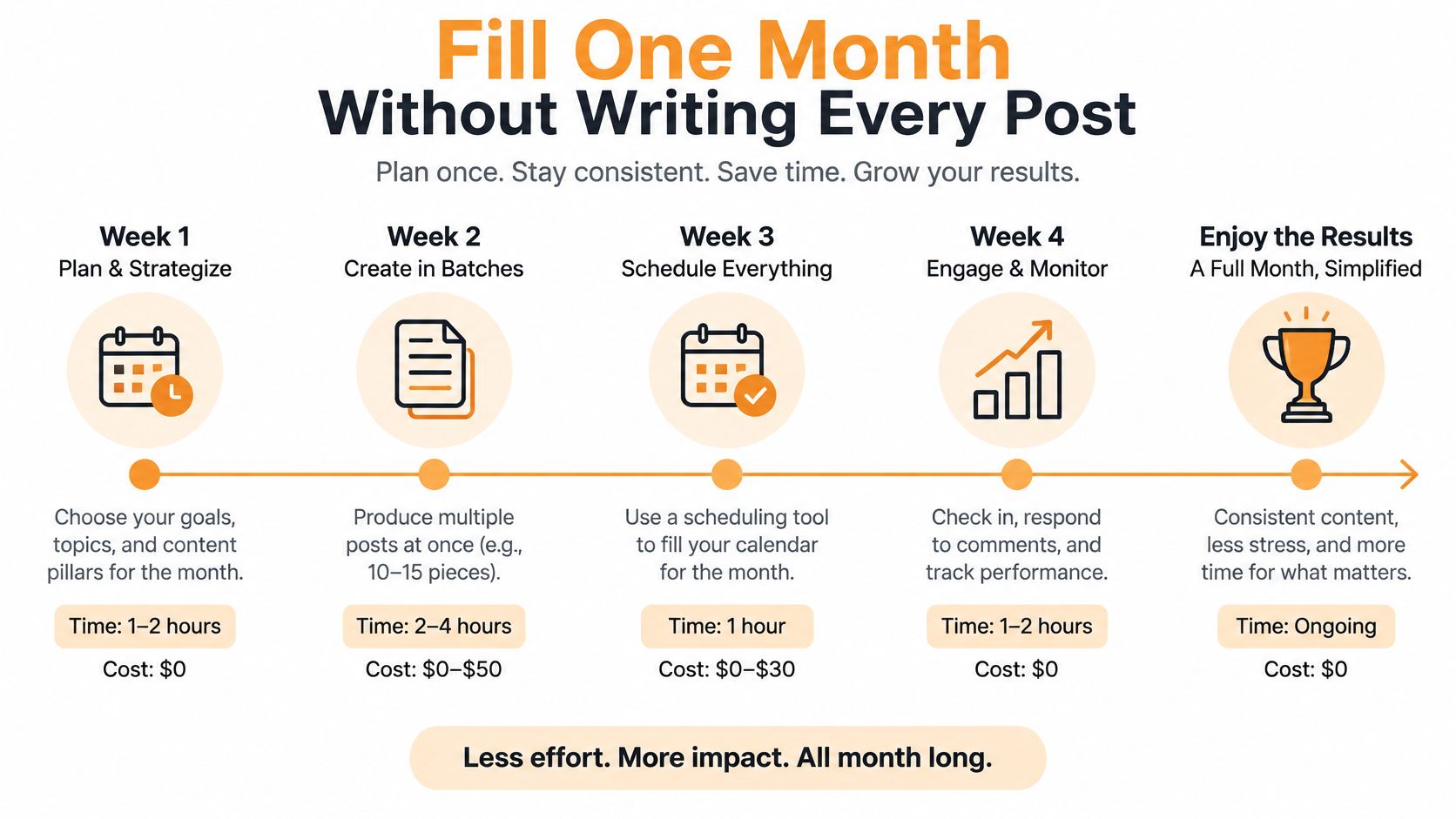
One sample month for a solo operator
Name the pillars in everyday language: teaching, proof, point of view, and offer. For a solo professional or a small agency, each week gets this mix, not a different personality every day.
- Teaching: one LinkedIn lesson tied to a problem clients already pay you to solve.
- Proof: one client story or result, and only if you have permission to tell it.
- Point of view: one founder or personal note. Opinion, not a recap of someone else's thread.
- Offer: one promotional post. If you need four offers, the month is an ad schedule.
- Two flexible rows: blank on purpose. A prompt sits in the topic cell. The caption waits.
One core idea shouldn't create three calendars. The lesson becomes a LinkedIn post, a short video, and a line in the newsletter. Child versions stay on the master row so you can see timing. If the backlog of half-ideas is the main mess, how to organize content ideas keeps the bank separate from rows that have a date.
Status labels have to stay honest: idea, drafting, needs asset, in review, scheduled, published. When a row goes stale, don't polish a dead caption. Send it back to idea or delete it. Locked rows have a date and an asset. Flexible rows are prompts until the week they ship.
If you want the month laid out as a sequence, this walkthrough shows the order without turning it into a caption factory.
Duplicate that month, assign owners, and mark which posts are locked. The open rows should look empty. That's the point.
Set a Cadence and Recycle What Already Worked
A calendar can look full and still collapse by week three. Set a cadence one person can keep, then leave room to respond to what performs.
For LinkedIn, start with one to three strong posts a week. A schedule built for high-volume Facebook or Instagram can burn out the owner and crowd the feed with thin updates. Consistency means showing up week after week, not publishing a pile of posts on Monday.
An independent analysis of more than 100,000 users across a 26-week period found that consistent weekly posting strongly outperformed sporadic posting. Use that as a reason to build a dependable cadence, not as a promise that a particular posting volume will produce a particular result.
The image shows a practical loop: set a weekly floor, rotate content pillars, then decide what to do with posts that have already shipped.
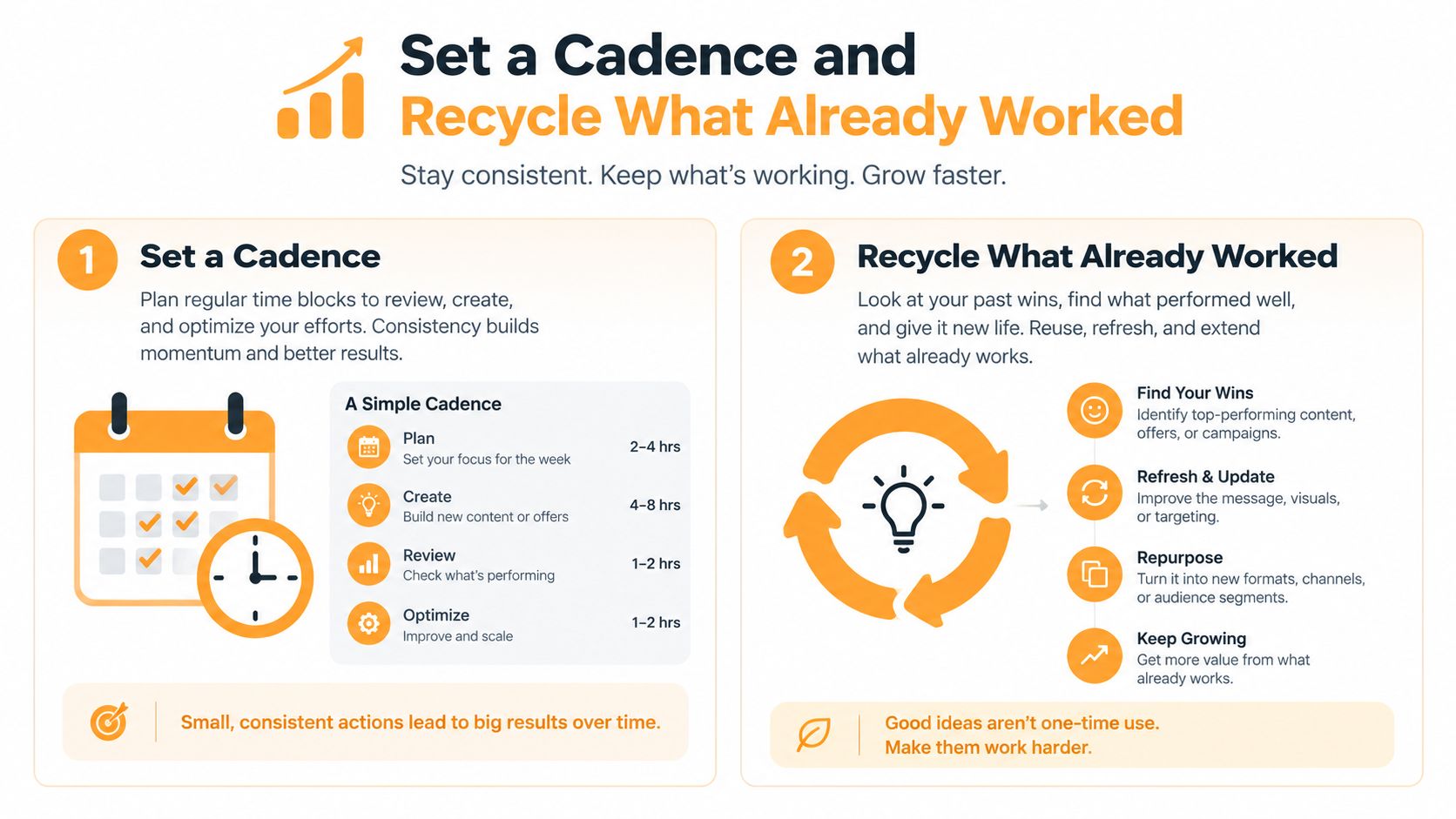
What you check, and what you do with it
Once a week, record impressions, reactions, comments, saves, profile views, and qualified leads. Once a month, compare themes, formats, and the weeks that carried the work. Total likes flatter posts that already had an audience and can hide posts that reached the right people.
Compare like with like. Normalize engagement by impressions or followers, separate organic from paid, and judge a carousel against other carousels. Use the results to test a clear hypothesis, such as whether a customer example earns more qualified attention than a general tip. Keep the hypothesis and the result in the calendar row.
Then make one call:
- Recycle: the post cleared its threshold. Create a native variation, such as turning a LinkedIn lesson into a short video with a different opening. Copying the same paragraph across channels is not repurposing.
- Revise: it came close. Keep the idea, change the hook or audience, and set a new threshold.
- Pause: it missed. Leave it off the schedule instead of filling an empty cell.
A content repurposing framework can help turn a strong idea into a fresh format without creating a second calendar. After each review, use the recycle-or-revise field to make the next decision. Rotate teaching, proof, point of view, and offer, and keep a flexible slot available for timely ideas. If a pillar repeatedly misses its threshold, give it less space rather than posting it harder.
Choose Where the Calendar Lives
A calendar gets unreliable when the plan, publishing queue, and drafts each claim to be the source of truth. Give each tool one job, then decide which record wins when statuses conflict.
Three jobs, three homes
The sheet owns the plan. Keep the hypothesis, accessibility checks, owner, approval, and fixed or flexible slot in a shared spreadsheet. Anyone on the account should be able to tell what is approved and what is still a prompt. Leave publishing to another tool.
The scheduler owns the clock. After approval, move the row's date and asset handoff into a scheduler. Compare social media scheduling apps if you need to choose one, but keep the spreadsheet as the master record. If the scheduler becomes a second planning system, its statuses will drift from the sheet.
Drafting owns the blank page. When writing is the bottleneck, start LinkedIn drafts with the author's profile, past posts, and real experience. Use keywords in flexible rows as prompts, not as finished captions. Examples can help beat the blank cursor, but leave the slot open if the idea is not ready. Return the chosen draft to its master row, with an owner and status. The drafting workspace does not approve the plan.
If two calendars disagree, the sheet wins. Nothing publishes until the row says scheduled.
Cadence belongs in the system as a commitment the team can keep, not a borrowed quota. Buffer's 2026 analysis of 4.8 million channel-week observations from about 161,000 Facebook, Instagram, and X profiles points to a practical takeaway: posting consistently is better than leaving the calendar silent. Use that as a reason to maintain a realistic cadence, not to copy volume from other networks or treat it as a LinkedIn target.
Tools cannot repair a disconnected calendar, a status field no one updates, a missing owner, or a scorecard that counts only published posts. Set the spreadsheet as the source of truth, define who updates each row, and leave future slots flexible until there is a clear idea worth scheduling.
Start the Sheet This Week
Do this in one sitting, under an hour. Don't reorganize the archive and don't design a new color code.
Duplicate the social media content calendar template. Add the decision columns and the accessibility columns from earlier. Name three or four pillars in plain language. Block one month with fixed rows assigned and flexible slots left as prompts. Set the LinkedIn floor at one to three posts a week. Put an owner on every row, even when that owner is you.
Use the checklist as the last pass, not as a second planning project.
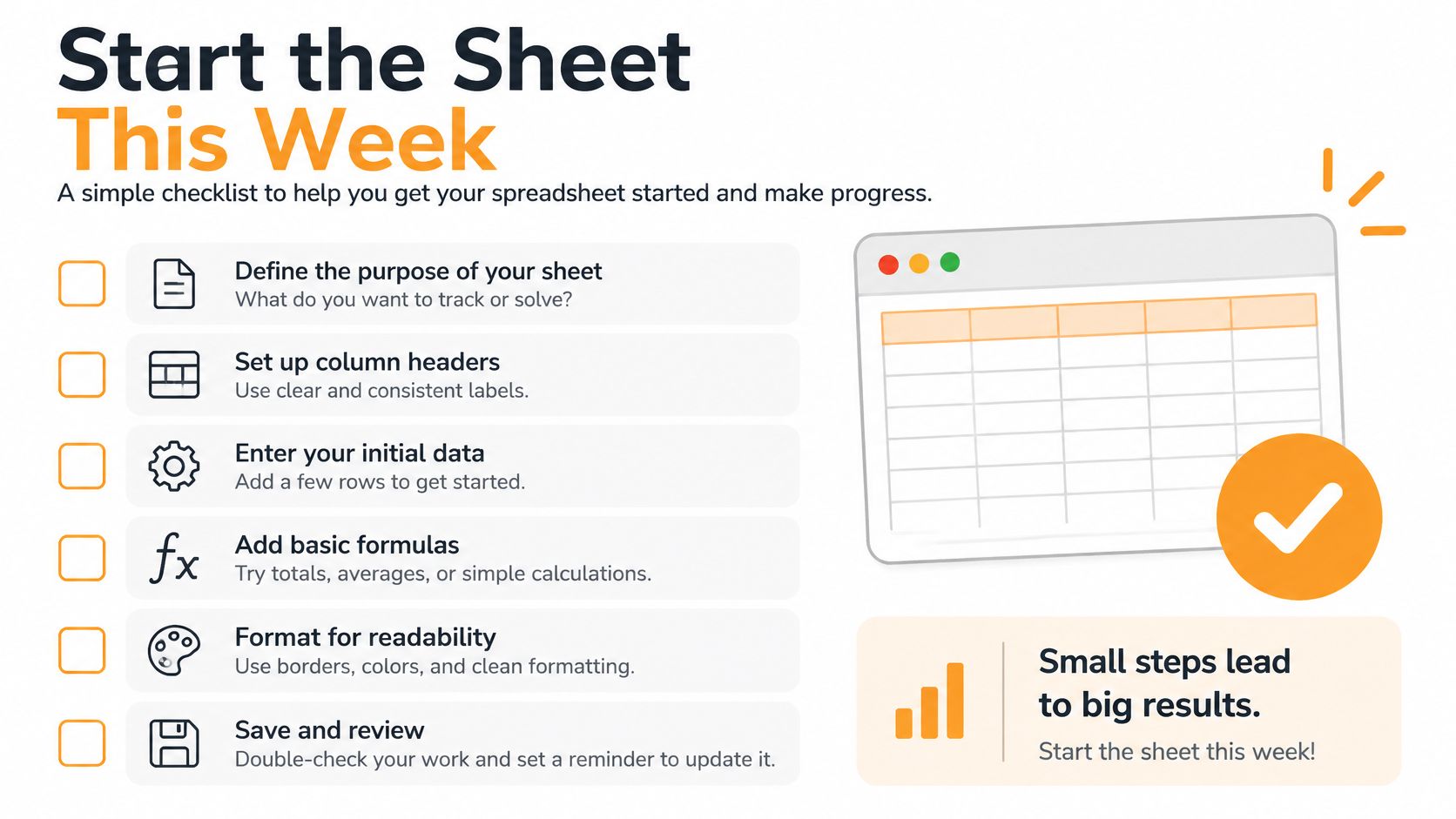
Tick these before anything is scheduled
- Hypothesis written: one sentence that names the action you want from a real reader.
- Success threshold chosen: a result you'll look up later, not "perform well."
- Asset and alt text status filled: if either is empty, the status stays needs asset.
- Approval named: a person. A department can't sign a row.
- One older winner flagged: recycle or revise, so the month isn't all new writing.
You should be able to publish the next two weeks without filling every future cell. Locked posts have dates and owners. The rest are prompts waiting for the week they belong to.
Leave the later flexible rows blank. An empty prompt is a decision. A caption you already regret is a mess.
If dates are the mess, finish the sheet and stop opening new tools. If LinkedIn drafts are the mess, write a few on-voice versions from keywords already in those open rows, then paste the keepers back with owner and status. The calendar stays the decision. The draft is only the words.
RedactAI drafts LinkedIn posts in your own voice from your profile, your history, and a few keywords, then helps you schedule, recycle winners, and read the numbers that belong on the calendar. If the flexible rows are full of topics and empty of copy, that's the bottleneck it was built for. Start with RedactAI and paste the keepers back into the sheet before you schedule them.






























































































































































































