Tuesday at 9 a.m. isn't a strategy. It's a screenshot from someone else's audience, pasted onto your calendar.
That popular advice fails busy professionals for two simple reasons. Your followers may not live where you live, and you may be stuck in a meeting, on a flight, or deep in client work when that supposed magic hour arrives. If you schedule LinkedIn posts for a time you can't attend, you've automated publication and abandoned the conversation.
I would flip the question. Don't start with, "What's the best time?" Start with, "Which weekday windows can I test, in my audience's time zone, while I'm available to reply?" That turns scheduling into a small, useful experiment. You queue the post ahead of time, protect your calendar, and learn from profile visits, qualified comments, and connection requests, not likes alone.
Weekday Windows Worth Scheduling First
Queue on weekdays inside your audience's local business hours. LinkedIn timing isn't flat across the week, and weekends shouldn't be your default while you're still learning what works.
Sprout Social's timing analysis reported analyzing nearly 2 billion engagements across approximately 307,000 social profiles. It identified Tuesday from 11 a.m. to 5 p.m. as the strongest overall window, followed by Wednesday from 11 a.m. to 4 p.m. and Thursday at 11 a.m. and from 1 p.m. to 5 p.m., using local time.
LinkedIn Scheduling Windows to Test First
| Day | Local time | Strength | How to use it |
|---|---|---|---|
| Tuesday | 11 a.m. to 5 p.m. | Strongest overall window | Primary test day |
| Wednesday | 11 a.m. to 4 p.m. | Second-strongest block | Primary test day |
| Thursday | 11 a.m. and 1 to 5 p.m. | Strong late morning and afternoon | Primary test day |
| Monday | 1 to 2 p.m. | Narrow opportunity | Secondary only |
| Friday | 11 a.m. and 1 to 2 p.m. | Short windows | Secondary only |
| Saturday to Sunday | Daytime | Weaker period | Do not use as the default |
Treat this grid as a starting point, not a universal answer. Country mix, seniority, a carousel versus short text, and your account's own history can move the winner by hours. That's why testing specific LinkedIn post times against your analytics beats copying a generic chart.
Pick three slots inside Tuesday through Thursday. Keep format and topic mix reasonably comparable, then judge impressions, comments, profile visits, and connection requests rather than likes. A quiet first hour doesn't prove the slot failed, because a post can keep being evaluated well beyond publication.
Practical rule: If you can't reply during the window, it's not a good test slot, even if a chart ranks it first.
How to Schedule Posts Inside LinkedIn
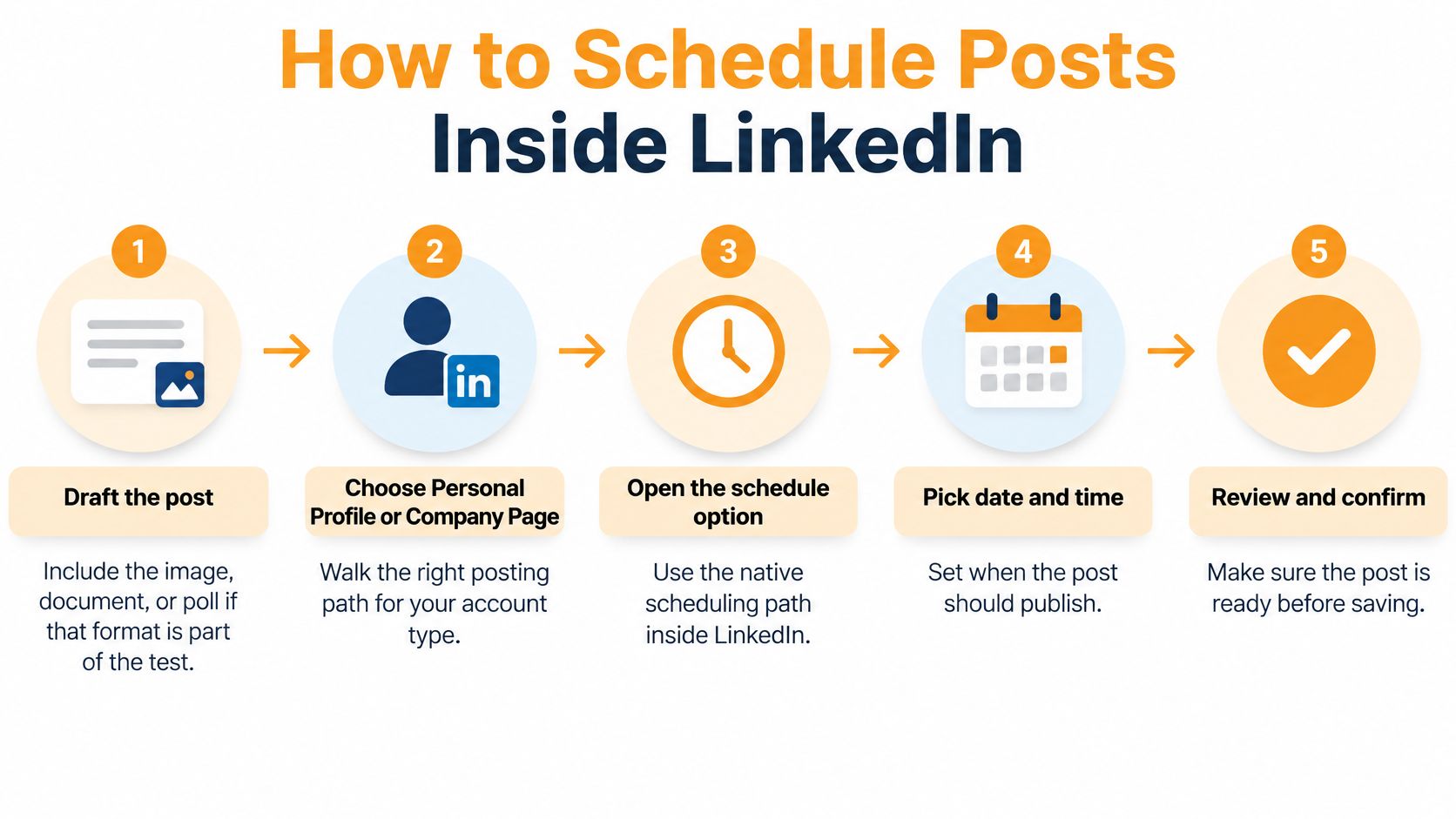
Native scheduling looks simple until a post lands an hour off, a link card breaks, or nobody knows who can cancel it. Work through the clicks in order, and check the easy misses before you save.
Build the Post Before You Touch the Clock
- Draft the complete post: Open Start a post on your personal profile or from your Company Page admin view. Add the final text, image, document, or poll now, not as a placeholder you'll somehow fix later.
- Check the format limits: Confirm the format you've chosen offers the scheduling control you need. Polls and documents can give you fewer options than plain text, so discover that before the post is approved.
- Preview like a phone reader: Shrink your view to a narrow mobile width. Check the opening lines, line breaks, link card, image crop, and document title, then add alt text while you can still edit freely.
That preview matters more than many realize. A strong hook buried below an awkward break can look fine on desktop and unreadable in the feed. Fix the visible first lines before you lock anything.
Set the Date, Time Zone, and Owner
- Open the clock control: Click the schedule or clock icon next to Post instead of publishing. Don't rely on memory if the control isn't visible, because some mobile layouts hide scheduling or place it differently.
- Pick the audience-local time: Choose a date and a time from your test grid, in the audience's zone rather than automatically using yours. I would schedule at least 24 hours ahead, which leaves room for edits, approvals, and a simple sanity check against breaking news.
- Confirm the displayed zone: Read the time zone shown on the picker out loud before saving. Pay extra attention around daylight saving changes, when a post can shift an hour relative to the market you're targeting.
- Save, then reopen the queue: Confirm the schedule, then open the scheduled posts view from your profile or Page admin area. Verify the post is there, with the intended date and time, and know how to edit, move, or delete it before it goes live.
For a Company Page, confirm you have an admin role before drafting a week of content. It's a frustrating dead end to finish the copy and then discover you can't publish or manage the queue. Assign one owner to each scheduled item, even if you're a team of one, because somebody has to cancel it if a client name, number, or claim becomes outdated overnight.
Check What Happened After Publication
After the post goes live, open its analytics and record more than reactions. Note impressions, comments, profile visits, and connection requests, plus the exact local time and format. Without that log, you're just queuing content and guessing later.
Aim for a concrete buffer before Monday starts: three weekday posts already in the queue, each previewed, time checked, and owned by one person who can stop it. That's when native scheduling starts saving time instead of creating cleanup work.
When a Scheduling Platform Beats Native
Don't buy another tool because a logo list told you to. Decide from the publishing job sitting in front of you.
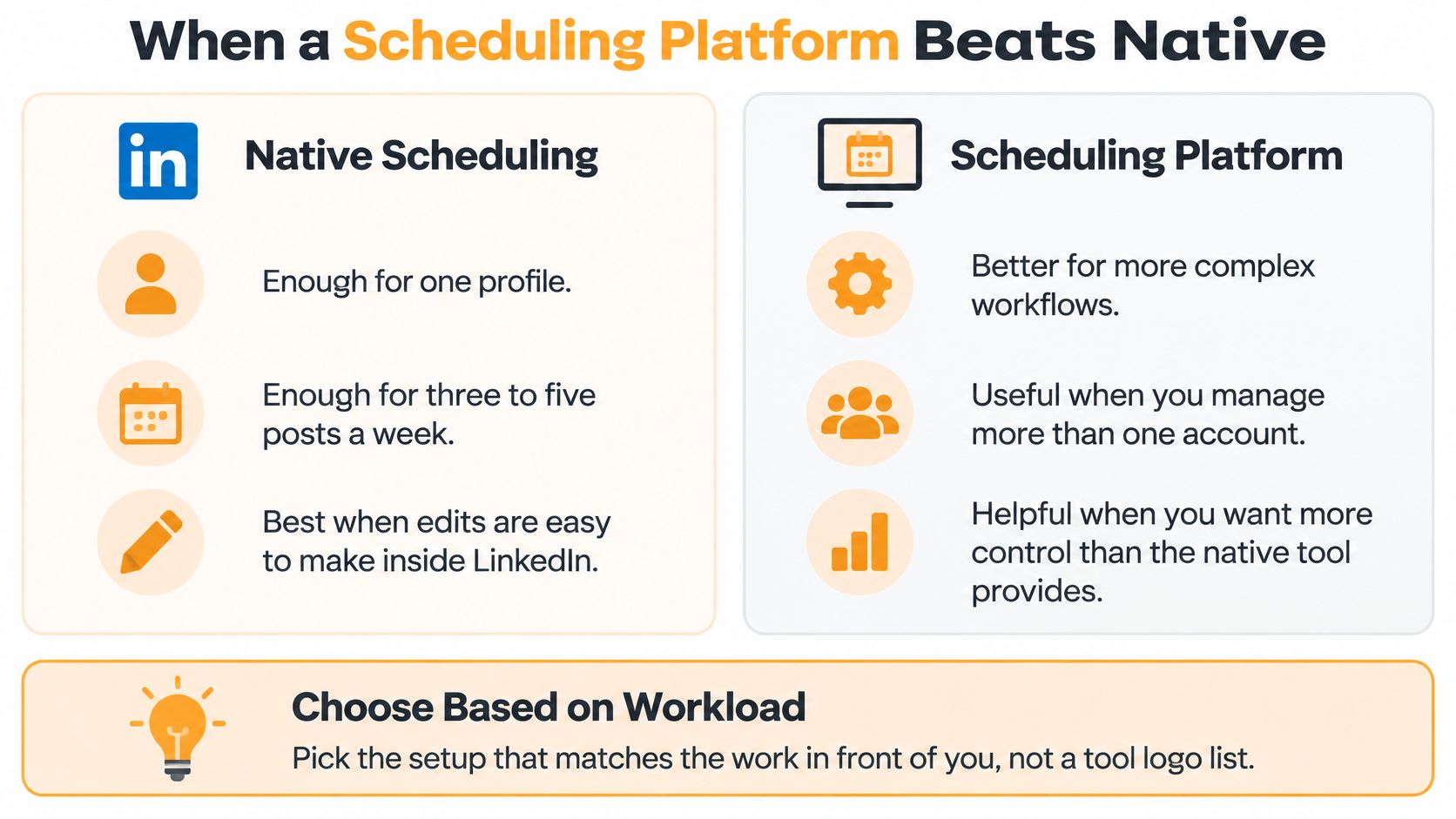
Native scheduling is enough for one profile, a manageable weekly queue, and edits you're happy to make inside LinkedIn. A separate platform starts earning its place when you add destinations, approvers, creators, travel, or regions. A careful comparison of post scheduling app features should focus on preview, a visible queue, approval flow, time zone controls, and post level stats, because those features solve daily friction.
Native LinkedIn Scheduling Versus a Separate Queue
| Situation | Best fit | Job it solves | Watch-out |
|---|---|---|---|
| One personal profile, 3 to 5 posts a week | LinkedIn native scheduler | Queue, edit, and read analytics in one place | Some mobile views hide the scheduler |
| Founder plus a company Page | Native on both, or one shared queue | One calendar for two destinations | Page posting needs an admin role |
| Agency publishing for clients | Scheduler with an approval step | Buffer, preview, and sign-off before publish | Still review names, numbers, and claims by hand |
| Followers across several regions | Queue with time-zone controls | Rotate regional slots without reposting by hand | Do not stamp every post in the creator's own city |
The founder row catches people out. Posting as yourself and posting as the company aren't the same workflow, and a shared calendar helps only if the right person has Page admin access. Check permissions before you promise a launch date.
Agencies need a stronger gate, not just a bigger queue. A client should approve copy that mentions their customers, results, pricing, or regulated claims, even when the platform can publish automatically. Automation doesn't transfer accountability.
For a multi region audience, look for an explicit time zone control at the post or queue level. If every item inherits your laptop's city, you'll keep calling that a global schedule while one region gets every convenient slot.
Stay native until a specific job hurts. Then choose the smallest setup that removes that pain.
That's the test. If you're solo and LinkedIn handles your queue cleanly, keep the money and the simplicity. Move when approvals, destinations, or regions start causing missed edits and time mistakes.
How Many Posts to Queue Each Week
More posts don't guarantee more reach. Confusing publishing frequency with guaranteed distribution is how busy people build a large queue, dilute their ideas, and still wonder why conversations haven't improved.
Buffer's social media benchmarks summarize an analysis of more than 2 million LinkedIn posts from over 94,000 accounts, pointing to two to five weekly posts as a commonly recommended baseline. That finding is observational, so it doesn't prove frequency itself caused the improvement.
The tighter ceiling is your reply capacity. A post that pulls a dozen comments while you sit in back-to-back calls does less for pipeline than a quieter slot where you can answer within the hour. Queue only the volume you can staff after publish.
Start With Three, Then Earn More Volume
| Weekly tier | When to use it | Stop rule |
|---|---|---|
| 3 posts | Your starting baseline | Stay here if replies or quality slip |
| 5 posts | Quality and response capacity remain stable | Drop back if topics start repeating |
| 6 to 10 posts | Distinct topics with enough hours left to follow up on comments | Stop if posts stack too closely or replies lag |
Executives, consultants, and sales professionals can stop there. The aim is recognizable expertise and useful conversations that support pipeline, recruiting, partnerships, or inbound enquiries.
Understanding what posting cadence means in practice helps, because cadence isn't just count. It covers spacing, topic variety, and whether your calendar leaves hours open to respond. Don't place two updates in the same afternoon without a clear reason, and don't queue near duplicates that split the same audience's attention.
Give Every Queued Post an Exit
Each scheduled item needs four things before it earns a slot:
- One owner: A named person can edit, move, or cancel it.
- One clear difference: It adds a point last week's post didn't make.
- One cancellation rule: News, a sensitive client reference, or a wrong number triggers a hold.
- One monitoring window: Somebody checks comments and corrects misunderstandings after it publishes.
Hold cadence steady while you test timing, and change only one clock variable at a time. Compare rolling medians by slot, not averages, so one unusually strong post doesn't crown a weak schedule. A cancellation rule only works if someone reads the queue each morning; five minutes of review beats a post going live next to a headline it shouldn't touch.
That discipline matters outside publishing too. If your LinkedIn content exists to start sales conversations, a team handling managed prospecting with Outbound Consulting is a reasonable adjacent resource, but scheduled posts still need distinct ideas and a human ready to respond.
The benchmark I'd use is sustainable cadence multiplied by differentiated content. If five posts leave no time for thoughtful replies, three stronger posts are the better business decision.
Rotate Times for Global Followers
There is no single global best hour. Say your buyers sit in New York, Berlin, and Singapore. Any slot you choose gives one region a normal workday and asks another to catch up hours later.

SocialCrawl's review of LinkedIn timing datasets describes independent datasets differing by roughly seven hours, with timing varying by geography, audience size, and content type. It also notes platform guidance suggesting posts can continue being tested for 24 to 48 hours. That weakens the idea that one universal slot decides everything.
Run a Three Week Regional Rotation
| Week | Audience region | Local window | Measure |
|---|---|---|---|
| Week 1 | North America | Late morning, US Eastern | Comments from target roles, profile visits |
| Week 2 | Europe | Late morning, Central European | Comments from target markets, clicks |
| Week 3 | Asia-Pacific | Business hours, local | Comments and leads from target markets |
| Repeat | Best-performing region | Its winning window | Leads and profile visits |
Before you build that rotation, open your analytics and read the follower location breakdown. If most followers sit in one region, weight the rotation toward them and give each other major region one deliberate slot. Don't rotate evenly just to feel fair if your commercial audience is concentrated somewhere else.
If you only post once a week, alternate regions across weeks instead of always privileging your home city. Log which slot produced comments from people you want to reach, plus profile visits, clicks, and leads. Impressions alone can crown the biggest region while hiding the market that produced real conversations.
Pair each slot with a 60 to 90 minute reply block when you're awake and available. A slightly less crowded hour you can attend beats a supposedly perfect hour while you're on a flight with notifications off.
A rotating schedule that gives each major region occasional priority is more useful than one permanent slot that repeatedly inconveniences the same followers.
Agencies should segment results by follower location when that data exists. If audience composition shifts, rerun the read instead of defending last quarter's winner. Your goal isn't to find a magic timestamp. It's to learn which regions respond, at which local times, with outcomes worth repeating.
Fixes When Scheduled Posts Fall Flat
The most expensive failure is a good post published while you're unavailable. It collects early questions, nobody answers them, and the conversation dies before you return from meetings.
Hootsuite's guide to the LinkedIn algorithm explains that ranking uses active signals such as reactions, comments, and reposts, and passive signals such as reading or dwell time. It also describes posts remaining under evaluation for 24 to 48 hours or longer, while older relevant posts can resurface. Scheduling therefore has to include what you do after publication, not just the timestamp.
Scheduled Post Problems and the Fix
| Symptom | Likely cause | Fix |
|---|---|---|
| Quiet post while you were offline | No one answered early comments | Move it to a slot you can attend for 60 to 90 minutes |
| Two similar posts the same day | Attention split by near-duplicates | Cancel one and space the next to another day |
| Publish time off by an hour | Wrong time zone or daylight saving | Reset the zone and recheck every queued item |
| Ugly or empty link preview | Card cached before the edit | Fix the preview before it goes live |
| Comments feel forced | Generic engagement bait | Ask a specific question you can reply to |
| Recycled hit feels stale | Old hook, no current context | Add a fresh detail, then schedule the update |
Change one variable at a time. If you move the hour, rewrite the hook, and switch from text to a document, the next result tells you almost nothing. Pick the likely cause, make one concrete fix, and keep the next read interpretable.
For recycling, don't resurface a winner word for word just because it performed once. Add a current example, correct an outdated detail, or answer the strongest objection from the original comments. Readers should feel they're getting an updated point of view, not a rerun you hoped they wouldn't recognize.
Start a Two-Week Timing Test
Run the test this week instead of collecting more timing charts. Keep it small enough that you'll finish it.
Your Two Week Checklist
- Queue three posts: Use Tuesday, Wednesday, and Thursday inside late morning to afternoon windows, in the audience zone you're testing first.
- Keep formats comparable: Don't compare a personal story, a poll, and a document as if only the clock changed.
- Block reply time: Protect 60 to 90 minutes after each publication for comments and follow up messages.
- Log useful outcomes: Record impressions, comments from the right people, profile visits, and connection requests.
- Check every picker: Confirm date, local time, and time zone before saving each post.
In week two, rotate one regional slot if your followers are spread across regions, and change nothing else. Then compare rolling medians by slot. One viral post can make a mediocre hour look brilliant, so don't promote a winner from a single spike.
Keep the winning slot only if it also fits a time when you can reply. Add volume only when comments stay manageable and every new post says something distinct. That's a schedule you can sustain after the test ends.
If drafting in your own voice is the part that keeps stalling your queue, RedactAI can help you create posts learned from your previous content, schedule them, review real time statistics, and recycle your strongest ideas with fresh context. Visit RedactAI to build your next two week test around posts that still sound like you, published at times you can show up for.