
Useful expertise is sitting in your notes, client calls, sales conversations, and half-finished drafts. You know what your audience needs to hear, but LinkedIn video content keeps getting postponed because every idea feels like a full production: script, camera, lighting, captions, editing, thumbnail, publishing, and follow-up.
That approach makes video harder than it needs to be. A strong professional video can begin with one clear insight, one audience problem, and a simple path from hook to useful takeaway. The repeatable system matters more than elaborate production.
This list covers eight LinkedIn video content formats you can turn into working systems. Each idea includes a practical concept, script structure, filming approach, optimization choices, CTA direction, measurement step, and repurposing path. You'll also see where tools such as RedactAI can demonstrate profile analysis, personalized drafting, scheduling, recycling, and analytics without replacing human judgment. For additional production inspiration, compare this approach with a LinkedIn video creator workflow, then adapt the format to your professional context.
1. Behind-the-Scenes AI Post Generation
A screen-led walkthrough can make an abstract AI feature understandable in a few minutes. Instead of claiming that automation will solve content creation, show the actual sequence: the source material goes in, the system identifies patterns, and the creator reviews and edits the draft.
For a RedactAI demonstration, begin with a professional who has useful experiences but keeps delaying posts. Show the profile, previous posting history, and a short personal story as the source material. Then reveal several draft directions and explain why the creator chooses one rather than publishing the first output automatically.

A simple walkthrough script
Use this structure:
- Name the bottleneck: “I have ideas, but turning them into posts takes too long.”
- Show the inputs: Profile information, posting history, expertise, and a real experience.
- Explain personalization: The tool uses those inputs to shape drafts around the creator's tone and subject matter.
- Review the output: Compare different hooks, choose the most accurate angle, and edit anything that sounds unlike the person.
- Give the next step: Invite viewers to test one idea rather than automate their entire voice.
Keep the cursor movement deliberate. Zoom into the fields that matter, use smooth transitions between screens, and place captions close to the relevant interface element. Avoid showing a busy dashboard for too long. The viewer should understand what changed between the input and the draft.
A responsible product explanation also names the creator's role. RedactAI can help generate and personalize drafts, but the professional still needs to check accuracy, context, confidentiality, and tone. A practical companion resource is this guide to using AI to write LinkedIn posts.
Practical rule: Show the edit, not only the generation. The human review is part of the trust-building story.
The embedded product video can appear later in the walkthrough, after the viewer understands the problem and the three-stage process.
Repurpose the recording into a short teaser about the bottleneck, a feature-focused clip about personalization, and a text post summarizing the workflow. Measure profile visits, comments about authenticity, draft selections, and qualified conversations rather than treating views as the only outcome.
2. Before and After Post Transformations
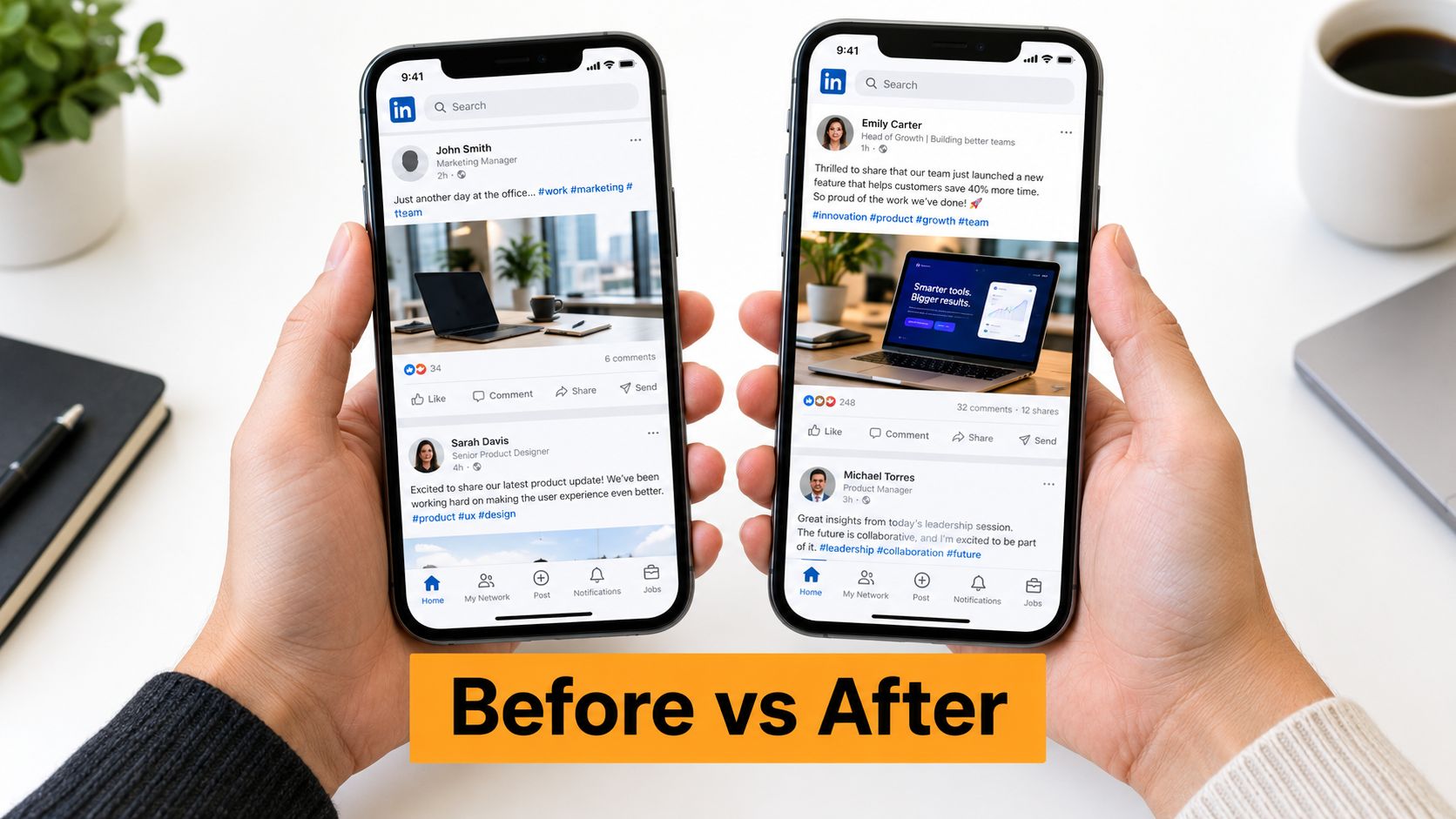
Before-and-after videos work because the viewer can see the decision-making. The strongest version doesn't just place two blocks of copy on screen. It explains what the original post failed to communicate, what changed in the revised version, and why the new structure better serves a specific audience.
Use one transformation per video. Start with the original draft, identify the unclear opening or broad claim, and then show the revised version with annotations. Highlight changes such as a more specific audience, a clearer point of view, a concrete example, or a CTA that invites a useful response.
Make the transformation credible
A practical script sounds like this:
- “This draft had a useful idea, but the opening tried to speak to everyone.”
- Show the original post and mark the vague section.
- “We changed the audience, moved the insight earlier, and added the context that makes the lesson credible.”
- Reveal the revised version in a split-screen layout.
- Ask the viewer which version they'd be more likely to read or respond to.
Use animated highlights sparingly. A subtle outline around the hook is more useful than constant motion. The thumbnail can show a clear contrast, such as “Broad lesson” versus “Specific point,” without promising a performance result.
If you show engagement metrics, use real records and obtain explicit permission from the account owner. Do not imply that a transformation guarantees more likes, comments, reach, or leads. Outcomes depend on the topic, audience, timing, distribution, and the quality of the underlying insight.
For agencies, anonymized examples can protect client confidentiality while still teaching the editorial principle. For solo professionals, a public self-edit can be more persuasive because viewers can see the complete context.
Turn one transformation into a series
Each approved example can become a quote clip, a carousel, and a written breakdown. The video CTA should invite viewers to inspect one underperforming draft and ask, “Is the problem the idea, the audience, or the way the idea starts?” That question creates a more useful conversation than “Want better engagement?”
Measure saves, thoughtful comments, profile visits, and requests for review. If the audience repeatedly asks about hooks, make the next video about openings. Let the questions determine the next transformation.
3. LinkedIn Algorithm Principles That Hold Up
A subject-matter expert can publish a polished LinkedIn video, see limited response, and blame the algorithm. The stronger diagnosis separates documented platform capabilities, audience behavior, and recommendations that still need testing.
LinkedIn introduced native video broadly in 2017, letting members record in the mobile app or upload existing files. The platform also provided audience information such as viewer companies, job titles, locations, views, likes, and comments. That made video an analyzable professional format rather than an external link. LinkedIn's original native-video announcement provides the historical context.
Build the algorithm video around a decision the viewer can repeat. Open with a practical principle: “Posting video isn't a strategy by itself.” Film a direct-to-camera explanation, then show the content path on screen: a clear professional problem, a relevant opening, immediate context, readable captions, one useful takeaway, and a focused CTA. Each element should earn its place. A longer video with several disconnected tips is harder to follow and harder to evaluate.
Test the native-video choice
A native upload gives LinkedIn a direct video asset and audience feedback. A link to another platform asks the viewer to leave the feed. Neither format should be treated as a permanent winner. Recreate the same core idea as a native video and as a written post with a link, keep the audience and topic comparable, then compare results for your account.
Use the platform's technical guidance when preparing exports. LinkedIn supports uploaded videos from 3 seconds to 10 minutes, resolutions from 256×144 to 4096×2304, frame rates from 10 to 60 frames per second, bitrates from 192 Kbps to 30 Mbps, and files up to 5 GB, according to its video upload specifications. These are publishing constraints, not instructions to maximize every setting.
Use one filming checklist for every episode:
- Opening frame: State the audience problem in readable text.
- Caption layer: Keep the meaning available without audio.
- Core lesson: Teach one principle instead of listing every tactic.
- CTA: Ask for an opinion, example, or next question.
- Review point: Revisit the recommendation as platform behavior changes.
Avoid fake “best time to post” timestamps. Test publishing windows that fit your audience, label them as experiments, and review the results periodically. Measure qualified comments, saves, profile visits, and follow-up questions alongside views. Then repurpose the main video into short clips, with each clip covering one principle and pointing viewers toward the complete explanation.
4. A Thirty-Day LinkedIn Content Idea System
A content calendar video should solve a specific problem: the professional who opens LinkedIn with no idea what to publish. The answer isn't a rigid daily prescription. It's a set of prompts organized around audience needs, professional experiences, and different levels of commitment.
Build the video as four weekly chapters. One week can focus on useful explanations, another on industry observations, another on personal lessons, and another on conversations with the audience. Within each chapter, show how the same prompt changes for a founder, a consultant, and an agency client.
For example, the prompt “Explain a common mistake” could become:
- A founder explaining a product decision that changed their roadmap.
- A recruiter explaining why a job description loses qualified candidates.
- An agency strategist explaining why a client's content calendar became difficult to maintain.
Make the calendar usable
Display the calendar as a visual grid, but pause on a few entries long enough to show the corresponding script. A useful daily structure is:
- Point of view: What do you believe or notice?
- Evidence from experience: What did you observe?
- Practical takeaway: What can the viewer do next?
- Conversation CTA: What would you like the audience to add?
Don't turn every day into a sales post. A healthy system gives the audience useful context before asking for a meeting, download, or product conversation. The creator can use RedactAI to generate variations, adapt drafts to a personal voice, and plan future posts, but every draft still needs audience and accuracy review. The AI content calendar generator guide can support that planning workflow.
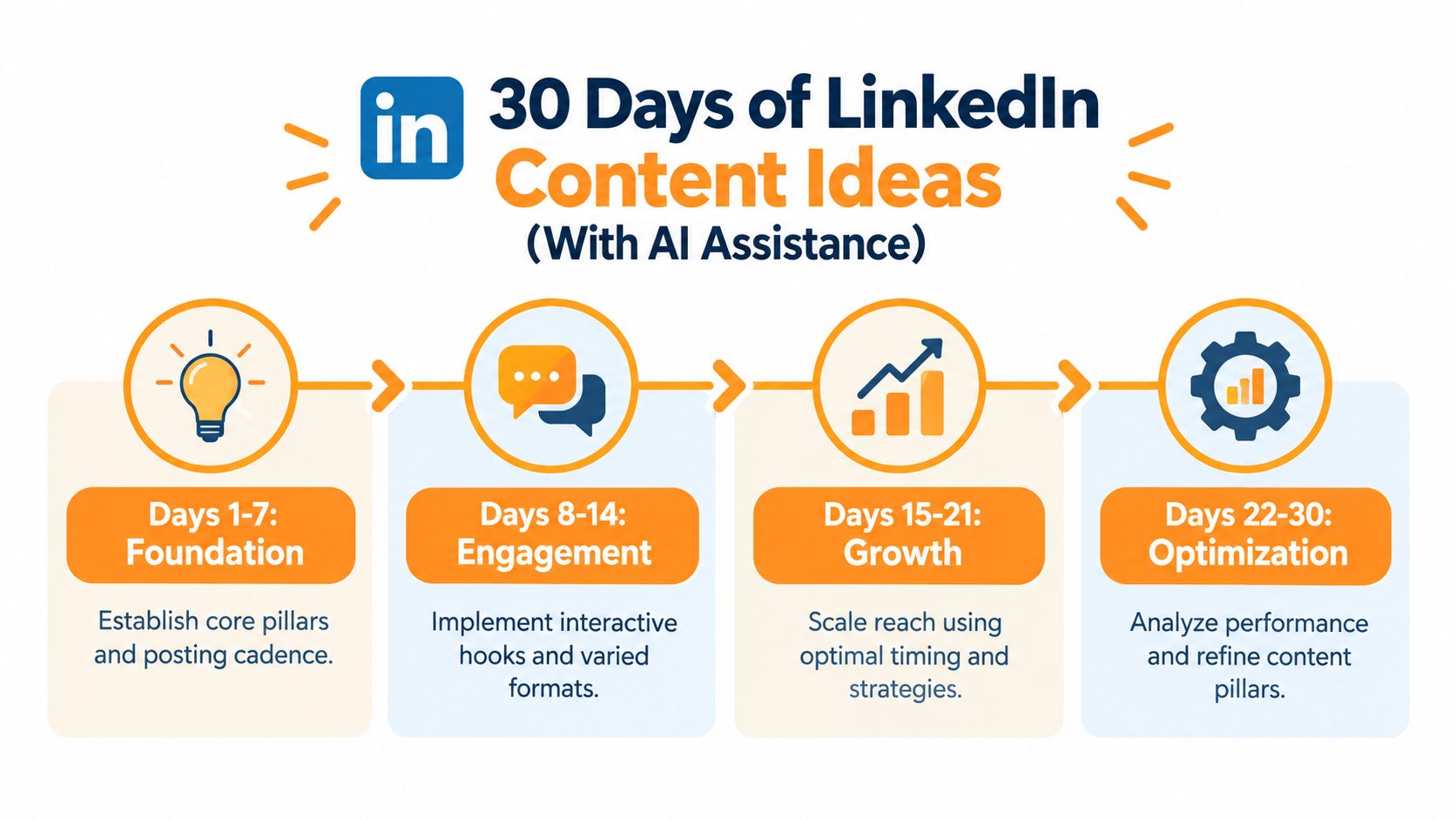
A long calendar video can become four weekly clips, daily text prompts, and an agency planning asset. For each published video, record the audience segment, topic pillar, hook style, and CTA. After the review period, keep the prompts that produce useful conversations and rewrite the ones that feel repetitive.
5. Turn One Professional Insight Into Ten Distinct Posts
Content recycling fails when the creator changes a few words and calls the result a new idea. A better system starts with one durable insight and maps each variation to a different audience need, format, or stage of the conversation.
Choose a core idea such as, “A sales team should diagnose the buying process before changing its pitch.” The video can then show different angles: a personal lesson, a common mistake, a practical framework, a contrarian opinion, a short story, a question for peers, a response to a customer objection, a manager's coaching note, an industry observation, and a summary for beginners.
Build the repurposing map
Record the explanation once, then edit the recording into clips that introduce each angle. Keep the central idea consistent, but change the audience promise and CTA. A sales leader might ask for examples from other teams. A founder might invite disagreement. An agency might turn the framework into a client workshop prompt.
A useful script for the video is:
- “Here's the idea I want to keep using.”
- “Here are the audience problems connected to it.”
- “Here's how each version changes the opening and takeaway.”
- “Here's the quality-control pass before anything gets scheduled.”
The quality-control pass matters more than the multiplication. Check that each draft contains a distinct point, matches the creator's voice, preserves factual accuracy, and fits the intended audience. Remove variations that merely repeat the same claim.
Plan distribution without exhausting the audience
You don't need to publish every variation immediately. Space the angles around related conversations, seasonal relevance, product announcements, and questions from comments. RedactAI can help recycle top-performing content and create additional drafts, but the creator should decide whether an old idea still reflects current knowledge.
For an agency, the framework becomes a repeatable client system. Store the core insight, audience segments, approved terminology, prohibited claims, CTA options, and review status in one brief. Then create variations for each account without forcing every client into the same voice.
Measure whether the variations create different actions. One may earn saves, another may prompt comments, and another may lead to profile visits. Treat those signals as clues about audience intent, not as proof that one version is universally superior.
One recording is a source asset. It isn't automatically ten good posts. Distinct audience value is what makes repurposing worthwhile.
6. Expert Interviews Built Around Working Habits
A guest has thirty minutes between meetings and one useful process to share. The interview should reveal how that process works, not produce another conversation about motivation or “showing up.” Build the episode around decisions the audience can copy: choosing a topic, writing an opening, recording with limited time, correcting captions, reading responses, and extending one idea into later content.
Send a short brief before recording. State the audience, episode purpose, expected format, recording requirements, and permission needs. Ask the guest to bring one example they can describe accurately. Confirm approval for their name, company, recording, screenshots, metrics, and customer or client references before publication.
Shape the conversation as a workday story. Begin with the audience problem the guest understands unusually well, then ask how they identify a publishable topic and what makes them rewrite or reject an opening. Move into the practical constraints: how they record when time is short and what they do when captions change the meaning. Close by asking which audience response prompts a follow-up and how they reuse a useful answer.
Record three assets in one session: a direct-to-camera introduction, the main conversation, and a closing CTA. Vary framing or camera angles enough to support cuts, and capture clean audio. Keep complete ideas together when creating quote clips. Chapter markers can organize the long version without stripping context from a dramatic sentence.
Before publishing, check that every clip preserves the guest's meaning, captions use accurate wording, speaker labels identify who is talking, and on-screen questions make sense without sound. Ask viewers which answer they want expanded in a future clip. Repurpose the recording into quote videos, a written post, a practical-question carousel, and an internal briefing for the sales or content team.
RedactAI can support ideation, drafting, scheduling, and recycling as an optional workflow. Do not suggest that the guest used or endorses it unless they have explicitly agreed to that statement.
Track completion, qualified comments, profile visits, and requests for follow-up topics. The interview earns another episode when viewers apply an answer and ask for the next useful detail.
7. Niche Video Systems for HR, Sales, Marketing, and Tech
A rejected-candidate announcement, a stalled deal, a campaign that missed its target, or a delayed product release gives a niche video a clear starting point. Each scenario creates a repeatable series chapter with its own audience problem, vocabulary, proof, and CTA.
Use one production system across HR, sales, marketing, and technology, then change the subject and evidence for each role. Keep each video focused on one working decision. Open with the problem, show the relevant artifact or example, explain the response, and finish with a next step.
Build each chapter around a real decision
For HR, film a video explaining why the team removed take-home assignments, showing the brief that was dropped and the replacement interview exercise. The hook can be, “We stopped asking candidates to complete unpaid work.” Use a direct-to-camera explanation with the old and new process on screen. Invite recruiters to share how they assess practical skills.
For sales, examine a prospect who said, “Send me information,” after a discovery call. Show the question that exposed the underlying objection, then give viewers a two-line follow-up script. Ask sales reps to comment with the objection they hear most often.
For marketing, break down a campaign that changed its positioning after weak early responses. Show the original headline, the revised version, and the evidence behind the change. Close by asking which version the audience would test.
For technology, explain a product decision such as delaying a feature to address reliability issues. Use a simple diagram or screen recording, define technical terms in captions, and ask engineers or buyers which trade-off they would choose.
Keep a short optimization checklist for every chapter: state the problem in the opening caption, show real working evidence, remove jargon that does not help the decision, check captions against specialist terms, and use a CTA that fits the role. Agencies can turn this into a client template with approved examples, tone guidance, compliance rules, CTA preferences, and a review owner. RedactAI can assist with drafting and scheduling, while the agency verifies that each version reflects the client's actual voice.
Turn strong answers into quote clips, written posts, or briefing notes only when those formats add a clear use. Pick the vertical where your pipeline is thinnest, publish that chapter first, and let its comment language shape the second vertical's script.
8. LinkedIn Analytics Dashboard Walkthrough
A video gets views, but few comments or profile visits. Before recording another version, open the analytics dashboard and trace the gap. The repeatable system is simple: identify the signal, form a hypothesis, change one production choice, then measure the next video against it.
Begin with an anonymized dashboard and a spoken walkthrough. Define views, reactions, comments, shares, audience information, and available watch or retention indicators in plain language. Tie each metric to a decision. If LinkedIn does not provide a measurement, label the gap clearly rather than presenting a proxy as a direct result.
LinkedIn-reported coverage cited by Vidico says total video watch time grew 36% year over year in 2024, reaching 154 billion video views, while video posts were shared 20 times more than other content types. The detailed LinkedIn video statistics report provides that context. Use it to justify testing video as a distribution channel, not to predict reach for an individual post.
Build the review into the production cycle
Record the screen, highlight one finding, and narrate the next action:
- Strong topic, weak next step: keep the subject, clarify the CTA, and check profile visits or meaningful responses.
- Early drop-off: rewrite the opening caption, shorten the setup, and remove background explanation.
- Useful comments: answer the recurring question in a follow-up video instead of repeating the original post.
- Strong audience response: use that segment's language and examples in the next script.
This creates a content system rather than a dashboard tour. The hook comes from the observed problem, filming uses the relevant screen or chart, and the CTA asks for the response that matches the test. Agencies can standardize the sequence in client reporting while keeping the interpretation with a strategist.
A benchmark gives context, not a quota. A 2025 Socialinsider benchmark covering approximately 1 million posts reported a 5.60% engagement rate by impressions for LinkedIn video posts, compared with 6.60% for multi-image posts and 5.85% for native documents, as cited in LinkedIn's professional publishing benchmark post. Treat those figures as directional and account for topic, audience, and format.

Log the topic, format, hook, audience, CTA, distribution choice, and resulting action each month. A practical content performance measurement guide can structure the review. RedactAI may assist with analytics, scheduling, and content recycling, while the strategist decides what to test next.
8-Point LinkedIn Video Content Comparison
| Item | Implementation complexity 🔄 | Resource requirements ⚡ | Expected outcomes ⭐ | Ideal use cases 📊 | Key advantages / Tips 💡 |
|---|---|---|---|---|---|
| Behind-the-Scenes: How AI Generates Your LinkedIn Posts | Medium, screen-led walkthrough, scripting and clear explanations | Low–Medium, screen capture, editing, captions | ⭐⭐⭐⭐, builds trust and showcases personalization | Demoing product intelligence to skeptical professionals | 💡 Highlight personalization, use before/after frames, minimize jargon |
| Before & After: Real LinkedIn Post Transformations | Medium, editing split-screens + legal consent for metrics | Medium, user permissions, metric collection, polished edits | ⭐⭐⭐⭐, strong social proof and measurable ROI signals | Converting prospects with proven results and case studies | 💡 Use explicit consent, emphasize metric improvements and contrast |
| LinkedIn Algorithm Hacks: What Actually Gets Views | Low–Medium, research + clear visuals; needs regular updates | Low, data visuals, periodic research and checks | ⭐⭐⭐⭐, positions as authority; delivers actionable tips | Thought leadership and educating users on best practices | 💡 Cite sources, label time-sensitive tips, use checklist visuals |
| 30 Days of LinkedIn Content Ideas (With AI Assistance) | Medium, structured chapters, planning and pacing | Medium, calendar graphics, example drafts, scheduling demo | ⭐⭐⭐⭐, reduces planning paralysis; highly actionable | Solving content planning for busy professionals and teams | 💡 Offer downloadable calendar, show sample posts per week |
| How to Turn One Idea Into 10 LinkedIn Posts | Low–Medium, mapping angles and repurposing workflow | Low, examples, templates, QC pass for repetition | ⭐⭐⭐⭐⭐, high efficiency; multiplies content output | Creators facing burnout; agencies scaling volume | 💡 Ensure distinct audience angles and a quality-control pass |
| Expert Interview: Top LinkedIn Creator Reveals Secrets | High, guest coordination, recording quality, legal checks | High, expert scheduling, professional production, editing | ⭐⭐⭐⭐, credibility boost and high shareability | Building trust via authority and aspirational content | 💡 Prepare concise questions, secure permissions and highlight quotes |
| Niche-Specific Content: HR, Sales, Marketing, Tech | Medium–High, research across verticals; maintain cohesion | Medium–High, role-specific examples, domain research, mini-episodes | ⭐⭐⭐⭐, highly relevant per audience; broad applicability | Targeting vertical audiences or agency client portfolios | 💡 Split into mini-episodes, use role-specific pain points and metrics |
| Measuring Success: LinkedIn Analytics Dashboard Walkthrough | Medium, UX explanation + backend data integration | High, analytics integration, anonymized sample data, dashboard design | ⭐⭐⭐⭐⭐, appeals to data-driven users; supports ROI claims | Reporting to stakeholders and optimizing posting strategy | 💡 Use anonymized real data, explain metrics in plain language |
Build a Video System, Not a One-Off Post
The eight formats work best as connected systems. A behind-the-scenes walkthrough can explain a process. A before-and-after video can teach editorial judgment. An algorithm video can clarify what you're testing. A content calendar can supply the next topics. Repurposing can extend one insight, interviews can add another voice, niche chapters can improve relevance, and analytics can decide what deserves another iteration.
Start with one audience problem. Choose the format that demonstrates the problem most clearly, then write a short script that moves from hook to context, useful point, and CTA. Don't begin by buying equipment or building a complicated production pipeline. Begin with the question your viewer needs answered.
Record for silent viewing from the first frame. The available reporting describes average LinkedIn viewing time as approximately 13 to 15 seconds, while also indicating that most LinkedIn videos are watched without sound, according to Vidico's accessibility-focused LinkedIn video reporting. That makes readable captions, strong contrast, visible context, and concise opening text production requirements, not decorative extras.
Your optimization pass should check the opening frame, caption accuracy, mobile readability, native upload, CTA clarity, and audience fit. LinkedIn's supported export range gives you flexibility, but a consistent H.264 and AAC MP4 workflow helps prevent avoidable rendering, cropping, and audio problems. Test the finished file on a phone before you scale the process.
Review analytics with a decision attached to each signal. If viewers respond to a particular problem, make a follow-up. If comments reveal confusion, clarify the explanation. If a format earns attention but no meaningful next step, revise the CTA or reconsider the audience promise. Don't judge a professional video only by visible reactions.
Professionals should protect authenticity and choose a cadence they can maintain. A clear, useful recording made consistently is more valuable than an ambitious format that disappears after one attempt. Agencies need a slightly different system, with reusable templates, client-specific voice guidance, approvals, rights checks, caption review, and reporting that explains business relevance rather than merely listing activity.
RedactAI can optionally support ideation, personalized drafting, scheduling, recycling, and analytics within that workflow. It shouldn't replace subject expertise, editorial review, consent checks, or a creator's responsibility for what gets published. If you already have source material in video form, you can also use the content-recycling approach to turn that material into written LinkedIn ideas, then decide which insights deserve a new native video.
Choose one repeatable format this week. Record one useful answer, add captions, publish it natively, and write down what you'll review afterward. Once that process feels manageable, expand the system with a second format rather than trying to produce all eight at once.
RedactAI helps professionals and agencies turn profile context, past posts, and personal experiences into personalized LinkedIn drafts, then supports scheduling, content recycling, and performance review. Visit RedactAI to explore a practical way to support your LinkedIn video content workflow while keeping the final voice, judgment, and expertise your own.

































































































































































































