You publish a thoughtful LinkedIn post, add five hashtags that seem relevant, and then open your analytics later wondering what happened. The post earned impressions and reactions, but did any particular hashtag help? Did the broad industry tag attract the right readers, or did your topic, opening line, and timing do all the work?
That frustration isn't a measurement failure on your part. LinkedIn doesn't provide a native dashboard that attributes views, clicks, or followers to individual hashtags. You can see how a post performed, but you generally can't see which tag produced which result. That makes many hashtag recommendations sound more precise than the available data allows.
The useful answer isn't to abandon hashtags or collect a longer list. It's to treat LinkedIn hashtag analytics as an attribution puzzle. You observe post-level outcomes, compare similar posts, and make careful inferences about the hashtag sets you used.
By the end of this guide, you'll know how to:
- Read the right signals: Separate impressions from engagement, profile visits, and longer-term audience response.
- Run simple comparisons: Test different hashtag sets without needing an expensive analytics platform.
- Avoid volume traps: Use relevance and controlled experiments instead of assuming more tags create more reach.
- Build a repeatable workflow: Record what you publish, compare patterns, and refine your choices with confidence.
If you need a starting point for researching possible tags, you can use this LinkedIn hashtags list, then test the candidates against your own content rather than trusting popularity alone.
Introduction Why Your Hashtags Feel Like Guesswork
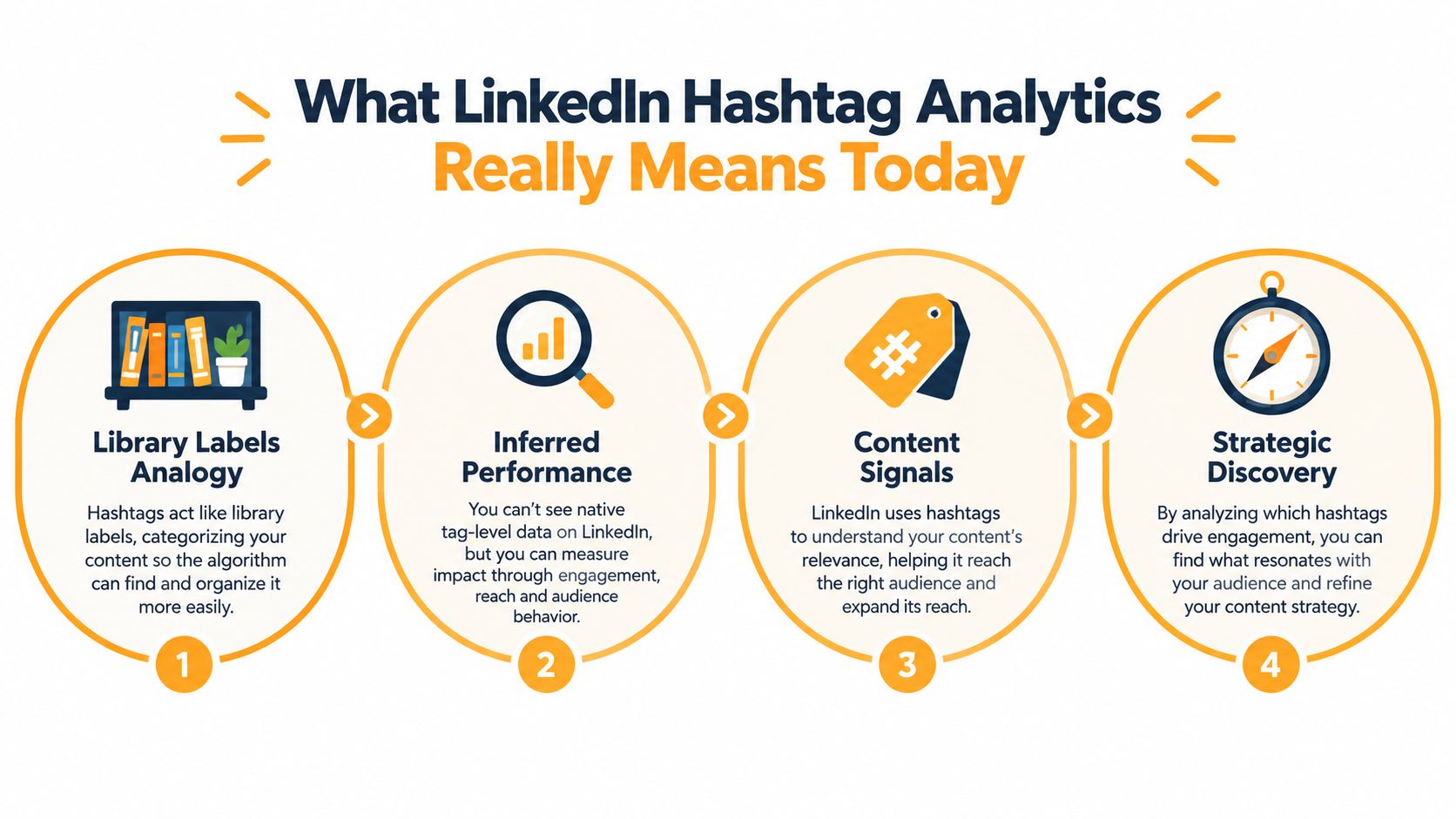
A hashtag can act like a label on a library book. It helps classify a post and gives LinkedIn another signal about its topic, but the label isn't a receipt. It doesn't tell you exactly who discovered the post through that label or whether the label caused the reader to stop, react, comment, or visit your profile.
That distinction matters because LinkedIn's native reporting no longer tracks hashtag performance at the post level. Creators and marketers typically work with impressions, reactions, comments, and other post metrics, then infer whether their hashtag choices contributed to the outcome. Sprout Social's overview of LinkedIn hashtag analytics describes this historical limitation and the platform's basic public hashtag lookup.
LinkedIn still supports hashtag discovery, and public hashtag pages can expose basic follower counts. What it doesn't provide is a built-in view showing the exact reach, clicks, or follower growth generated by #contentstrategy compared with #b2bmarketing on the same post.
That leaves you with a choice. You can keep copying popular hashtags and hope the numbers improve, or you can create a small testing habit that turns uncertainty into useful evidence.
The mindset shift: Don't ask, “Which hashtag got me these views?” Ask, “When similar posts use different hashtag sets, what performance pattern appears?”
Your test won't produce perfect attribution. LinkedIn's feed includes many variables, including topic, hook, audience, posting time, format, and early engagement. Still, a controlled comparison can reveal whether a hashtag set consistently supports visibility or conversation for your audience.
The process is practical. First, understand what LinkedIn does and doesn't measure. Next, choose the metrics that matter for your goal. Then compare similar posts with sparse, relevant hashtag sets and record what happens. Over time, you won't need absolute certainty to make better decisions. You'll have a clearer basis for keeping, replacing, or retesting each group of tags.
What LinkedIn Hashtag Analytics Really Means Today
Think of LinkedIn as a library where every post is placed on a shelf. Hashtags are shelf labels. A label such as #recruitment may help classify a post, while #talentacquisition gives a more specific signal about its subject. Neither label guarantees that the right reader will find the book, read it, or recommend it.
This is why hashtag analytics isn't the same as hashtag counting. Counting how many followers a public hashtag has can give you a rough sense of its scale, but it doesn't prove that your post reached those followers. Likewise, seeing a post perform well after adding a tag doesn't prove that the tag caused the result.
LinkedIn's native analytics focuses on the post as a whole. You can review post-level outcomes such as impressions, reactions, comments, and audience insights, but the platform doesn't isolate direct hashtag attribution. Independent guidance also notes that deeper questions, such as reach, sentiment, or audience growth by tag, generally require third-party workflows. SocialPilot's discussion of the attribution gap explains why marketers often need to export data or use external analysis.
What you can observe
You can observe whether posts using a particular hashtag set receive stronger or weaker outcomes than comparable posts. You can also look for changes in the quality of the response, such as more comments from relevant professionals or more profile visits from people in your target market.
You can't claim that one tag generated a precise share of those results unless you have a separate measurement system that supports that attribution. Even then, the result may represent an association rather than a clean causal effect.
Why the change affected strategy
When native tag-level reporting isn't available, hashtag decisions move from dashboard reading to inference and experimentation. A marketer may search public hashtag pages to understand basic categorization and audience context, then compare post performance over time.
That creates a more modest but more useful question: does this tag belong in the mix for this topic and audience? A relevant tag may help LinkedIn interpret the post, but the post still needs a clear idea, useful detail, and a reason for readers to respond.
The strongest workflow treats hashtags as one content signal among several. You don't measure them in isolation by staring at follower counts. You compare them against similar publishing conditions and keep your conclusions proportional to the evidence.
Key Metrics That Reveal Hashtag Impact
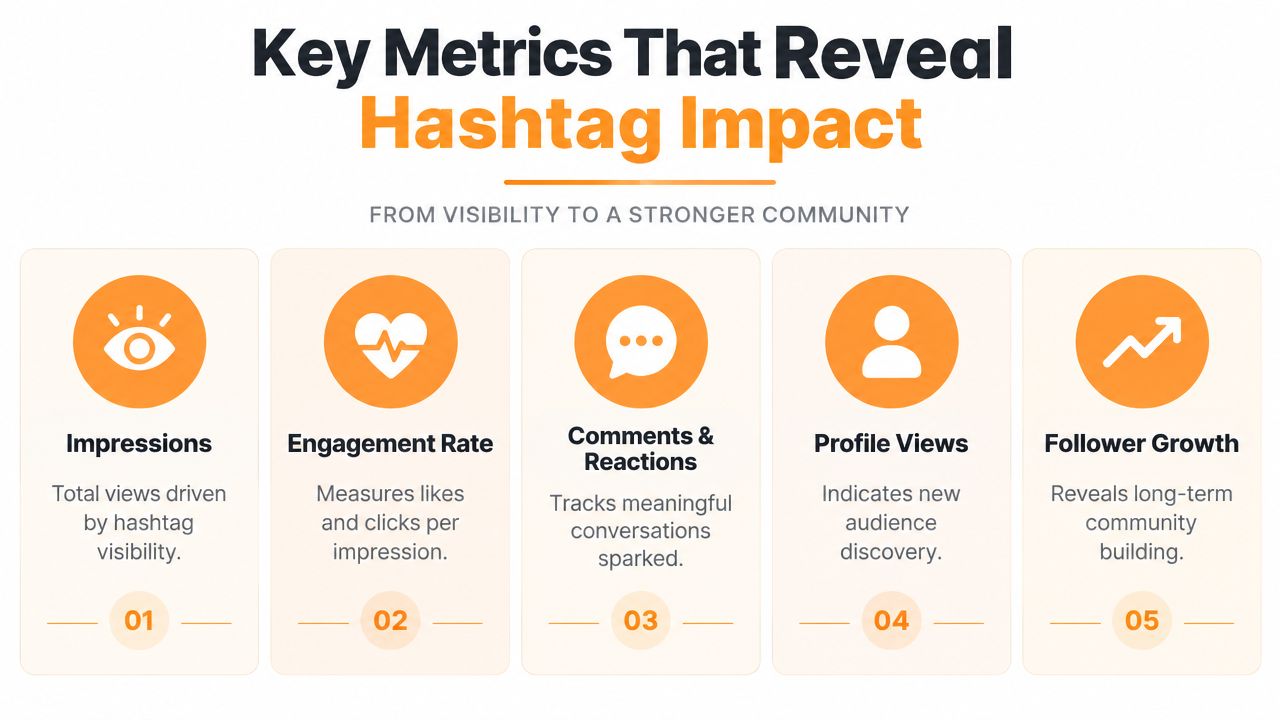
A hashtag does not arrive with its own results column. You see what happened to the post, then work backward to ask whether the tag helped discovery, attention, or action. That makes hashtag analytics an attribution puzzle, not a counting game. Each metric is a clue, and the pattern matters more than any single high number.
Impressions show distribution
Impressions record how often LinkedIn displayed a post. Compare this outcome across similar posts that use different hashtag sets, but do not read it as a tag-level report. LinkedIn does not show how many impressions came from one specific hashtag.
A rise in visibility may reflect a sharper opening, a timely subject, stronger early reactions, or a more active audience. Impressions therefore work like the number of people who passed a shop window. They show reach, not which sign brought each person inside.
If exposure terms still feel unclear, LinkedIn impressions versus views explains the distinction between these measures.
Engagement reveals response quality
Engagement rate places interactions beside impressions, giving response a clearer context. Reactions and comments indicate activity, yet their value differs. A thoughtful question from a relevant buyer can matter more than several quick reactions from a broad audience.
A 2026 Metricool study analyzed 673,658 posts from 63,108 accounts. It reported that posts with at least one hashtag received 85% more impressions than the platform average on Company Pages and Personal Profiles, along with approximately 88% more interactions on Company Pages and 85% more on Personal Profiles. These findings show correlation across a large dataset, not proof that hashtags alone caused the difference. Read the full methodology in Metricool's 2026 LinkedIn hashtag study.
A separate dataset summarized by Ordinal found a higher median engagement rate for posts with hashtags, 2.56% versus 1.75% without hashtags, while average impressions fell from 6,632 to 2,269. The contrast is useful: a post can reach fewer people and still prompt stronger responses from those who see it. The Ordinal summary and analysis shows why one metric cannot settle the attribution question.
The central tradeoff: Visibility shows how far a post traveled. Engagement shows whether the audience cared enough to respond.
Comments, profile visits, and followers add context
Comments help assess conversation quality, particularly when readers ask relevant questions or share professional experience. Profile visits suggest that the post created interest beyond the feed. Follower growth can support a longer-term conclusion, though several posts and activities may influence it.
Read these signals beside impressions and engagement rate. A hashtag set that attracts the right professionals may be more useful than one that produces a larger but less relevant audience.
Use strategies from LLMrefs to place hashtag observations within broader LinkedIn content goals. A tag linked to attention without meaningful action may serve a different purpose from one associated with useful comments, profile exploration, or continued audience growth.
How to Track and Interpret Hashtag Performance Step by Step
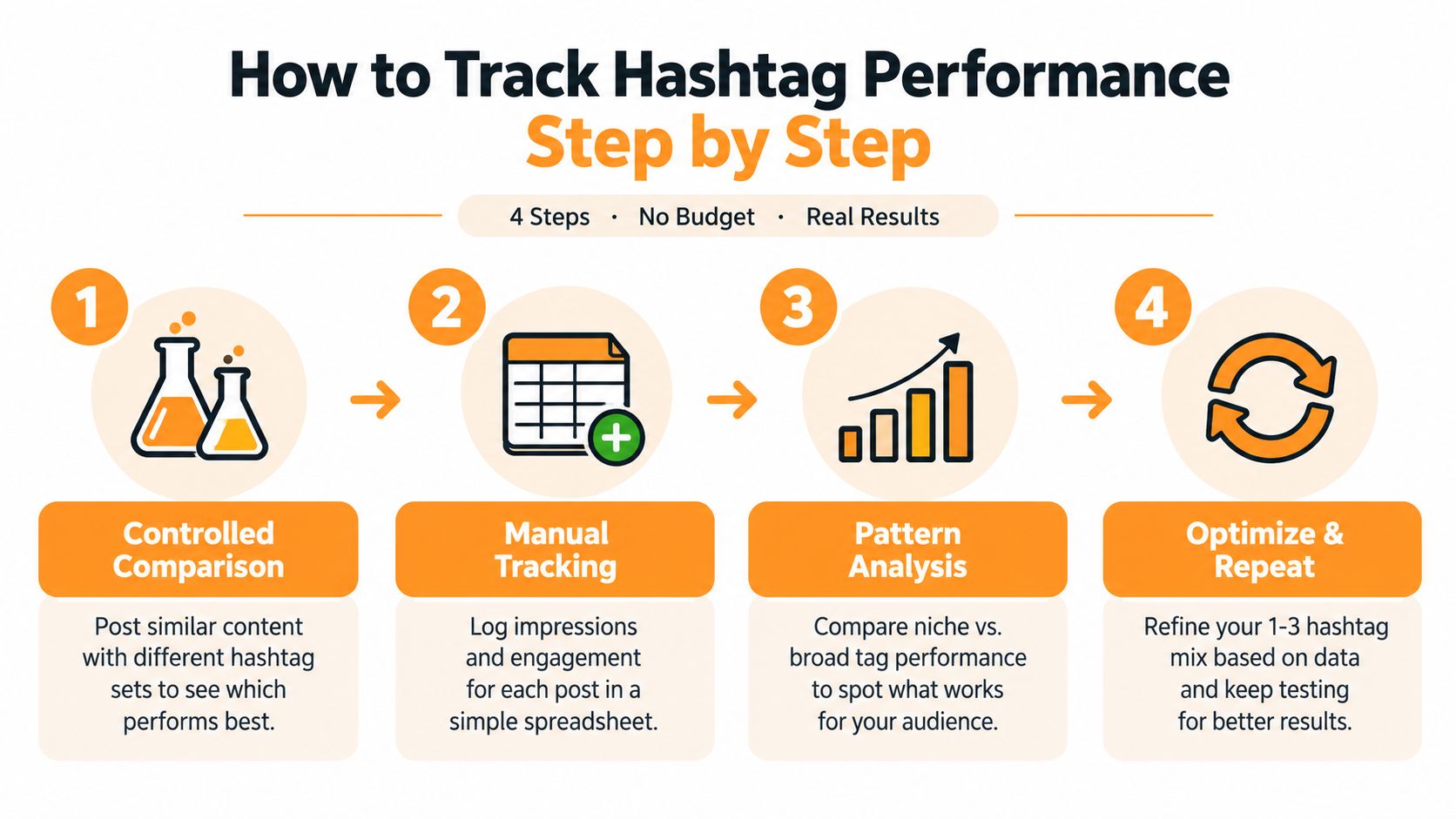
Hashtag performance is an attribution puzzle, not a counting game. LinkedIn shows what happened to the post as a whole, so you need controlled comparisons to estimate whether a hashtag helped. A spreadsheet is enough to begin.
Start with a clean comparison
Choose a topic you can publish about repeatedly, such as hiring advice, technical SEO, or sales enablement. Prepare two or more hashtag sets for the same subject:
- Set A: A narrow, specialist tag.
- Set B: A different narrow tag with a related meaning.
- Set C: A small combination of relevant tags.
Keep the format, audience, topic, and general publishing conditions as similar as reasonably possible. You are not running a laboratory experiment. You are reducing the biggest sources of confusion so the comparison has a clearer signal.
Change one main variable at a time. If one post has a stronger hook, a better example, and a different hashtag set, the result cannot show which change made the difference.
Record the whole post outcome
Create columns for the date, topic, format, opening angle, hashtag set, impressions, reactions, comments, engagement rate, profile visits, and followers if available. Add a short note about unusual conditions, such as a major industry announcement or an unusually active conversation.
The dataset summarized by Ordinal reported that 26.68% of LinkedIn posts used hashtags. It also found that engagement increased with more hashtags while impressions dropped after five. That pattern does not identify one universal winning quantity. Record the exact number and identity of every tag instead of entering only “used hashtags.” The underlying comparison is discussed by Metricool.
Look for repeated patterns
One post is an anecdote. A group of comparable posts gives you a direction. Compare median or typical outcomes within each set, then check whether a pattern appears across comments, profile visits, or impressions.
Independent analysis has reported that posts using one to three hashtags often outperform posts with none on engagement. Performance can flatten or reverse as the count rises beyond about five. ConnectSafely's analysis of hashtag quantity supports a sparse-testing approach, while your own audience provides the practical test.
Treat each hashtag set like a route on the same journey. If one route repeatedly brings the right visitors, it deserves further testing, even if it does not produce the largest reach.
Change one variable at a time
Once a set looks promising, remove or replace one hashtag while keeping the others stable. This estimates the added tag's marginal effect. It will not create perfect attribution, but repeated comparisons can show whether that tag appears more often in stronger or weaker outcomes.
After each review, record one decision: keep, replace, or retest. That short label turns observations into a testing habit and prevents old assumptions from becoming strategy.
Tools and Workflows That Fill the Analytics Gap
LinkedIn is useful for publishing and reviewing post outcomes, but it isn't a complete hashtag attribution system. Public hashtag pages can support basic lookup and follower-count checks, while native post analytics shows what happened to the post as a whole.
Third-party tools add another layer by organizing posts into campaigns, comparing hashtag groups, and combining performance records over time. Some workflows can also support broader analysis, including sentiment or audience growth by tag, although the quality and availability of those features vary by tool.
A practical comparison
| Capability | Native LinkedIn | Third-Party Tools |
|---|---|---|
| Post impressions | Available at post level | Usually organized across posts and campaigns |
| Reactions and comments | Available at post level | Aggregated for comparison and reporting |
| Individual hashtag reach | Not directly attributed | May be inferred or analyzed through tagging and exports |
| Hashtag follower counts | Basic public lookup | Can be combined with broader monitoring workflows |
| Sentiment by hashtag | Not provided as a native tag report | Available in some listening platforms |
| Audience growth by tag | Not isolated | Possible in some external workflows |
| Controlled comparisons | Manual | Easier with tagging, exports, and reporting |
| Best use | Fast, no-budget observation | Repeated campaigns, teams, and deeper analysis |
The table points to a sensible decision rule. Manual tracking is enough when you're an individual creator testing a small number of topics. External tooling becomes more useful when an agency or marketing team needs shared records, recurring reports, competitor monitoring, or analysis across many posts.
Choose tools for the question you need answered
Don't buy a tool because it promises “hashtag analytics” in the abstract. Ask what evidence it can provide. Can it separate posts by hashtag set? Can it export impressions and engagement? Can it compare time periods? Does it measure direct attribution, or does it group posts that contain a tag?
Teams building larger data pipelines may also investigate a LinkedIn scraping API from Scrapeway. That type of workflow can help collect public LinkedIn data for structured analysis, but it should be evaluated carefully for data quality, privacy, platform rules, and the exact fields you need.
The important distinction remains the same: a tool can make collection and comparison easier, but it can't magically turn LinkedIn's post-level signals into perfect causal attribution. Better organization improves your inference. It doesn't remove uncertainty.
Turning Insights Into a Smarter Hashtag Strategy With RedactAI
A smarter hashtag strategy starts with a smaller set. Use tags that describe the post accurately and match the audience you want to attract. A narrow tag can help classify a specialist topic, while a broader industry tag may place the post in a wider professional conversation.
Start by creating a few groups:
- Topic tags: Describe the subject, such as technical SEO or recruitment.
- Audience tags: Reflect the people you want to reach, such as startup founders or HR leaders.
- Branded tags: Identify a recurring series, campaign, or company conversation.
Test the groups instead of combining every possible option. The evidence summarized by Ordinal found stronger median engagement for hashtagged posts, but it also showed that impressions declined in the reported comparison. Independent analysis points to a useful starting range of one to three relevant hashtags, with performance potentially flattening as the count moves beyond about five. These findings support a relevance-first approach, not a fixed rule for every account.

Use examples to make the tradeoff visible
Suppose you publish a post about improving a recruitment process. One version uses a broad hiring tag and two specific recruitment tags. Another uses five broad business tags. If the second version earns more impressions but the first generates more relevant comments and profile visits, the “winner” depends on your objective.
For a job-seeking creator, profile discovery may matter most. For a consultant, qualified comments may be more useful than maximum distribution. Record the outcome you care about before you publish, so you don't change the scoring system after seeing the result.
You can also rotate closely related sets across similar topics. Keep the post's central idea stable, change the hashtag group, and compare the response. Avoid treating a single strong post as proof. Keep a tag when it appears in repeated positive patterns, replace it when it consistently adds noise, and retest it when the evidence is mixed.
Make the workflow part of content production
RedactAI can fit into this loop by helping professionals analyze posting history, develop niche-specific ideas, generate drafts, schedule updates, recycle strong content, and review post performance. Used carefully, that kind of workflow can reduce the gap between creating content and recording what happened to it.
The platform is available through RedactAI. Use it as an organizing aid, not as a substitute for judgment. Your audience, subject matter, and publishing objective should determine whether a hashtag stays in the mix.
Conclusion Build a Consistent Hashtag Testing Habit
LinkedIn hashtag analytics becomes less confusing when you stop looking for a magic number and start examining attribution. LinkedIn gives you post-level outcomes, not a clean report that assigns impressions, clicks, or followers to individual tags. That limitation doesn't make testing pointless. It tells you to make smaller claims and use better comparisons.
A lightweight weekly review can keep the process manageable:
- Record the exact hashtag set used on each post.
- Group similar topics so unrelated content doesn't distort the comparison.
- Review impressions and engagement rate together.
- Check comments and profile visits for audience quality.
- Mark each set as keep, replace, or retest.
- Change one tag at a time when you want a clearer comparison.
Start with one recurring topic and a small number of relevant hashtags. The research summarized by Metricool and ConnectSafely suggests that hashtag quantity and performance don't move in a straight line, so adding tags isn't a reliable substitute for relevance. A 2025 peer-reviewed study of 991 LinkedIn posts reported that hashtags increased expected reactions by about 6%, while tagging people increased reactions by roughly 15%, which is another reminder that hashtags may be a secondary formatting signal rather than your strongest optimization lever. Read the peer-reviewed study in the Journal of Interactive Marketing.
Keep your conclusions grounded. If a hashtag set performs well, say it was associated with stronger results in your comparison. Don't claim that one tag caused every impression. That honest language will make your decisions more reliable, especially as your content topics, audience, and goals change.
A consistent testing habit also protects your voice. You can experiment with distribution signals without turning every post into a pile of keywords. Over time, organized records and a focused publishing workflow can help you create posts that remain recognizable, useful, and easier to improve.
RedactAI helps you turn your LinkedIn posting history into a more organized content and testing workflow, with draft creation, scheduling, recycling, and performance review in one place. Visit RedactAI to explore a practical way to track hashtag patterns while keeping your authentic voice.