Most of the advice about LinkedIn posts vs articles gets the verdict right and the reasoning wrong. You've read it: articles are dead, posts win, don't waste your time on long-form. That conclusion comes from comparing median reach in the first week and calling the race there.
I'd argue the opposite framing. Posts and articles don't compete for the same slot in your week. A post is a fast instrument you use to find out whether an idea has legs. An article is the place that idea goes to live once the market has already told you it does. Judging an article by its first five days is like judging a book by how many people picked it up in the bookstore on Saturday.
The bigger mistake is publishing a link to the article and calling that distribution. That's not a funnel, that's a footnote. What follows is the comparison in numbers, the reason the two formats get measured on different clocks, and one monthly cycle that turns a single article into a month of posts.
Posts vs Articles Side by Side
Longer isn't better on LinkedIn. That's the first thing to get straight, because the character limit tempts you into thinking more room means more performance. It doesn't. Room is for depth that earns a reference shelf, not for reach.
The formats are built for different jobs, and LinkedIn's own help documentation draws the line cleanly. Posts are the feed-based updates (text, images, video, polls, events) designed for rapid distribution and interaction. Articles are long-form publications, and LinkedIn measures them through views, including views generated on LinkedIn or through email notifications (LinkedIn help center). The same documentation states the limits: a post caps at 3,000 characters, an article at 125,000.
| Criterion | LinkedIn post | LinkedIn article |
|---|---|---|
| Typical length | Up to 3,000 characters | Up to 125,000 characters |
| Where it shows up | Home feeds of connections | Article page, search and email notifications |
| Best for | Quick opinions, experiences, discussion prompts | Technical explainers, case studies, evergreen expertise |
| Media and formats | Text, images, video, polls, events | Long-form publication |
| Dedicated URL and SEO title and description | No | Yes |
Read the last row carefully, because it's the one most comparisons skip. Articles get a dedicated URL plus an SEO title and SEO description (LinkedIn publishing support). A post has no equivalent. You can't hand someone a link to a post two months later and expect it to behave like a page. That single difference decides which format you use for anything you'll send again.
The rule of thumb I'd give a friend: start with a post when the idea is still a hypothesis. Move to an article once the idea has earned real depth, meaning people asked follow-up questions and you had more to say than 3,000 characters allowed.
Reach and Engagement Numbers Compared
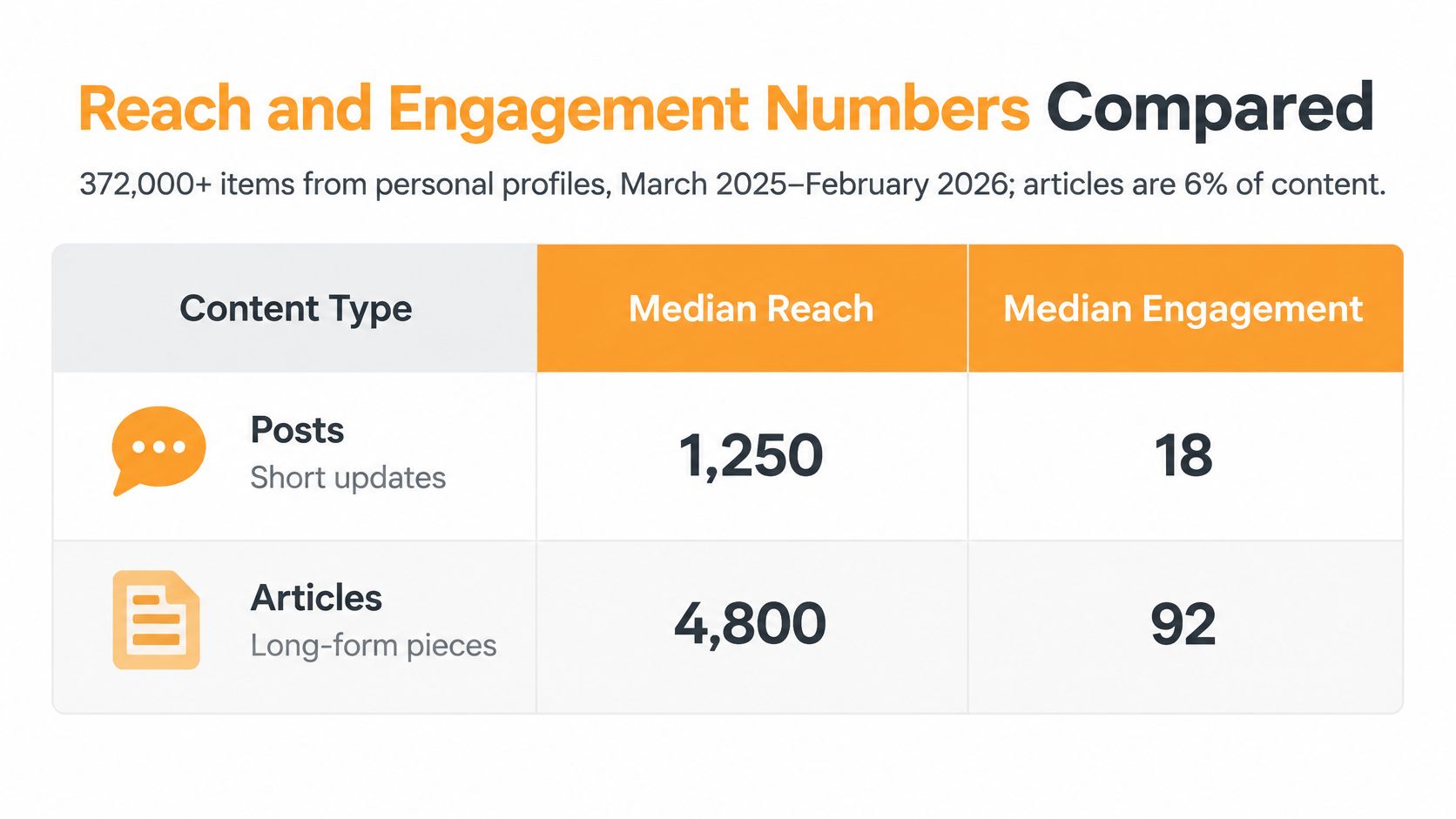
Here's the headline many authors lead with, and it's real. Articles reached a median of 596 people with 12 engagements. Document and carousel posts reached 1,198 people with 35 engagements. That's roughly double the reach and nearly triple the engagement, and it's the gap everyone quotes (AuthoredUp benchmark).
That benchmark covers more than 372,000 LinkedIn items from personal profiles between March 2025 and February 2026, where articles were 6.0% of content. Image posts hit a median 1,031 people and 36 engagements, while text posts landed at 921 and 21.
| Format | Median reach | Median engagements | Reach multiplier | Engagement multiplier |
|---|---|---|---|---|
| Text post | 921 | 21 | 1.07x | 0.78x |
| Image post | 1,031 | 36 | 1.20x | 1.33x |
| Document or carousel | 1,198 | 35 | 1.39x | 1.30x |
| Article | 596 | 12 | 0.69x | 0.44x |
What the multipliers actually tell you
The multiplier columns are the useful part, because they control for the fact that some profiles are bigger than others. Articles show a 0.69x reach multiplier and 0.44x engagement multiplier against each profile's own median. Documents show 1.39x and 1.30x. Text posts show 1.07x and 0.78x, which is worth noting: plain text reaches slightly above the median and engages slightly below it.
So an article doesn't just underperform a carousel in absolute terms. It underperforms against the author's own baseline, which means the format itself is doing the damage, not the account size.
Two more figures land in the same direction. A separate analysis of more than 3 million LinkedIn publications from the same March 2025 to February 2026 window put image posts at 1.20 times average reach and 1.33 times average engagement, with articles at 0.69 times reach and 0.44 times engagement (AuthoredUp format study). Those are averages across formats rather than profile-median multipliers, so they explain the gap without being strictly comparable to the table above.
What this does not mean: a lower multiplier is a distribution signal, not a quality verdict. The dataset measures how far content travels in the feed, not how long a reader spends with it or whether it gets forwarded to a hiring manager.
The caveats matter as much as the numbers. These are directional benchmarks from personal profiles, not universal law. Audience size, topic, author authority, posting cadence and how "engagement" gets defined all move the result. If your audience is 400 recruiters who read everything you write, your article may well beat your carousel. Longer word count buys you room to make an argument. It doesn't buy feed performance.
How to Measure Each Format Fairly
Posts and articles need different scorecards. LinkedIn post analytics cover impressions, reactions, comments, reposts, saves and sends. Article analytics focus on views and article-specific audience information (LinkedIn analytics documentation). Comparing 40 article reactions with 300 post reactions misses the more useful question: how many people read each piece, and what did the right readers do afterward?
LinkedIn says these figures are estimates, not exact counts. The platform also sets different retention windows for analytics data, as described in its analytics documentation:
- Article performance, viewer, demographic and newsletter data: up to two years
- Discovery and social engagement data for other content types: up to 1,000 days
- Reached-member data: 400 days
- Demographic breakdowns: 180 days
The four signals worth separating
Four signals help you assess performance without treating every number as interchangeable.
Initial reach shows how many feeds a post entered. Qualified engagement tells you whether the right people responded. A comment from a target client may matter more than reactions from people outside your audience. Search discovery indicates whether a piece keeps getting found over time. Reusable authority asks whether you would share the article again in a sales or recruiting conversation.
| Goal | Post signal | Article signal |
|---|---|---|
| Initial reach | Impressions | Article views, including views on LinkedIn and from email |
| Interaction | Reactions, comments, reposts, saves and sends | Article views and article-specific audience information |
| Audience quality | Reached-member data, available for 400 days | Viewer and demographic data, retained for up to two years |
| Long-term value | Discovery and social engagement, available for up to 1,000 days | Article performance data, retained for up to two years |
Compare formats over a horizon that fits their role. A post can show whether an idea earns a response quickly; an article can keep serving as a durable reference. Short posts can test and refine the argument that eventually becomes one article, giving you both immediate feedback and a piece worth sharing later.
For a closer look at interpreting post-level metrics, use this guide to LinkedIn post analytics. Set a consistent review point for each format, then compare the numbers that match its job: impressions and qualified engagement for posts, and views plus continued usefulness for articles.
Choosing the Right Format for Your Goal
Forget format debates for a second and look at your week. Most content decisions are obvious once you name what you're trying to do, so here are five situations that cover most of them.
You have an opinion and you're not sure it lands. Post it. Feedback arrives within hours and costs you nothing to rewrite. This is the cheapest market research available on LinkedIn, and skipping it is why so many articles read like arguments nobody asked for.
You're announcing a launch, an event or a hiring push. Post with an image or a document. The job is quick attention and a comment thread, and a carousel outperforms a long explainer for that every time.
You need to explain a framework with steps. Article. The argument needs room, examples and a link you can send for the next six months without it looking stale.
You're arming a sales or recruiting conversation. Article, without hesitation. A dedicated URL and SEO description make it findable in search and shareable in a DM. Sending somebody a post link feels like forwarding a receipt.
You're a consultant or executive building a profile. Mix, with one article as the anchor. When a prospect clicks your profile and sees a real piece of thinking rather than forty updates, the profile does work while you sleep.
A worked example
Say a freelance operations consultant has a theory about why onboarding breaks at fifty employees. She writes three posts over two weeks, each from a different angle: the cost of a bad first week, the handoff nobody owns, the spreadsheet that becomes a system. Two get polite nods. The third gets eleven comments and three DMs asking how she fixes it.
That third post is the article. She now knows the hook, the objections, and the vocabulary her buyers use. She writes it once, with an SEO title and description, and spends the next month publishing posts that each pull one section back out.
A post asks for a reaction. An article asks for time. Ask for the wrong one and you'll read silence as failure.
If the mechanics of publishing the long-form side are unfamiliar, this walkthrough on how to write an article on LinkedIn covers the editor, formatting and SEO fields.

Notice what none of these five situations require: a decision about which format is "better." They require a decision about which format does this job this week. That's a much easier question, and you can answer it in ten seconds.
Build the Monthly Cycle and Optimize Both Formats
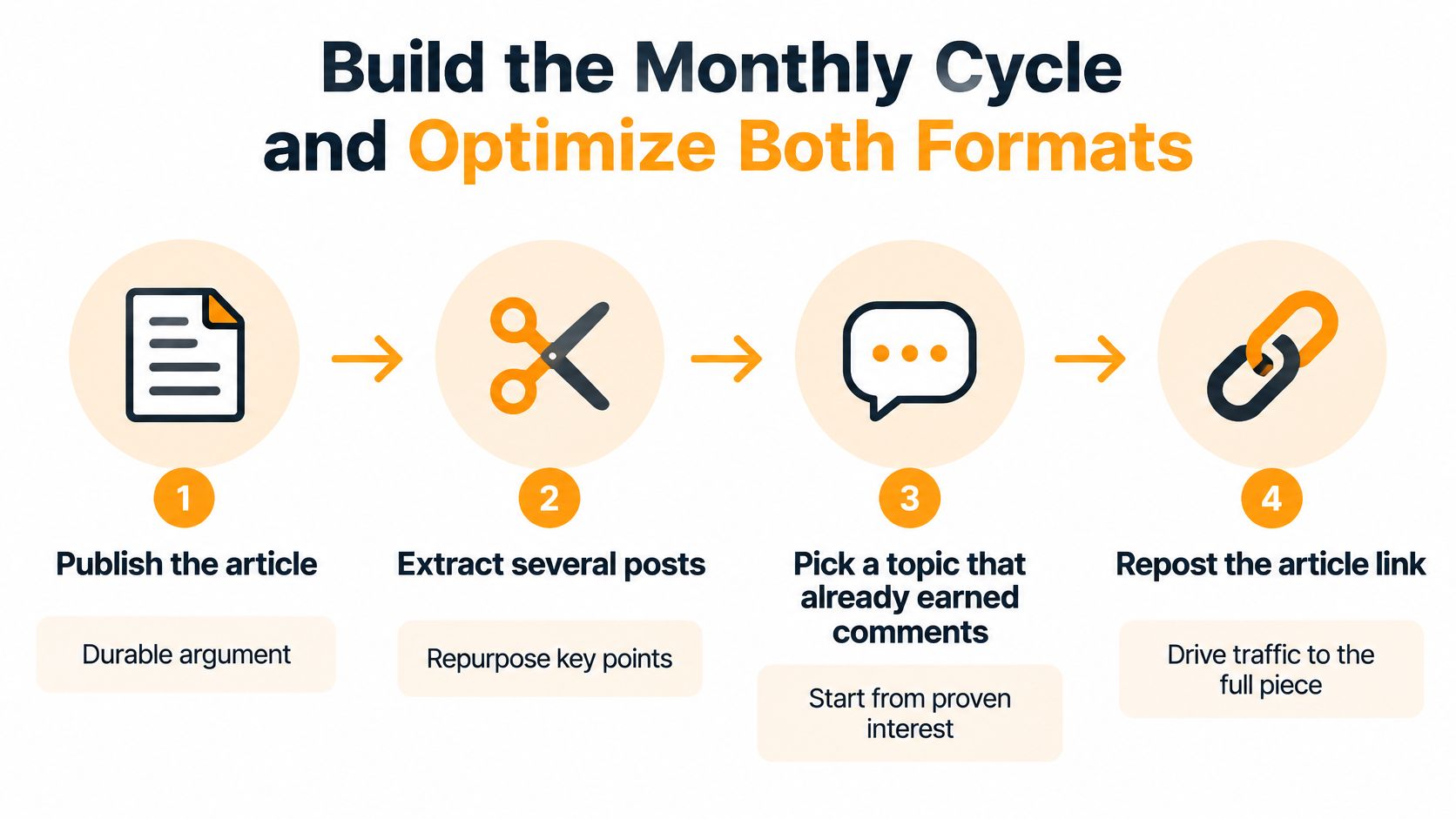
The two formats stop being alternatives and become one system. The article is the durable argument. The posts are the distribution. Run them as a cycle and the reach problem mostly solves itself, because you're no longer asking one format to do a job it's bad at.
Step 1. Start from a topic that already earned comments
Don't pick your article topic from a keyword tool. Pick it from the post that got the most substantive replies. The comments tell you what people didn't understand, which is exactly the material an article needs. If nothing you've posted has earned that response yet, you don't have an article, you have a guess.
Step 2. Draft the article around one framework
One. Not a survey of the field, not five tips stapled together. A single argument with a beginning, a middle, and examples that survive being read twice. This is the section where the 125,000-character allowance is irrelevant: most strong articles land far below it, and length for its own sake is the most common way to lose a reader at paragraph four.
Step 3. Publish it with the fields a post doesn't have
Fill in the SEO title and SEO description before you hit publish. Posts don't offer these, so this is the one stage of the cycle where the article gets an advantage. Title first, description second, and keep both concrete. "Why onboarding breaks at fifty employees" beats "Some thoughts on scaling."
Step 4. Pull four to six native posts from it
Each post covers one insight, one objection, or one example from the article. Not one post that announces the article. Four to six that stand alone and happen to point back. Write each with a hook in the first line, because the feed preview is short and the first line is all readers see.
This is the step that eats time, and it's where tooling helps. RedactAI can recycle content from YouTube videos or blog posts into LinkedIn posts in seconds, which turns one finished article into a week of drafts you still edit in your own voice.
Step 5. Use a document or carousel when the post has steps
If a post contains a sequence or a comparison, put it in a document. Document and carousel posts reached a median of 1,198 people and 35 engagements, the strongest reach in the personal-profile benchmark, and they carried a 1.39x reach multiplier, per the AuthoredUp benchmark. Steps and side-by-sides are what carousels are for. A wall of text describing a five-step process wastes the format.
End every one of these posts with a single specific question. "Which of these four breaks first in your company?" gets replies. "Thoughts?" gets scrolled past.
Step 6. Spread the posts and link back
Space them across the month rather than dumping six in three days. Point the closely related ones at the article URL, and leave the standalone ones to do their own work. A month gives each post its own window in the feed and gives the article a steady trickle of readers instead of one spike and silence.
RedactAI's Optimize, Schedule and Recycle tools include scheduling posts, real-time statistics, viewing your best posts based on statistics, and recycling and repurposing your best content, which is how a month like this gets run without a spreadsheet and a Sunday night.
Step 7. Review at day 30
Compare article views against post impressions, not reactions against reactions. Then look at what really matters: profile visits, DMs, and whether anyone asked for the link. Take your strongest post of the month and use it as the seed for the next article. The cycle feeds itself.
One upgrade worth making
If you're publishing long-form regularly, put it in a newsletter rather than as a standalone article. In 2024, articles represented 4% of LinkedIn posts, and articles included in newsletters achieved nearly four times the performance of standalone articles, according to AuthoredUp and Just Connecting customer data analyzed by Richard Bliss. Subscriber notifications do the distribution work that the feed won't.
Before anything goes out, run four checks: the hook works alone, the body is native rather than a link, there's exactly one ask, and the SEO fields are filled. Miss the hook and nothing else matters.
If you need to produce this volume of posts without dropping quality, a structured content repurposing framework saves you from reinventing the process every month.
Choose a Format and Test It This Week
My verdict, stated plainly: publish posts first, and add one article a month as the depth layer. Posts carry the distribution and the conversation. The article carries the credibility and the link you'll still be sending next year.
Use an article on its own only when it's a long explainer, a case study, or a proof piece you'll send repeatedly in sales or recruiting. Everything else works better as a post that earns its way into an article.
Here's the seven-day test. Pick one point you can state in a few lines, publish it as a native post with a first-line hook and one specific question, then leave it alone for a week.
At day seven, record impressions, comments, reposts and saves. If readers asked for the method or the full steps, that's your signal to expand it into the article. If the discussion stayed thin, rewrite the hook once before you spend the room an article allows on it. One rewrite is cheap. A 3,000-word piece nobody asked for is not.
Then judge each format on its own terms. The post gets judged on feed response in the first 72 hours. The article gets judged on views and on whether the URL was worth sending again. Keep the angle that earned a real response and park the rest as notes for later posts.
The habit that changes outcomes: never write an article on a topic that hasn't already produced a conversation.
No format guarantees a viral result, and anyone selling you one is selling you something else. What's reliable is the sequence: test cheap, expand what works, distribute the depth with posts. The Essential plan gives you 15 posts a month across one profile, and new clients get an initial free 7-day trial period, after which the subscription starts unless you give notice. That's enough to run the test above before you decide anything.
If you want to see how this works with a tool that learns your voice first, RedactAI builds a personalized model from your LinkedIn profile and your last 100 posts, then generates complete posts from a few keywords so the posts-first habit doesn't collapse under the time cost. You can turn a finished article, a YouTube video or a blog post into several native posts in seconds, and schedule them at peak times while the article keeps collecting readers in the background. Visit RedactAI to start with the free trial and see what your own voice sounds like at volume.