It's Tuesday at 9 a.m. You open LinkedIn, paste the same kind of text update you've posted for months, and hit publish. A few likes arrive. Two polite comments. Then nothing.
Your idea probably isn't the problem. Your format is. A lesson that falls flat as a paragraph can work as a story, a swipeable checklist, or a 90-second video. The job changes, so the packaging should change too.
That's how I judge LinkedIn post types. Not by which one supposedly wins the algorithm, but by what you need from the reader. Do you want trust, saves, market data, or a real debate? Pick the format built for that job.
The nine formats below cover the practical options for 2026. Each one includes a hook or setup you can use today, plus the trade-off nobody mentions. If you're dictating drafts on the move, voice-driven writing for professional networking can help you capture the raw idea first and choose the format second.
Start with two formats. Test them properly. Your feed will stop looking like a rerun.
1. Text-Only Post
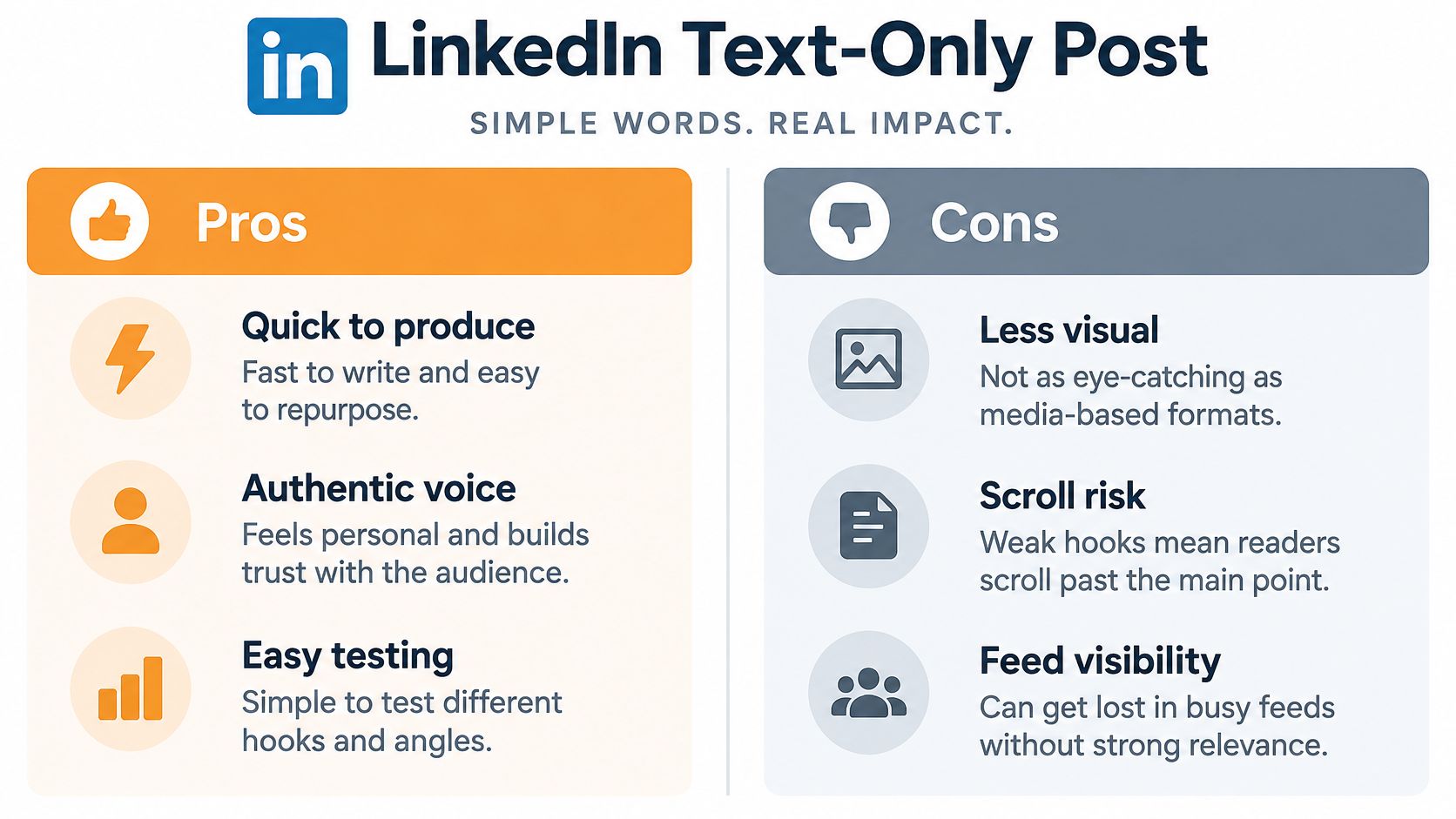
No image. No PDF. Just words, line breaks, and a point of view. The text-only post is still the fastest way to sound like a person instead of a content department.
Its job is voice. Solo creators such as Justin Welsh use frequent short text posts on founder lessons and productivity, and executives do well with one lesson from a hiring decision or client call in five to eight short paragraphs. The post lives or dies in the first two or three lines before the see more fold.
Text is also everywhere, which is the problem. In Metricool's 2024 dataset, there were 719,537 text posts, compared with 579,283 image posts, 201,629 video posts, and 78,522 carousel posts. You're competing in the most crowded lane.
Make the Hook Earn the Click
- Lead with a claim: Write a hook under about 200 characters that promises something specific.
- Keep paragraphs short: One or two sentences is enough.
- End with friction: Ask a real question or land a clear takeaway.
- Draft three hooks: Pick the one you'd stop for.
If your first line could open anyone's post, it shouldn't open yours.
The infographic below sums up the trade-off between speed and sameness.
2. Document (Carousel) Post
Upload a PDF and LinkedIn turns it into a swipeable document post. One idea per slide. One reason to keep swiping. That's the whole mechanic.
Use it to teach a framework. Say a marketing consultant turns a client onboarding process into an eight-slide carousel, or a recruiter shares a hiring checklist with one step per slide. Readers can save it, return to it, and share it with a colleague. A dense text post rarely gets that treatment.
The numbers support testing it. Socialinsider's benchmark of approximately 1.3 million posts reported a 7.00% average engagement rate for native documents in 2025, ahead of multi-image posts at 6.45% and video at 6.00%. Don't treat that as a guarantee for your account. Treat it as a reason to run your own comparison.
Build Slides People Finish
Slide one needs a bold, specific headline that promises a benefit. Limit each slide to one main point and keep your colors and typography consistent so the deck feels like one piece, not nine screenshots. Finish with a comment prompt or a clear reason to save the post.
If you want the mechanics in one place, this guide to creating a LinkedIn carousel post walks through the format step by step.

3. Poll Post
A poll post asks one question with two to four answers. Voting takes one tap. That's why people do it, and that's also why you shouldn't overvalue the result.
The job here is cheap market data, not authority. Say a sales leader asks whether prospects prefer email or video follow-ups, or a startup CEO asks which feature to build next quarter. You learn something fast and you start conversations in the comments.
Reach can mislead you, though. AuthoredUp's personal-profile data shows polls produced 1.78 times the reach but only 0.37 times the engagement of the average post. Translation, lots of taps and not much depth. Fine for research. Weak for trust.
Ask a Question Worth Answering
Frame the poll around a real decision your audience faces. Keep options balanced and mutually exclusive, then add a comment asking voters why they chose that answer. The reasoning in the comments is usually worth more than the percentages.
Practical rule: If you won't publish a follow-up with your interpretation, don't publish the poll.
Need starting points? Browse these LinkedIn poll ideas and adapt one to a decision your buyers argue about.

4. Native Video Post
Upload the video directly to LinkedIn. Don't link out and hope people follow. A native video post keeps the viewer in the feed and puts your face and voice in front of them.
Its job is trust at speed. A consultant can record a 90-second tip with captions. A founder can film a short product demo on a phone. Neither needs a studio. Both beat a polished brand video that sounds like it went through legal.
The trade-off is effort and drop-off. Video asks for more from the viewer than text does, so a slow opening kills it. Hook viewers in the first three seconds with the problem or the payoff, add captions to every video, and keep it focused on one takeaway.
A Simple Setup That Works
- Open on camera: Say the claim first, introduce yourself later if at all.
- Caption everything: Many people watch with the sound off.
- Write a real caption: The text above the video should add context and a call to action.
- Check completion, not just views: Use measuring short-form video campaign performance as a reminder to track watch-through and comments, not vanity plays.
One honest takeaway, delivered plainly, will outperform five tips rushed in 60 seconds.
5. Image or Infographic Post
Sometimes the reader needs the point in two seconds. That's the image or infographic post. One visual carries the idea and a short caption adds the context.
Use it for fast comprehension. An HR specialist can share a chart from their own recruiting data. A marketing agency can turn a client testimonial into a clean quote graphic. Multi-image versions also deserve a test, since a 2025 LinkedIn benchmark based on 1 million posts from 9,000 active business pages found multi-image posts had a 6.60% engagement rate, followed by native documents at 5.85% and videos at 5.60%.
Don't cram a blog post into a graphic. If the text needs zooming, you've built a bad carousel.
Keep It Legible in the Feed
Use high contrast and minimal text on the image itself. Keep the caption to a few lines, credit your data source clearly, and ask one question so the post doesn't end at a glance.
The format also recycles well. Turn one strong chart into the opening slide of a document post next week and compare saves. Same insight, different job.
6. Listicle or How-To Guide Post
Readers love knowing exactly what they're getting. A listicle or how-to post makes that promise up front, then delivers it in numbered pieces.
Its job is practical proof of expertise. A sales coach might post seven discovery questions that uncover real budget. A freelance writer might share five mistakes that make client briefs unusable. A B2B marketer could outline how to run a LinkedIn ad test in five steps. Each one solves a concrete problem instead of floating an opinion.
Make Every Item Do Real Work
- Name the outcome first: Use a specific number and a clear benefit in the opening line.
- Add one example per item: Advice without an example is just a slogan.
- Stop at five to seven items: Longer lists get skimmed and forgotten.
- Keep steps under three lines: If a step needs a paragraph, split it.
The video below is a useful watch if you want to see structured teaching broken into clear segments.
Offer a checklist as an optional extra if you have one. Then take the strongest item and turn it into its own story post later.
7. Personal Story or Lesson Post
Advice is easy to scroll past. A specific moment isn't. The personal story post starts with something that happened, builds a bit of tension, and lands on a lesson the reader can use.
The data backs the instinct. In a 134,000-post analysis, story posts centered on a specific personal moment generated 38% more engagement than advice posts from the same authors. Same writers, different vehicle. That's the point.
Say a founder describes a failed product launch and what changed in their customer research afterward. Or an executive shares a layoff experience and the leadership lesson it forced on them. Both posts build trust because they cost the writer something to publish.
Tell It Without Oversharing
Start in the middle of the story, not with your life history. Include one concrete detail that makes the scene believable, such as the exact sentence a customer said or the number you saw on the dashboard that morning.
Reality check: One true detail beats three paragraphs of vulnerability theater.
Make the lesson actionable for someone who wasn't there. Leave out confidential client details, names you don't have permission to use, and anything you'd regret if your boss screenshotted it.
8. Hot Take or Contrarian Opinion Post
This is the format people misuse most. A hot take post isn't yelling for reach. It's a clear claim your industry can argue with, backed by reasoning that holds up.
Its job is to start a debate and show how you think. A sales leader might argue that cold calling still beats cold email for enterprise accounts, with numbers from their own pipeline. A marketer might claim that most content calendars waste time and offer a different planning method. Both give readers something to push against.
Keep the claim specific and defensible. Vague provocation gets eye-rolls. A narrow claim with evidence gets comments from people worth knowing.
Disagree Like a Professional
- State the claim in line one: Don't bury it under throat-clearing.
- Name the strongest counterargument: Answer it before the comments do.
- Reply thoughtfully: Your responses extend the post and show your judgment.
- Skip personal attacks: Attack the practice, never the person.
I recommend one contrarian post at a time, then a break. If every post is a fight, readers stop believing any of them.
9. Case Study or Results Post
Opinions build attention. Evidence builds pipeline. A case study post shows the challenge, what you did, and the measurable result, all in the feed.
Lead with the outcome. Say a marketing agency explains how a client increased qualified demo requests over one quarter, or a consultant describes how a process change reduced onboarding time for a SaaS client. Readers in the same situation immediately know if the post is for them.
Get permission before you share client details. Use real metrics and state the time frame, even when the numbers are modest. A small, honest result with a clear method beats a huge vague claim every time. For a sense of how proof-driven storytelling works in other channels, these TikTok influencer marketing campaign examples show the same principle of showing the work, not just the win.
Close With the Reader's Version
End by asking whether readers face the same bottleneck, or offer to share the checklist you used. That turns proof into a conversation, and conversations are where clients come from.

How the 9 LinkedIn post types compare at a glance
Choose a format based on the response you want: trust, learning, audience input, or discussion. Use the setup tip to give each post a clear job.
| Post Type | Best For | Main Strength | Main Drawback | Hook or Setup Tip |
|---|---|---|---|---|
| Text-Only Post | Sharing quick insights and building a personal voice | Fast to write and feels direct | Depends on a strong opening line | Start with a specific problem your audience recognizes. |
| Document (Carousel) Post | Teaching frameworks, processes, and steps | Gives readers room to follow an idea slide by slide | Takes time to design; readers may drop off early | Put the promised takeaway on the first slide. |
| Poll Post | Gathering audience input and starting a debate | Makes it easy for readers to respond | Poll answers offer limited nuance | Ask a focused question, then invite people to explain their choice in the comments. |
| Native Video Post | Demonstrating a process or putting a face to an idea | Shows tone and delivery as well as the message | Takes more effort to record and caption | Open with the result or question the video will address. |
| Image or Infographic Post | Making data, a quote, or one visual idea easy to scan | Communicates a point quickly | Gives limited room for explanation | Lead with one clear takeaway, then add context in the post text. |
| Listicle or How-To Guide Post | Sharing practical tips or step-by-step advice | Easy to scan and save | Can feel generic without specific advice | Name the reader's task, then make each step actionable. |
| Personal Story or Lesson Post | Building trust through personal experience | Makes a lesson memorable and human | Can feel self-focused without a useful takeaway | Start with the moment a belief or approach changed. |
| Hot Take or Contrarian Opinion Post | Starting a debate around a distinct viewpoint | Gives readers a clear position to respond to | A weak argument can undermine credibility | State the common assumption, then explain what your experience or reasoning challenges. |
| Case Study or Results Post | Showing how a problem was addressed | Connects an approach to evidence | Requires accurate results and permission to share client details | Lead with the outcome, then show the challenge and method behind it. |
Pick Two Formats and Test Them This Month
You don't need all nine formats. You need two that match the job you're trying to do right now.
If your goal is trust, pair a weekly personal story with one case study every two weeks. If your goal is teaching, alternate document posts with listicles and watch which one earns more saves. If your goal is market insight, run one poll, publish the follow-up interpretation, and then write the text post your audience's answers deserve.
Run the test for four weeks. Post on the same days and at roughly the same times, so you're comparing formats rather than schedules. Keep the topics in the same territory too. A carousel about pricing and a story about your dog aren't a format test, they're two different bets.
Track What Actually Matters
Likes are the weakest signal you have. Track comments from people in your target roles, saves, profile visits, and inbound conversations. A post with modest reach and three comments from potential buyers beats a high-reach post full of congratulations from strangers.
Compare each format against your own baseline, not a benchmark from someone else's audience. Your industry, seniority mix, and network size shape your results more than any platform average. Write down the numbers each week. Memory will lie to you by week three.
Consistency beats perfection here. A decent story posted every week builds a recognizable voice. One flawless carousel every two months builds nothing. Batch your drafting, recycle your strongest idea into a second format, and keep the cadence boringly steady.
Start small if time is the blocker. RedactAI offers free tools including an AI LinkedIn Profile Review and a LinkedIn Post Formater, which give you a low-effort way to clean up your profile and format drafts before you commit to a full routine. Fix the profile first, since every good post sends people there to check whether you're worth following.
Then pick your two formats and post this week. Not next month when the strategy deck is ready. This week, with the idea you already have, packaged in a format that finally fits it.
Turn one idea into several of these formats without staring at a blank page. RedactAI generates complete LinkedIn posts from a few keywords in your own voice, learned from your profile and posting history, and helps you optimize, schedule, and recycle your best performers. Visit the site, start for free, and run your four-week format test with drafts ready to go.